concept input in category asp.net

This is an excerpt from Manning's book ASP.NET Core in Action, Second Edition.
Middleware is composed in a pipeline, with the output of one middleware passing to the input of the next.
You can think of the binding models as the input to a Razor Page, taking the user’s raw HTTP request and making it available to your code by populating “plain old CLR objects” (POCOs). Once your page handler has run, you’re all set up to use the output models in ASP.NET Core’s implementation of MVC—the view models and API models. These are used to generate a response to the user’s request. We’ll cover them in chapters 7 and 9.
As an example, the listing below shows the
OnPostpage handler for the Checkout.cshtml Razor Page. TheInputproperty is marked for binding, and uses theUserBindingModeltype shown previously in listing 6.6. This page handler doesn’t do anything with the data currently, but the pattern of checkingModelStateearly in the method is the key takeaway here.Listing 6.7 Checking model state to view the validation result
public class CheckoutModel : PageModel                           #A
{
    [BindProperty]                                               #B
    public UserBindingModel Input { get; set; }                  #B

    public IActionResult OnPost()                                 #C
    {
        if (!ModelState.IsValid)                                  #D
        {
            return Page();                                        #E
        }

        /* Save to the database, update user, return success */    #F

        return RedirectToPage("Success");
    }
}
If the
ModelStateindicates an error occurred, the method immediately calls thePagehelper method. This returns aPageResultthat will ultimately generate HTML to return to the user, as you saw in chapter 4. The view uses the (invalid) values provided in theInputproperty to repopulate the form when it’s displayed, as shown in figure 6.7. Also, helpful messages for the user are added automatically using the validation errors in theModelState.

This is an excerpt from Manning's book ASP.NET 4.0 in Practice.
In the next few pages, you’ll learn how to leverage data annotations to check that the input you receive is compliant with your rules.
Simply put, even if you’re building an intranet, the input you receive is not to be trusted. In this case, the majority of attacks are going to come from the company employees, so don’t think that because you’re just running an intranet you don’t need to seriously address security.
Generally speaking, don’t trust any input. The input is going to come from different sources, most of which are beyond your control. Today it’s common to have spiders trying to inject some code in your application or to bypass your protections.
<input type="checkbox" checked="checked" />

This is an excerpt from Manning's book ASP.NET MVC 2 in Action.
The controller— A mediator. The controller processes input, acts upon the model, and decides what to do—render a view, redirect somewhere else, and so on. The controller might pull the most recent comments for a blog post and send them to a view.
The input could be correct, satisfying all data type validation and business rules. In this case, the request will be fully processed, and the controller will redirect to the next page. The input could have an error, whether because an invalid date was entered, or the input breaks a business rule. In this situation, the controller needs to render the original page again with the appropriate error messages.
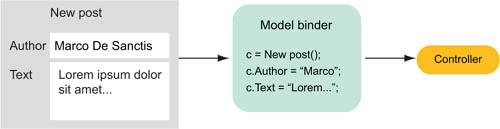
An action method receives input from the web browser via its method arguments. The controller uses the model binder feature to convert values from web requests into CLR objects that match the names of parameters for the action method. The internals of how this works are covered in chapter 14. For now, it’s important to understand that a convention is used to match form values by their name to the parameter name of an action.