concept item in category asp.net

This is an excerpt from Manning's book ASP.NET Core in Action.
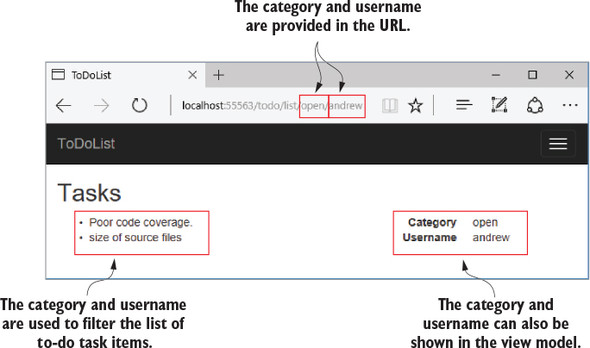
The first step when the MvcMiddleware receives a request is routing the request to an appropriate controller. Let’s think about another page in your to-do application. On this page, you’re displaying a list of items marked with a given category, assigned to a particular user. If you’re looking at the list of items assigned to the user “Andrew” with a category of “Simple,” you’d make a request to the /todo/list/Simple/Andrew URL.
Listing 8.5. View model for displaying select element dropdowns and list boxes
public class SelectListsViewModel { public string SelectedValue1 { get; set; } #1 public string SelectedValue2 { get; set; } #1 public IEnumerable<string> MultiValues { get; set; } #2 public IEnumerable<SelectListItem> Items { get; set; } #3 = new List<SelectListItem> { new SelectListItem{Value= "csharp", Text="C#"}, new SelectListItem{Value= "python", Text= "Python"}, new SelectListItem{Value= "cpp", Text="C++"}, new SelectListItem{Value= "java", Text="Java"}, new SelectListItem{Value= "js", Text="JavaScript"}, new SelectListItem{Value= "ruby", Text="Ruby"}, }; } #1 These properties will hold the values selected by the single-selection select boxes. #2 To create a multiselect list box, use an IEnumerable<>. #3 The list of items to display in the select boxes !@%STYLE%@! {"css":"{\"css\": \"font-weight: bold;\"}","target":"[[{\"line\":2,\"ch\":65},{\"line\":2,\"ch\":67}],[{\"line\":3,\"ch\":65},{\"line\":3,\"ch\":67}],[{\"line\":19,\"ch\":0},{\"line\":19,\"ch\":2}],[{\"line\":2,\"ch\":65},{\"line\":2,\"ch\":67}],[{\"line\":3,\"ch\":65},{\"line\":3,\"ch\":67}],[{\"line\":19,\"ch\":0},{\"line\":19,\"ch\":2}],[{\"line\":5,\"ch\":65},{\"line\":5,\"ch\":67}],[{\"line\":20,\"ch\":0},{\"line\":20,\"ch\":2}],[{\"line\":7,\"ch\":65},{\"line\":7,\"ch\":67}],[{\"line\":21,\"ch\":0},{\"line\":21,\"ch\":2}]]"} !@%STYLE%@!
The items supplied in asp-for must be an IEnumerable<SelectListItem>.

This is an excerpt from Manning's book ASP.NET 4.0 in Practice.
After you’ve added the item, Visual Studio starts a wizard. The first step lets you choose whether you want to create a model starting from a database or from scratch and then create a database from it. Because we already have a database, we’re opting for the first choice. Figure 2.6 shows the form where you make this choice.
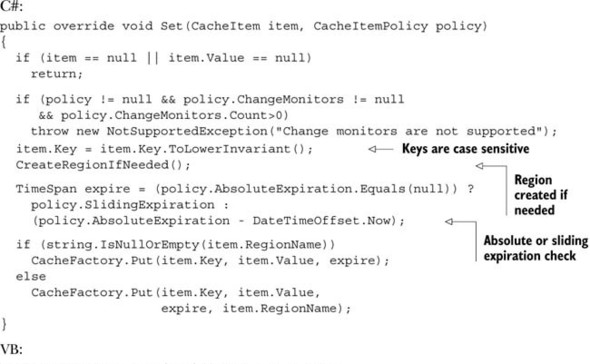
This tip is important for dealing with out-of-process providers, when an item saved in cache must be serializable. A serializable item can not only be copied in memory, but can also be transmitted across the wire. If you’re planning to switch sometime to an out-of-process provider, you’ll want to remember this advice. Because you can choose the caching provider at the runtime stage in ASP.NET 4.0, serializable items let you transparently move from an in-process strategy, such as the standard ASP.NET Cache, to an enterprise cache server, like AppFabric, by building your own provider.
AppFabric caching is a fully distributed cache engine that supports cache regions, balancing items across the nodes, and so on. Read more about AppFabric caching on http://www.mng.bz/sxza. You can install it on Windows Vista, Windows 7, Windows Server 2008, and Windows Server 2008 R2. Best of all, it’s free of charge. You can see how it works in figure 14.10.
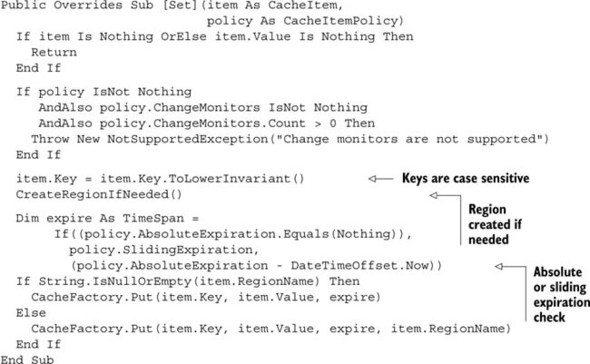
Remember that to be cached in AppFabric caching, the objects need to be serializable. The only other important point to keep in mind is that AppFabric’s API provides explicit calls for default or explicit regions, and you must address this fact in your code. Regions are used to separate the items, which are contained in the same area, to be divided by multiple applications. You don’t have to use regions, but using them enables you to differentiate your cache policy. AppFabric caching also supports named caches, which is another option that groups together a set of regions.