concept name in category asp.net

This is an excerpt from Manning's book ASP.NET Core in Action, Second Edition.
The first thing to notice is that the main project, WebApplication1, is nested in a top-level directory with the name of the solution, also WebApplication1 in this case. Within this top-level folder, you’ll also find the solution (.sln) file for use by Visual Studio and files related to Git version control,[2] though these are hidden in Visual Studio’s Solution Explorer view.
Once all the properties that can be bound on the binding model are set, the model is passed to the page handler (or the
[BindProperty]property is set), and the handler is executed as usual. The behavior from this point is identical to when you have lots of individual parameters—you’ll end up with the same values set on your binding model—but the code is cleaner and easier to work with.

This is an excerpt from Manning's book ASP.NET Core in Action.
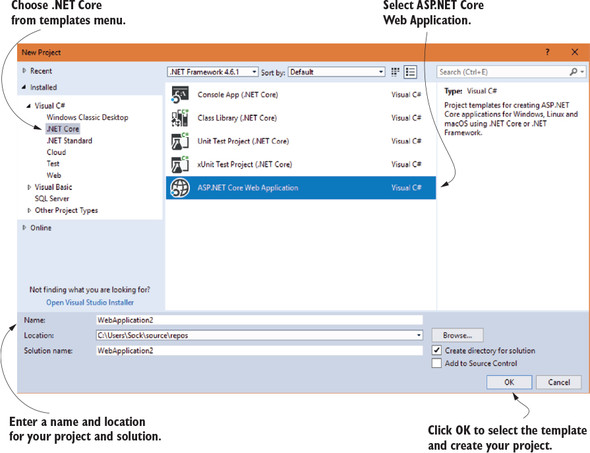
When an action method returns a ViewResult, it’s signaling to the MVC middleware that it should find a Razor template and generate the appropriate view. In the example, the action method doesn’t specify the name of the view to find, so the middleware attempts to find an appropriate file by using naming conventions, as shown in figure 2.14.
Figure 2.14. View files are located at runtime based on naming conventions. Razor view files reside in a folder based on the name of the associated MVC controller and are named with the name of the action method that requested it. Views in the Shared folder can be used by any controller.
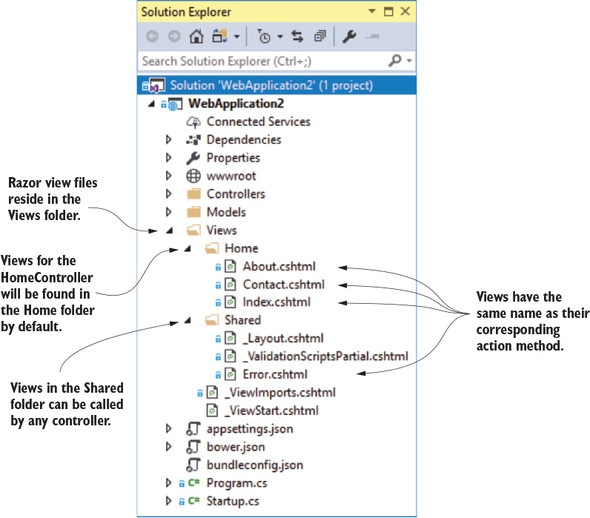
Razor view templates are stored in cshtml files (a portmanteau of cs and html) within the Views folder of your project. Generally, they’re named according to their associated actions, and reside in subfolders corresponding to the name of the controller. When a controller returns a ViewResult, the Razor engine attempts to locate the appropriate view template, as illustrated in figure 2.15. For example, considering the HomeController you’ve already seen, the view template for the About action method can be found at Views\Home\About.cshtml, relative to the base project path.
In this section, I show how to create two simple Tag Helpers. In section 19.4.1, you create a system information Tag Helper, which prints details about the name and operating system of the server your app is running on. In section 19.4.2, you create a Tag Helper that you can use to conditionally show or hide an element based on a C# Boolean property.
Listing 19.13. A custom view component to display the current user’s recipes
public class MyRecipesViewComponent : ViewComponent #1 { private readonly RecipeService _recipeService; #2 private readonly UserManager<ApplicationUser> _userManager; #2 public MyRecipesViewComponent(RecipeService recipeService, #2 UserManager<ApplicationUser> userManager) #2 { #2 _recipeService = recipeService; #2 _userManager = userManager; #2 } #2 public async Task<IViewComponentResult> InvokeAsync( #3 int numberOfRecipes) #4 { if(!User.Identity.IsAuthenticated) { return View("Unauthenticated"); #5 } var userId = _userManager.GetUserId(HttpContext.User); var recipes = await _recipeService.GetRecipesForUser( userId, numberOfRecipes); return View(recipes); #6 } } #1 Deriving from the ViewComponent base class provides useful methods like View(). #2 You can use DI in a view Component. #3 InvokeAsync renders the view component. It should return a Task<IViewComponentResult> #4 You can pass parameters to the component from the view. #5 Calling View() will render a partial view with the provided name. #6 You can pass a view model to the partial view. If you don’t specify a name, Default.cshtml is used. !@%STYLE%@! {"css":"{\"css\": \"font-weight: bold;\"}","target":"[[{\"line\":0,\"ch\":68},{\"line\":0,\"ch\":70}],[{\"line\":28,\"ch\":0},{\"line\":28,\"ch\":2}],[{\"line\":2,\"ch\":68},{\"line\":2,\"ch\":70}],[{\"line\":3,\"ch\":68},{\"line\":3,\"ch\":70}],[{\"line\":4,\"ch\":68},{\"line\":4,\"ch\":70}],[{\"line\":5,\"ch\":68},{\"line\":5,\"ch\":70}],[{\"line\":6,\"ch\":68},{\"line\":6,\"ch\":70}],[{\"line\":7,\"ch\":68},{\"line\":7,\"ch\":70}],[{\"line\":8,\"ch\":68},{\"line\":8,\"ch\":70}],[{\"line\":9,\"ch\":68},{\"line\":9,\"ch\":70}],[{\"line\":29,\"ch\":0},{\"line\":29,\"ch\":2}],[{\"line\":2,\"ch\":68},{\"line\":2,\"ch\":70}],[{\"line\":3,\"ch\":68},{\"line\":3,\"ch\":70}],[{\"line\":4,\"ch\":68},{\"line\":4,\"ch\":70}],[{\"line\":5,\"ch\":68},{\"line\":5,\"ch\":70}],[{\"line\":6,\"ch\":68},{\"line\":6,\"ch\":70}],[{\"line\":7,\"ch\":68},{\"line\":7,\"ch\":70}],[{\"line\":8,\"ch\":68},{\"line\":8,\"ch\":70}],[{\"line\":9,\"ch\":68},{\"line\":9,\"ch\":70}],[{\"line\":29,\"ch\":0},{\"line\":29,\"ch\":2}],[{\"line\":2,\"ch\":68},{\"line\":2,\"ch\":70}],[{\"line\":3,\"ch\":68},{\"line\":3,\"ch\":70}],[{\"line\":4,\"ch\":68},{\"line\":4,\"ch\":70}],[{\"line\":5,\"ch\":68},{\"line\":5,\"ch\":70}],[{\"line\":6,\"ch\":68},{\"line\":6,\"ch\":70}],[{\"line\":7,\"ch\":68},{\"line\":7,\"ch\":70}],[{\"line\":8,\"ch\":68},{\"line\":8,\"ch\":70}],[{\"line\":9,\"ch\":68},{\"line\":9,\"ch\":70}],[{\"line\":29,\"ch\":0},{\"line\":29,\"ch\":2}],[{\"line\":2,\"ch\":68},{\"line\":2,\"ch\":70}],[{\"line\":3,\"ch\":68},{\"line\":3,\"ch\":70}],[{\"line\":4,\"ch\":68},{\"line\":4,\"ch\":70}],[{\"line\":5,\"ch\":68},{\"line\":5,\"ch\":70}],[{\"line\":6,\"ch\":68},{\"line\":6,\"ch\":70}],[{\"line\":7,\"ch\":68},{\"line\":7,\"ch\":70}],[{\"line\":8,\"ch\":68},{\"line\":8,\"ch\":70}],[{\"line\":9,\"ch\":68},{\"line\":9,\"ch\":70}],[{\"line\":29,\"ch\":0},{\"line\":29,\"ch\":2}],[{\"line\":2,\"ch\":68},{\"line\":2,\"ch\":70}],[{\"line\":3,\"ch\":68},{\"line\":3,\"ch\":70}],[{\"line\":4,\"ch\":68},{\"line\":4,\"ch\":70}],[{\"line\":5,\"ch\":68},{\"line\":5,\"ch\":70}],[{\"line\":6,\"ch\":68},{\"line\":6,\"ch\":70}],[{\"line\":7,\"ch\":68},{\"line\":7,\"ch\":70}],[{\"line\":8,\"ch\":68},{\"line\":8,\"ch\":70}],[{\"line\":9,\"ch\":68},{\"line\":9,\"ch\":70}],[{\"line\":29,\"ch\":0},{\"line\":29,\"ch\":2}],[{\"line\":2,\"ch\":68},{\"line\":2,\"ch\":70}],[{\"line\":3,\"ch\":68},{\"line\":3,\"ch\":70}],[{\"line\":4,\"ch\":68},{\"line\":4,\"ch\":70}],[{\"line\":5,\"ch\":68},{\"line\":5,\"ch\":70}],[{\"line\":6,\"ch\":68},{\"line\":6,\"ch\":70}],[{\"line\":7,\"ch\":68},{\"line\":7,\"ch\":70}],[{\"line\":8,\"ch\":68},{\"line\":8,\"ch\":70}],[{\"line\":9,\"ch\":68},{\"line\":9,\"ch\":70}],[{\"line\":29,\"ch\":0},{\"line\":29,\"ch\":2}],[{\"line\":2,\"ch\":68},{\"line\":2,\"ch\":70}],[{\"line\":3,\"ch\":68},{\"line\":3,\"ch\":70}],[{\"line\":4,\"ch\":68},{\"line\":4,\"ch\":70}],[{\"line\":5,\"ch\":68},{\"line\":5,\"ch\":70}],[{\"line\":6,\"ch\":68},{\"line\":6,\"ch\":70}],[{\"line\":7,\"ch\":68},{\"line\":7,\"ch\":70}],[{\"line\":8,\"ch\":68},{\"line\":8,\"ch\":70}],[{\"line\":9,\"ch\":68},{\"line\":9,\"ch\":70}],[{\"line\":29,\"ch\":0},{\"line\":29,\"ch\":2}],[{\"line\":2,\"ch\":68},{\"line\":2,\"ch\":70}],[{\"line\":3,\"ch\":68},{\"line\":3,\"ch\":70}],[{\"line\":4,\"ch\":68},{\"line\":4,\"ch\":70}],[{\"line\":5,\"ch\":68},{\"line\":5,\"ch\":70}],[{\"line\":6,\"ch\":68},{\"line\":6,\"ch\":70}],[{\"line\":7,\"ch\":68},{\"line\":7,\"ch\":70}],[{\"line\":8,\"ch\":68},{\"line\":8,\"ch\":70}],[{\"line\":9,\"ch\":68},{\"line\":9,\"ch\":70}],[{\"line\":29,\"ch\":0},{\"line\":29,\"ch\":2}],[{\"line\":11,\"ch\":68},{\"line\":11,\"ch\":70}],[{\"line\":30,\"ch\":0},{\"line\":30,\"ch\":2}],[{\"line\":12,\"ch\":68},{\"line\":12,\"ch\":70}],[{\"line\":31,\"ch\":0},{\"line\":31,\"ch\":2}],[{\"line\":17,\"ch\":68},{\"line\":17,\"ch\":70}],[{\"line\":32,\"ch\":0},{\"line\":32,\"ch\":2}],[{\"line\":24,\"ch\":68},{\"line\":24,\"ch\":70}],[{\"line\":33,\"ch\":0},{\"line\":33,\"ch\":2}]]"} !@%STYLE%@!
Putting your attribute to the test in figure 19.10 shows that when CurrencyTo is an invalid value (£$%), the validation for the property fails and an error is added to the ModelState. You could do some tidying up of this attribute to let you set a custom message, to allow nulls, or to display the name of the property that’s invalid, but the important features are all there.

This is an excerpt from Manning's book ASP.NET 4.0 in Practice.
Table 1.1. Main events exposed by the Page class through special event handlers
Event
Description
Page_Init Called when the class associated with the page is loaded. This event is used to initialize values, not to modify controls’ state (because the state isn’t loaded). Page_Load Raised when the Page and its controls are ready to be used. This event is often used to modify control properties. Page_LoadComplete As the name suggests, this event occurs every time a Page_Load event is completed. Page_PreRender This event is the last event that you can use to modify the Page state before ASP.NET renders the content.
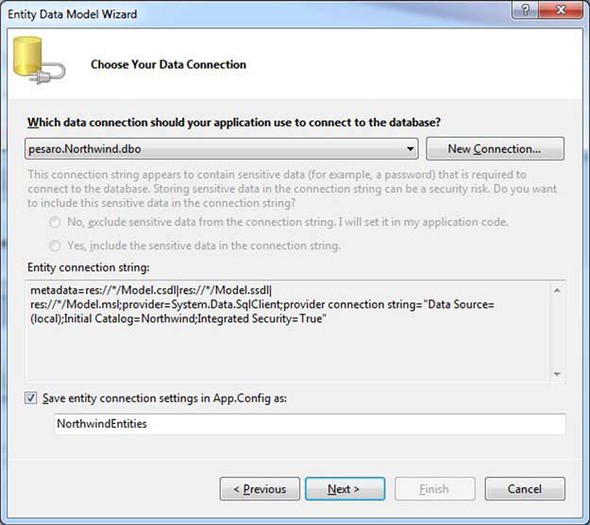
You need to create an XML file that contains the ID and the name of a given customer. This file must be saved on the server machine for further processing.

This is an excerpt from Manning's book ASP.NET MVC 2 in Action.
This ViewResult tells the framework to render a view. You have the option of providing a name for the view, but if you don’t—as in our case—it will just use the name of the action.
So where is this view located? We learned a few minutes ago that the default project structure contains a Views folder. By convention, views are located in a subfolder corresponding to the controller name. The name of the action (again by convention) is the same as the name of the view.
This is an excerpt from Manning's book ASP.NET MVC in Action with MvcContrib, NHibernate, and More.
The flow from our controller to our view is simple. The controller designates one or many objects to be forwarded to the view, then optionally specifies the name of the view. The MVC framework will locate the view, instantiate it, push in the ViewData, and have the view render itself to the response stream. The ViewPage base class fully supports rendering, but ViewState, postbacks, and the server-side postback events no longer happen. Rendering events still fire since ViewPage derives from System.Web.UI.Page.
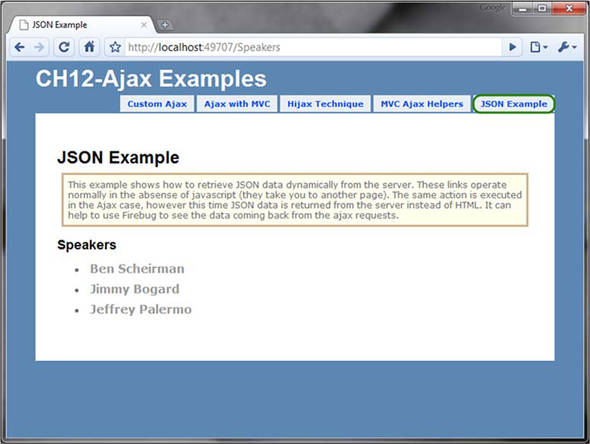
The view’s only responsibility is to transform objects passed to it into HTML. This is a key part of the SoC, a key best practice that Microsoft is focusing on with this product. The controller does not know how the view is doing the formatting. The only point of coupling is that the controller names the view, either implicitly with the name of the action, or explicitly with the View() method. It does not matter that the System.Web.Mvc.WebFormViewEngine is executing. The same controller could function quite well with an NVelocity view (supported in MvcContrib) since the controller’s only coupling to the view is the view name. For now, we’ll forward “Hello World3” to the view, and figure 1.10 shows the rendered page. This example has shown how to get a simple case working, but there are maintenance concerns you should be aware of while building an application with this framework.
In listing 3.1 we see a simple controller with a single action. This is a trivial example, and we will tackle more complex scenarios later. We begin by ensuring that the action method is public and returns ActionResult. If the method is not public, it will not be called. At this point, we can push some objects into ViewData and call the View() method with the name of the view that should render. That is the meat and potatoes of what it means to be an action method.
Listing 3.1. The SimpleController decides on ViewData and renders a view
using System.Web.Mvc; namespace MvcInAction.Controllers { public class SimpleController : Controller { public ActionResult Hello() { ViewData.Add("greeting", "Hello Readers!"); return View(); } } }The most important point to remember is that the controller action adds objects to the ViewData and calls for the rendering of a view by name. A popular convention is to keep the view name the same as the action name for simplicity. If the view name matches the action name, there is no need to specify it when calling return View(). ViewData is a IDictionary<string, object> at its core. The type is System.Web. Mvc.ViewDataDictionary, but we only need to worry about the interface. MvcContrib contains a group of extension methods called ViewDataExtensions which make ViewData easier to work with within a controller as well as a view. The extensions don���t take away any functionality; they add functionality. You will see use of these extensions sprinkled throughout this book.
The ASP.NET MVC Framework matches querystring values based completely on name. The order is unimportant. As an exercise, pull down the code for this chapter and change the order of the action parameters. The behavior of the application will be unaffected. Similarly, change the order of the querystring parameters. No change. The name of the parameter is what matters.
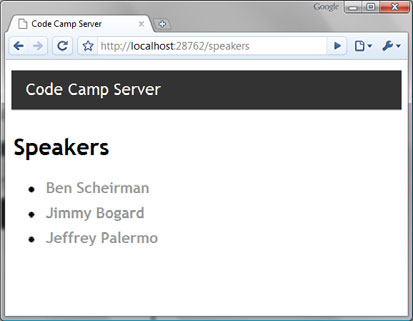
An HTML page that has a <form method="POST"/> tag will generate a POST back to the same URL, unless an alternate action is specified. When a page is posted to a URL, all form fields are translated into a form values collection. For instance, if the page contains <input type="text" name="FirstName"/>, user entries in that text box will be entered into the form collection and available to the server code that handles the request. With the ASP.NET MVC Framework, form values are routed automatically into the controller action. The action parameters are matched to values in the form collection by name. In figure 3.2, we see a page containing a form with text boxes that collect attendee registration information for CodeCampServer. Each of these text boxes has a unique name used to match action parameters.
Looking at listing 3.9, we see one option for receiving the form post. Notice the names of the parameters on this method. The parameter conferenceKey is still there and will be matched to the appropriate part of the route. Next are firstName, lastName, and so on. The ASP.NET MVC Framework will search to match parameters to this method. The matching mechanism matches by name. Because firstName exists in the form collection, the value will be passed into this method along with the other parameters. The end result is that all the attendee registration information is translated into action parameters and passed in. As developers, we don’t have to do a thing to extract the appropriate information from the form collection on the request. We must only ensure the names of the action parameters match up with the names posted to the URL.

This is an excerpt from Manning's book ASP.NET AJAX in Action.
The name of the XMLHttpRequest object is somewhat misleading because data can be transferred in the form of XML or other text-based formats. The ASP.NET AJAX framework relies heavily on a format called JavaScript Object Notation (JSON) to deliver data to and from the server. Examples of JSON and how the ASP.NET AJAX framework uses it are scattered throughout this book. You can find a more thorough explanation of JSON in chapter 3.
As we said previously, objects in JavaScript are collections of name and value pairs. To demonstrate, you can add a property to an object using an indexed notation, as if you were accessing a collection such as an array or a hash table. The following is another way to add a title property to the book object:
Listing 13.3. Adding XML comments to a JavaScript client class
function Person() { ///<summary> ///This class describes a person. ///</summary> this._name = ''; } Person.prototype = { get_name : function() { ///<summary> ///Returns the name of the person. ///</summary> return this._name; }, set_name : function(value) { ///<summary> ///Sets the name of the person. ///</summary> ///<param name="value" type="String"> ///The name of the person. ///</param> this._name = value; } } Person.registerClass("Person");