concept route in category asp.net

This is an excerpt from Manning's book ASP.NET Core in Action.
Which brings us to the final and most substantial piece of middleware in the pipeline: the MVC middleware. It’s responsible for interpreting the request to determine which method to invoke, for reading parameters from the request, and for generating the final HTML. Despite that, the only configuration required, aside from adding the middleware to the pipeline, is to define a route that will be used to map requests to a handler. For each request, the MVC middleware uses this route to determine the appropriate controller and action method on the controller to invoke, and hence, which HTML to generate.
Listing 5.2. Adding multiple routes to the MvcMiddleware
public class Startup { public void ConfigureServices(IServiceCollection services) { services.AddMvc(); } public void Configure(IApplicationBuilder app) { app.UseMvc(routes => { routes.MapRoute( name: "currency_by_code", #1 template: "currency/{code}", #2 defaults: new { controller="Currencies", action="View" }); routes.MapRoute( name: "default", template: "{controller=Home}/{action=Index}/{id?}"); }); } } #1 The name of the route can be used during URL generation, as you’ll see later. #2 The route template defines the structure of the URL to match. !@%STYLE%@! {"css":"{\"css\": \"font-weight: bold;\"}","target":"[[{\"line\":11,\"ch\":12},{\"line\":11,\"ch\":28}],[{\"line\":15,\"ch\":12},{\"line\":15,\"ch\":28}],[{\"line\":12,\"ch\":16},{\"line\":12,\"ch\":41}],[{\"line\":12,\"ch\":75},{\"line\":12,\"ch\":77}],[{\"line\":22,\"ch\":0},{\"line\":22,\"ch\":2}],[{\"line\":13,\"ch\":16},{\"line\":13,\"ch\":44}],[{\"line\":13,\"ch\":75},{\"line\":13,\"ch\":77}],[{\"line\":23,\"ch\":0},{\"line\":23,\"ch\":2}],[{\"line\":14,\"ch\":16},{\"line\":14,\"ch\":74}]]"} !@%STYLE%@!
Imagine your app receives a request to the /Person/JoeBloggs/View URL. This incoming URL is a perfect match for the final route, but because the route preceding it is more general, the final route is never tested. Consequently, the JoeBloggs() action method is executed instead of the method you might expect, View(string name), with name = "JoeBloggs". To fix this problem, you can swap the order of the last two routes. This is obviously a somewhat contrived example—it’s unlikely you’ll have an action method called JoeBloggs!—but hopefully the principle is clear.
Every conventional route must define the controller and action to run when a URL matches the route. This can be done either using the route template syntax, in which the controller and action name are taken directly from the URL, or by using default values, as you’ll see in the next section.

This is an excerpt from Manning's book ASP.NET 4.0 in Practice.
URL routing is a dispatching mechanism. You can bind a different set of URLs with a specific handler (an ASP.NET page) that will process the requests made to these URLs. Routing is managed by registering the routes in the application, linking together the path to be handled, and invoking the HttpHandler.
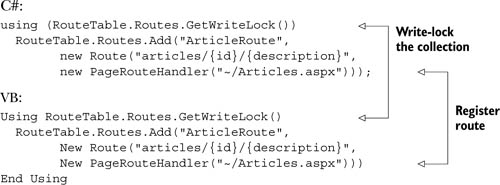
To register a route, you have to add a new RouteValueDictionary to the Routes property of the RouteTable class from the System.Web.Routing namespace. Typically, you can do that in global.asax or, if you prefer, in an HttpModule. The code is shown in listing 4.6.
ASP.NET 4.0 differs from ASP.NET 3.5 SP1 with respect to registering routes. Version 4.0 includes a special route handler, PageRouteHandler, designed to work with Web Forms. You can find more information about this new class on MSDN at http://mng.bz/5ENS.

This is an excerpt from Manning's book ASP.NET MVC 2 in Action.
The initial request to the application was made to / (the root of the site). We can check the routes to see how the application responds to URLs. Routes are a way for you to customize the URLs that users use when interacting with your site. You’ll learn about routing in depth in chapter 16, but we’ll cover what you need to know to get started.
Routes are (by default) defined in the Global.asax. Open this file and you should see the code shown in listing 1.1.
Let’s expand the routes and allow events to be listed by category. The most usable URL from the user’s point of view would probably be something like this:
http://example.com/events/meetingBut now we have a problem! We already have a route that matches /events/<something> used to list the events on a particular year, month, or day, so how are we now going to try to use /events/<something> to match a category as well? Our second route segment can now mean something entirely different; it clashes with the existing route. If the routing system is given this URL, should it treat that parameter as a category or a date?
Luckily, the routing system in ASP.NET MVC allows us to apply conditions. The syntax for this can be seen in section 16.3.3, but for now it’s sufficient to say that we can use regular expressions to make sure that routes only match certain patterns for a parameter. This means that we could have a single route that allows a request like / events/2009-01-01 to be passed to an action that shows events by date, and a request like /events/asp-net-mvc-in-action to be passed to an action that shows events by category. These URLs should clash with each other, but they don’t because we’ve made them distinct based on what characters will be contained in the URL.
It’s good practice to make constants for regular expressions used in routes because they’re often used to create several routes.
Listing 16.6 shows a controller that can handle a request that matches the route in listing 16.5.
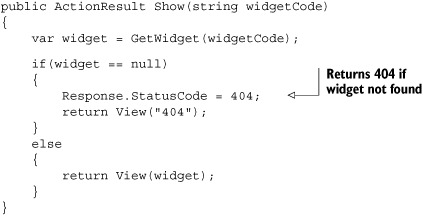
Listing 16.6 shows the action implementation in the controller for the route in listing 16.5. Although it’s simplified from a real-world application, it’s straightforward until we get to the case of the widget not being found. That’s a problem. The widget doesn’t exist and yet we’ve already assured the routing engine that we’d take care of this request. Because the widget is now being referred to by a direct resource locator, the HTTP specification says that if that resource doesn’t exist, we should return HTTP 404 not found. Luckily, that’s no problem; we can just change the status code in the Response and render the same 404 view that we’ve created for the catchall route. (We’ll cover catchall routes later in this chapter.)
The route values, shown in table 16.2, are all strings. The controller will be extracted out of this URL as users. The controller part of the class name is implied by convention, so the controller class created will be UsersController. As you can probably already tell, routes aren’t case sensitive.
This is an excerpt from Manning's book ASP.NET MVC in Action with MvcContrib, NHibernate, and More.
Routes will be discussed in great detail in chapter 5; however, you should be aware of some route basics to move through this section. Although Web Forms mandated a strict convention for URLs, the MVC framework provides a mechanism to allow developers to handcraft URLs, and have them map automatically to an object in the system that can handle the incoming web request. Routing was added to ASP.NET in the .NET Framework 3.5 Service Pack 1 release, and is available to all ASP.NET applications. The Global.asax.cs file contains basic routes that are provided with the MVC Web Application project to help you get started. Before continuing, we should define a route.
A route is the complete definition for how to dispatch a web request to a controller, usually using the System.Web.Mvc.MvcRouteHandler. In the past we have had little control over message dispatching without resorting to external tools like ISAPI filters or carefully crafted HttpModules for URL rewriting. With Web Forms, the URL of the web request was tightly coupled to the location of the page handling the request. If the page was named Foo.aspx in a folder named Samples, the URL was sure to be something like http://MvcContrib.org/Samples/Foo.aspx. Many teams have resorted to URL rewriting to wrangle some control over the URLs and how they are produced. With the ASP.NET MVC Framework, and ASP.NET 3.5 SP1 in general, routes are first-class citizens that can be managed directly in the web application. We start with defining how we want our URLs structured. The project template gives us a few routes to start, as shown in listing 1.1.
Routes must be defined before any request can be received by the application, so the project template adds the routes to the Application_Start method in the Global. asax.cs file. Later in the book, you’ll see that we do not leave the routes in this location except for the most trivial of web applications.

Rescuing the URL means controlling those that control applications. Although routing is not core to all implementations of the MVC pattern, it is often implemented as a convenient way to add an extra level of separation between external inputs and the controllers and actions which make up an application. The code required to implement routing using the ASP.NET MVC Framework is reasonably trivial but the thought behind designing a schema of URLs for an application can raise many issues. In this chapter, we’ll go over the concept of routes and their relationship with MVC applications. We’ll also briefly cover how they apply to Web Forms projects. We’ll examine how to design a URL schema for an application, and then apply the concepts to create routes for Code Camp Server, our sample application. Because routes are the front door of your web application, we’ll discover how to test routes to ensure they are working as intended. Now that you have an idea of how important routing is, we can start with the basics.
The Constraints parameter in MapRoute takes a dictionary in the form of an anonymous type which can contain a property for each named parameter in the route. In listing 5.5 we are ensuring that the request will only match if the {widgetCode} parameter starts with WDG followed by exactly 4 digits
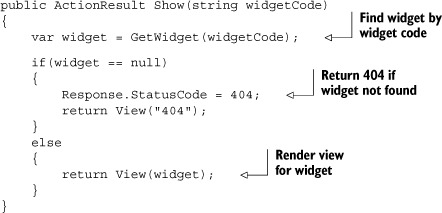
. Listing 5.6 shows a controller that can handle a request that matches the route in listing 5.5.
Listing 5.5 shows the action implementation in the controller for the route in listing 5.4. Although it’s simplified from a real world application, it’s straightforward until we get to the case of the widget not being found. That’s a problem. The widget does not exist and yet we have already assured the routing engine that we would take care of this request. As the widget is now being referred to by a direct resource locator, the HTTP specification says that if that resource does not exist, we should return HTTP 404 not found. Luckily, this is no problem and we can just change the status code in the Response and render the same 404 view that we have created for the catch-all route. (We’ll cover catch-all routes later in this chapter.)
Listing 5.2. Default routes
public class MvcApplication : HttpApplication { public static void RegisterRoutes(RouteCollection routes) { routes.IgnoreRoute("{resource}.axd/{*pathInfo}"); routes.MapRoute( "Default", "{controller}/{action}/{id}", new { controller = "Home", action = "Index", id = "" } ); } protected void Application_Start() { RegisterRoutes(RouteTable.Routes); } }
The route values, shown in table 5.2, are all strings. The controller will be extracted out of this URL as users. The "Controller" part of the class name is implied by convention; thus the controller class created will be UsersController. As you can probably already tell, routes are not case sensitive. The action describes the name of the method to call on our controller. In ASP.NET MVC, an action is defined as a public method on a controller that returns an ActionResult. By convention the framework will attempt to find a method on the specified controller that matches the name supplied for action. If none is found it will also look for a method that has the ActionNameAttribute applied with the specified action. The remaining values defined in a route are pumped into the action method as parameters, or left in the Request.Params collection if no method parameters match.