concept test in category asp.net

This is an excerpt from Manning's book ASP.NET Core in Action.
The other advantage of the model being independent of the view is that it improves testability. UI code is classically hard to test, as it’s dependent on the environment—anyone who has written UI tests simulating a user clicking buttons and typing in forms knows that it’s typically fragile. By keeping the model independent of the view, you can ensure the model stays easily testable, without any dependencies on UI constructs. As the model often contains your application’s business logic, this is clearly a good thing!
As I have throughout the book, I’m referring to testing .NET Core apps, but you can also use the same tools to execute tests against the full .NET framework if your app targets .NET Framework instead of .NET Core.
Test projects are console apps that contain a number of tests. A test is typically a method that evaluates whether a given class in your app behaves as expected. The test project will typically have dependencies on at least three components:
Listing 20.4. Unit test for ConvertToGbp using expected arguments
[Fact] #1 public void ConvertToGbp_ConvertsCorrectly() #2 { var converter = new CurrencyConverter(); #3 decimal value = 3; #4 decimal rate = 1.5m; #4 int dp = 4; #4 decimal expected = 2; #5 var actual = converter.ConvertToGbp(value, rate, dp); #6 Assert.Equal(expected, actual); #7 } #1 The [Fact] attribute marks the method as a test method. #2 You can call the test anything you like. #3 The class to test #4 The parameters of the test that will be passed to ConvertToGbp #5 The result you expect. #6 Executes the method and captures the result #7 Verifies the expected and actual values match. If they don’t, this will throw an exception. !@%STYLE%@! {"css":"{\"css\": \"font-weight: bold;\"}","target":"[[{\"line\":0,\"ch\":61},{\"line\":0,\"ch\":63}],[{\"line\":15,\"ch\":0},{\"line\":15,\"ch\":2}],[{\"line\":1,\"ch\":61},{\"line\":1,\"ch\":63}],[{\"line\":16,\"ch\":0},{\"line\":16,\"ch\":2}],[{\"line\":3,\"ch\":61},{\"line\":3,\"ch\":63}],[{\"line\":17,\"ch\":0},{\"line\":17,\"ch\":2}],[{\"line\":4,\"ch\":61},{\"line\":4,\"ch\":63}],[{\"line\":5,\"ch\":61},{\"line\":5,\"ch\":63}],[{\"line\":6,\"ch\":61},{\"line\":6,\"ch\":63}],[{\"line\":18,\"ch\":0},{\"line\":18,\"ch\":2}],[{\"line\":4,\"ch\":61},{\"line\":4,\"ch\":63}],[{\"line\":5,\"ch\":61},{\"line\":5,\"ch\":63}],[{\"line\":6,\"ch\":61},{\"line\":6,\"ch\":63}],[{\"line\":18,\"ch\":0},{\"line\":18,\"ch\":2}],[{\"line\":4,\"ch\":61},{\"line\":4,\"ch\":63}],[{\"line\":5,\"ch\":61},{\"line\":5,\"ch\":63}],[{\"line\":6,\"ch\":61},{\"line\":6,\"ch\":63}],[{\"line\":18,\"ch\":0},{\"line\":18,\"ch\":2}],[{\"line\":8,\"ch\":61},{\"line\":8,\"ch\":63}],[{\"line\":19,\"ch\":0},{\"line\":19,\"ch\":2}],[{\"line\":10,\"ch\":61},{\"line\":10,\"ch\":63}],[{\"line\":20,\"ch\":0},{\"line\":20,\"ch\":2}],[{\"line\":12,\"ch\":61},{\"line\":12,\"ch\":63}],[{\"line\":21,\"ch\":0},{\"line\":21,\"ch\":2}]]"} !@%STYLE%@!
When you create a test app that uses the .NET Test SDK, you can run your tests either with Visual Studio or using the .NET CLI. In Visual Studio, you run tests by choosing Tests > Run > All Tests from the main menu, or by clicking Run All in the Test Explorer window, as shown in figure 20.2.
Figure 20.2. The Test Explorer window in Visual Studio lists all tests found in the solution, and their most recent pass/fail status. Click a test in the left-hand pane to see details about the most recent test run in the right-hand pane.
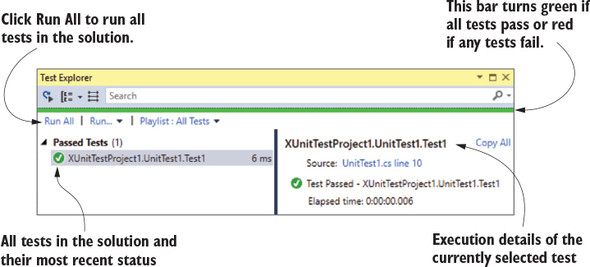
The Test Explorer window lists all the tests found in your solution, the results of each test, and overall, whether all the tests in your solution passed successfully. In xUnit, a test will pass if it doesn’t throw an exception, so Test1 passed successfully.

This is an excerpt from Manning's book ASP.NET MVC 2 in Action.
The tests should also be repeatable. That means no shared global variables for the test result state, and no shared state between tests in general. Keep unit tests isolated in every way, and they’ll be repeatable, order-independent, and stable.
Pay attention to pain—if tests become painful and time consuming to maintain, there’s something wrong. Correctly managed design and tests enable sustained speed of development, whereas poor testing techniques cause development to slow down to the point where testing is abandoned. At that point, it’s back to painstaking, time-intensive manual testing. If you start to think that you could move faster without writing the tests, look for technique errors or bad design in the production code. Get a peer to review the code. Tests should enable development, not slow it down.
Logs individual interactions within the test
Once we have described our test scenario behavior, we can author a test to execute this scenario. Our first pass at this UI test is in listing 20.1.