concept Use extension in category asp.net

This is an excerpt from Manning's book ASP.NET Core in Action.
Similar to the Run extension, when you add the Use extension to your pipeline, you specify a lambda function that runs when a request reaches the middleware. The app passes two parameters to this function:
By providing a pointer to the rest of the pipeline, you can use the Use extension to control exactly how and when the rest of the pipeline executes, as shown in figure 19.3. If you don’t call the provided Func<Task> at all, then the rest of the pipeline doesn’t execute for the request, so you have complete control.
Figure 19.3. Three pieces of middleware, created with the Use extension. Invoking the provided Func<Task> using next() invokes the rest of the pipeline. Each middleware can run code before and after calling the rest of the pipeline, or it can choose to not call next() at all to short-circuit the pipeline.
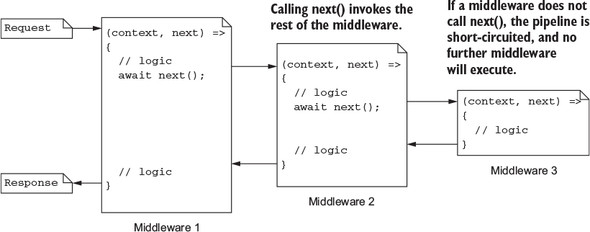
Exposing the rest of the pipeline as a Func<Task> makes it easy to conditionally short-circuit the pipeline, which opens up many different scenarios. Instead of branching the pipeline to implement the health-check middleware with Map and Run, as you did in listing 19.2, you could use a single instance of the Use extension. This provides the same required functionality as before but does so without branching the pipeline.
Listing 19.4. Adding headers to a response with the Use extension
public void Configure(IApplicationBuilder app) { app.Use(async (context, next) => #1 { context.Response.OnStarting(() => #2 { context.Response.Headers["Strict-Transport-Security"] = #3 "max-age=60"; #3 return Task.CompletedTask; #4 }); await next(); #5 } app.UseMvc(); #6 } #1 Adds the middleware at the start of the pipeline #2 Sets a function that should be called before the response is sent to the browser #3 Adds an HSTS header. For 60 seconds the browser will only send HTTPS requests to your app #4 The function passed to OnStarting must return a Task. #5 Invokes the rest of the middleware pipeline #6 No matter what response the MvcMiddleware generates, it’ll have the HSTS header. !@%STYLE%@! {"css":"{\"css\": \"font-weight: bold;\"}","target":"[[{\"line\":2,\"ch\":71},{\"line\":2,\"ch\":73}],[{\"line\":16,\"ch\":0},{\"line\":16,\"ch\":2}],[{\"line\":4,\"ch\":71},{\"line\":4,\"ch\":73}],[{\"line\":17,\"ch\":0},{\"line\":17,\"ch\":2}],[{\"line\":6,\"ch\":71},{\"line\":6,\"ch\":73}],[{\"line\":7,\"ch\":71},{\"line\":7,\"ch\":73}],[{\"line\":18,\"ch\":0},{\"line\":18,\"ch\":2}],[{\"line\":6,\"ch\":71},{\"line\":6,\"ch\":73}],[{\"line\":7,\"ch\":71},{\"line\":7,\"ch\":73}],[{\"line\":18,\"ch\":0},{\"line\":18,\"ch\":2}],[{\"line\":8,\"ch\":71},{\"line\":8,\"ch\":73}],[{\"line\":19,\"ch\":0},{\"line\":19,\"ch\":2}],[{\"line\":10,\"ch\":71},{\"line\":10,\"ch\":73}],[{\"line\":20,\"ch\":0},{\"line\":20,\"ch\":2}],[{\"line\":13,\"ch\":71},{\"line\":13,\"ch\":73}],[{\"line\":21,\"ch\":0},{\"line\":21,\"ch\":2}]]"} !@%STYLE%@!Simple cross-cutting middleware like the health-check and HSTS examples in this section are common, but they can quickly clutter your Configure method, and make it difficult to understand the pipeline at a glance. Instead, it’s common to encapsulate your middleware into a class that’s functionally equivalent to the Use extension, but which can be easily tested and reused.