concept view component in category asp.net

This is an excerpt from Manning's book ASP.NET Core in Action.
In the second half of the chapter, we look at custom MVC components, in particular Tag Helpers, view components, and custom validation attributes. In section 19.4, I’ll show you how to create two different Tag Helpers: one that generates HTML to describe the current machine, and one that lets you write if statements in Razor templates without having to use C#. These will give you the details you need to create your own custom Tag Helpers in your own apps, if the need arises.
In this section, you’ll see how to create a custom view component for the recipe app you built in previous chapters, as shown in figure 19.9. If the current user is logged in, the view component displays a panel with a list of links to the user’s recently created recipes. For unauthenticated users, the view component displays links to the login and register actions.
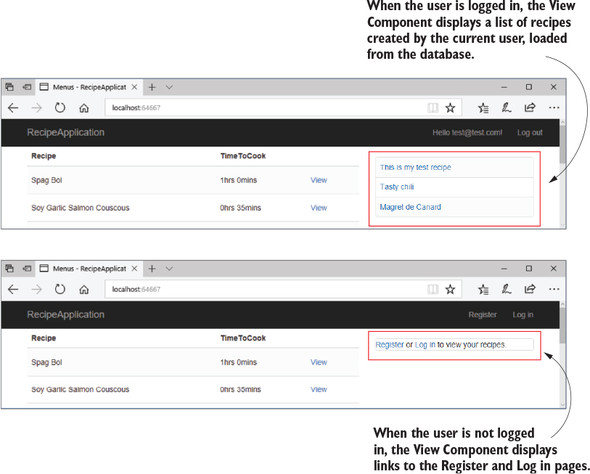
Use partial views when you want to encapsulate the rendering of a specific view model, or part of a view model. When you have rendering logic that requires business logic or database access, or where the section is logically distinct from the main page content, consider using a view component.
You invoke view components directly from views and layouts. You can invoke them in two different ways, but from ASP.NET Core 1.1 onward, the preferred way is to use a declarative Tag Helper-style syntax, using a vc: prefix:
<vc:my-recipes number-of-recipes="3">
</vc:my-recipes>
Custom view components typically derive from the ViewComponent base class, and implement an InvokeAsync() method, as shown in listing 19.13. Deriving from this base class allows access to useful helper methods, in much the same way that deriving from the Controller base class does for MVC controllers. But the parameters to InvokeAsync don’t come from model binding like they do for MVC controllers. Instead, you pass the parameters to the view component using properties on the Tag Helper element, as you saw previously.
Listing 19.13. A custom view component to display the current user’s recipes
public class MyRecipesViewComponent : ViewComponent #1 { private readonly RecipeService _recipeService; #2 private readonly UserManager<ApplicationUser> _userManager; #2 public MyRecipesViewComponent(RecipeService recipeService, #2 UserManager<ApplicationUser> userManager) #2 { #2 _recipeService = recipeService; #2 _userManager = userManager; #2 } #2 public async Task<IViewComponentResult> InvokeAsync( #3 int numberOfRecipes) #4 { if(!User.Identity.IsAuthenticated) { return View("Unauthenticated"); #5 } var userId = _userManager.GetUserId(HttpContext.User); var recipes = await _recipeService.GetRecipesForUser( userId, numberOfRecipes); return View(recipes); #6 } } #1 Deriving from the ViewComponent base class provides useful methods like View(). #2 You can use DI in a view Component. #3 InvokeAsync renders the view component. It should return a Task<IViewComponentResult> #4 You can pass parameters to the component from the view. #5 Calling View() will render a partial view with the provided name. #6 You can pass a view model to the partial view. If you don’t specify a name, Default.cshtml is used. !@%STYLE%@! {"css":"{\"css\": \"font-weight: bold;\"}","target":"[[{\"line\":0,\"ch\":68},{\"line\":0,\"ch\":70}],[{\"line\":28,\"ch\":0},{\"line\":28,\"ch\":2}],[{\"line\":2,\"ch\":68},{\"line\":2,\"ch\":70}],[{\"line\":3,\"ch\":68},{\"line\":3,\"ch\":70}],[{\"line\":4,\"ch\":68},{\"line\":4,\"ch\":70}],[{\"line\":5,\"ch\":68},{\"line\":5,\"ch\":70}],[{\"line\":6,\"ch\":68},{\"line\":6,\"ch\":70}],[{\"line\":7,\"ch\":68},{\"line\":7,\"ch\":70}],[{\"line\":8,\"ch\":68},{\"line\":8,\"ch\":70}],[{\"line\":9,\"ch\":68},{\"line\":9,\"ch\":70}],[{\"line\":29,\"ch\":0},{\"line\":29,\"ch\":2}],[{\"line\":2,\"ch\":68},{\"line\":2,\"ch\":70}],[{\"line\":3,\"ch\":68},{\"line\":3,\"ch\":70}],[{\"line\":4,\"ch\":68},{\"line\":4,\"ch\":70}],[{\"line\":5,\"ch\":68},{\"line\":5,\"ch\":70}],[{\"line\":6,\"ch\":68},{\"line\":6,\"ch\":70}],[{\"line\":7,\"ch\":68},{\"line\":7,\"ch\":70}],[{\"line\":8,\"ch\":68},{\"line\":8,\"ch\":70}],[{\"line\":9,\"ch\":68},{\"line\":9,\"ch\":70}],[{\"line\":29,\"ch\":0},{\"line\":29,\"ch\":2}],[{\"line\":2,\"ch\":68},{\"line\":2,\"ch\":70}],[{\"line\":3,\"ch\":68},{\"line\":3,\"ch\":70}],[{\"line\":4,\"ch\":68},{\"line\":4,\"ch\":70}],[{\"line\":5,\"ch\":68},{\"line\":5,\"ch\":70}],[{\"line\":6,\"ch\":68},{\"line\":6,\"ch\":70}],[{\"line\":7,\"ch\":68},{\"line\":7,\"ch\":70}],[{\"line\":8,\"ch\":68},{\"line\":8,\"ch\":70}],[{\"line\":9,\"ch\":68},{\"line\":9,\"ch\":70}],[{\"line\":29,\"ch\":0},{\"line\":29,\"ch\":2}],[{\"line\":2,\"ch\":68},{\"line\":2,\"ch\":70}],[{\"line\":3,\"ch\":68},{\"line\":3,\"ch\":70}],[{\"line\":4,\"ch\":68},{\"line\":4,\"ch\":70}],[{\"line\":5,\"ch\":68},{\"line\":5,\"ch\":70}],[{\"line\":6,\"ch\":68},{\"line\":6,\"ch\":70}],[{\"line\":7,\"ch\":68},{\"line\":7,\"ch\":70}],[{\"line\":8,\"ch\":68},{\"line\":8,\"ch\":70}],[{\"line\":9,\"ch\":68},{\"line\":9,\"ch\":70}],[{\"line\":29,\"ch\":0},{\"line\":29,\"ch\":2}],[{\"line\":2,\"ch\":68},{\"line\":2,\"ch\":70}],[{\"line\":3,\"ch\":68},{\"line\":3,\"ch\":70}],[{\"line\":4,\"ch\":68},{\"line\":4,\"ch\":70}],[{\"line\":5,\"ch\":68},{\"line\":5,\"ch\":70}],[{\"line\":6,\"ch\":68},{\"line\":6,\"ch\":70}],[{\"line\":7,\"ch\":68},{\"line\":7,\"ch\":70}],[{\"line\":8,\"ch\":68},{\"line\":8,\"ch\":70}],[{\"line\":9,\"ch\":68},{\"line\":9,\"ch\":70}],[{\"line\":29,\"ch\":0},{\"line\":29,\"ch\":2}],[{\"line\":2,\"ch\":68},{\"line\":2,\"ch\":70}],[{\"line\":3,\"ch\":68},{\"line\":3,\"ch\":70}],[{\"line\":4,\"ch\":68},{\"line\":4,\"ch\":70}],[{\"line\":5,\"ch\":68},{\"line\":5,\"ch\":70}],[{\"line\":6,\"ch\":68},{\"line\":6,\"ch\":70}],[{\"line\":7,\"ch\":68},{\"line\":7,\"ch\":70}],[{\"line\":8,\"ch\":68},{\"line\":8,\"ch\":70}],[{\"line\":9,\"ch\":68},{\"line\":9,\"ch\":70}],[{\"line\":29,\"ch\":0},{\"line\":29,\"ch\":2}],[{\"line\":2,\"ch\":68},{\"line\":2,\"ch\":70}],[{\"line\":3,\"ch\":68},{\"line\":3,\"ch\":70}],[{\"line\":4,\"ch\":68},{\"line\":4,\"ch\":70}],[{\"line\":5,\"ch\":68},{\"line\":5,\"ch\":70}],[{\"line\":6,\"ch\":68},{\"line\":6,\"ch\":70}],[{\"line\":7,\"ch\":68},{\"line\":7,\"ch\":70}],[{\"line\":8,\"ch\":68},{\"line\":8,\"ch\":70}],[{\"line\":9,\"ch\":68},{\"line\":9,\"ch\":70}],[{\"line\":29,\"ch\":0},{\"line\":29,\"ch\":2}],[{\"line\":2,\"ch\":68},{\"line\":2,\"ch\":70}],[{\"line\":3,\"ch\":68},{\"line\":3,\"ch\":70}],[{\"line\":4,\"ch\":68},{\"line\":4,\"ch\":70}],[{\"line\":5,\"ch\":68},{\"line\":5,\"ch\":70}],[{\"line\":6,\"ch\":68},{\"line\":6,\"ch\":70}],[{\"line\":7,\"ch\":68},{\"line\":7,\"ch\":70}],[{\"line\":8,\"ch\":68},{\"line\":8,\"ch\":70}],[{\"line\":9,\"ch\":68},{\"line\":9,\"ch\":70}],[{\"line\":29,\"ch\":0},{\"line\":29,\"ch\":2}],[{\"line\":11,\"ch\":68},{\"line\":11,\"ch\":70}],[{\"line\":30,\"ch\":0},{\"line\":30,\"ch\":2}],[{\"line\":12,\"ch\":68},{\"line\":12,\"ch\":70}],[{\"line\":31,\"ch\":0},{\"line\":31,\"ch\":2}],[{\"line\":17,\"ch\":68},{\"line\":17,\"ch\":70}],[{\"line\":32,\"ch\":0},{\"line\":32,\"ch\":2}],[{\"line\":24,\"ch\":68},{\"line\":24,\"ch\":70}],[{\"line\":33,\"ch\":0},{\"line\":33,\"ch\":2}]]"} !@%STYLE%@!
Create a view component by deriving from the ViewComponent base class, and implement InvokeAsync(). You can pass parameters to this function from the Razor view template. View components can use DI, have access to the HttpContext, and can render partial views. The partial views should be stored in the Views/Shared/Components/ <Name>/ folder, where Name is the name of the view component. If not specified, view templates use the name Default.cshtml.