concept ViewData in category asp.net

This is an excerpt from Manning's book ASP.NET Core in Action, Second Edition.
Any code between the curly braces will be executed but won’t be written to the response. In the listing you’re setting the title of the page by writing a key to the
ViewDatadictionary, but you aren’t writing anything to the response at this point:@{ ViewData["Title"] = "Privacy Policy"; }Another feature shown in this template is dynamically writing C# variables to the HTML stream using the
@symbol. This ability to combine dynamic and static markup is what gives Razor Pages their power. In the example, you’re fetching the"Title"value from theViewDatadictionary and writing the values to the response inside an<h1>tag:
ViewData—This is a dictionary of objects withstringkeys that can be used to pass arbitrary data from the page handler to the view. In addition, it allows you to pass data to _layout files, as you’ll see in section 7.4. This is the main reason for usingViewDatainstead of setting properties on thePageModel.
A common example is the title of the page. You need to provide a title for every page in your application, so you could create a base class with a
Titleproperty and make everyPageModelinherit from it. But that’s very cumbersome, so a common approach for this situation is to use theViewDatacollection to pass data around.In fact, the standard Razor Page templates use this approach by default by setting values on the
ViewDatadictionary from within the view itself:@{ ViewData["Title"] = "Home Page"; } <h2>@ViewData["Title"].</h2>This template sets the value of the
"Title"key in theViewDatadictionary to"Home Page"and then fetches the key to render in the template. This set and immediate fetch might seem superfluous, but as theViewDatadictionary is shared throughout the request, it makes the title of the page available in layouts, as you’ll see later. When rendered, this would produce the following output:<h2>Home Page.</h2>You can also set values in the
ViewDatadictionary from your page handlers in two different ways, as shown in the following listing.
This is an excerpt from Manning's book ASP.NET MVC in Action with MvcContrib, NHibernate, and More.
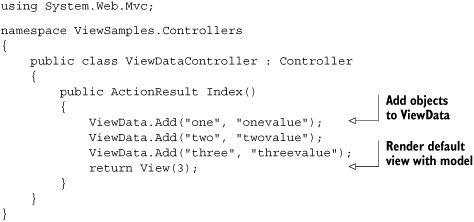
The Index action adds objects to the ViewData dictionary.
ViewData is the bag of state (sometimes referred to as a property bag) that is passed to a view. A view should get all the information it needs from ViewData, which is implemented as a dictionary. It contains key/value pairs as well as some special properties, like Model. The controller is responsible for filling the ViewData dictionary with objects, but action filters can add to the dictionary as well. In fact, ViewData is a property on System.Web.Mvc.ControllerBase, so anywhere you can access the controller you can access ViewData. As the view is executing, it pulls objects from ViewData during the rendering process.
In chapter 1, you saw a simple use of ViewData, so we won’t repeat that here. In any nontrivial application, your view will be composed of a master page, a main view, and many partials—possibly nested partials. It will help to know how ViewData is segmented among the views. For instance, it is important to consider a partial view that might be used by several other views. If the partial view needs an object in ViewData, whose responsibility is it to put the object into the dictionary? The following is an example that illustrates just what happens in this complex scenario. Examine the source of the controller in listing 4.6, the Index.aspx view in listing 4.7, Partial.aspx in listing 4.8 and NestedPartial.aspx in listing 4.9.
Listing 4.7. Accessing ViewData from the view
<%@ Page Language="C#" AutoEventWireup="true" Inherits="System.Web.Mvc.ViewPage<object>" %> <%@ Import Namespace="System.Web.Mvc.Html"%> <!DOCTYPE html PUBLIC "-//W3C//DTD XHTML 1.0 Transitional//EN" "http://www.w3.org/TR/xhtml1/DTD/xhtml1-transitional.dtd"> <html xmlns="http://www.w3.org/1999/xhtml" > <head runat="server"> <title></title> </head> <body> <div> This view: <%=GetType().Name %> Model: <%=ViewData.Model %><br /> Model Type: <%=ViewData.Model.GetType().Name %> ViewDataDictionary hashcode: <%=ViewData.GetHashCode()%> <br /> <%foreach (KeyValuePair<string, object> pair in ViewData){%> View data <%=pair.Key%> : <%=pair.Value %><br /> <% } %> <hr /> PARTIAL <%Html.RenderPartial("partial"); %> <hr /> NESTED PARTIAL PASSING IN MODEL <%Html.RenderPartial("nestedpartial", 89); %> <hr /> NESTED PARTIAL PASSING IN MODEL AND VIEWDATA <%Html.RenderPartial("nestedpartial", 89, new ViewDataDictionary {{"first", "1"} , {"second", "2"}}); %> <hr /> NESTED PARTIAL PASSING IN VIEWDATA <% var dictionary = new ViewDataDictionary {{"first", "value"}}; dictionary.Model = 100; Html.RenderPartial("nestedpartial", dictionary); %> </div> </body> </html>