concept CloudWatch event in category aws
This is an excerpt from Manning's book Amazon Web Services in Action, Second Edition.
Whenever you launch a new EC2 instance, you are sending a call to the AWS API. Subsequently, CloudTrail generates a CloudWatch event. Our goal is to add a tag to every new EC2 instance. Therefore, we are executing a function for every event that indicates the launch of a new EC2 instance. To trigger a Lambda function whenever such an event occurs, you need a rule. As illustrated in figure 7.19, the rule matches incoming events and routes them to a target, a Lambda function in our case.

This is an excerpt from Manning's book AWS Lambda in Action: Event-driven serverless applications.
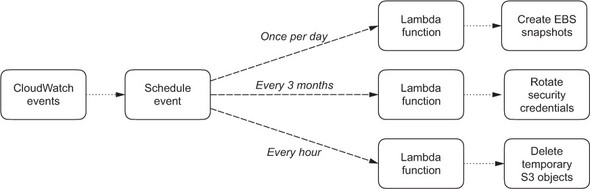
After you create the purgeBucketByPrefix function from the Lambda console, you can schedule a recurring execution from the Event sources tab. Select Add event source, choose “CloudWatch Events–Schedule” from the menu, and give your required recurrence in the Schedule expression.
Another interesting feature of CloudWatch is events, which allow you to be informed of state changes in your AWS resources. Multiple sources are available, such as generic AWS API calls, EC2 instance state transitions (for example, from pending to running), or signing in to the AWS console. Similar to what we explored in the previous section for alarms, with CloudWatch events you can create rules that wait for an event to happen and add Lambda functions as targets triggered by those events.