concept policy in category aws

This is an excerpt from Manning's book AWS Security.
One of the fundamental pieces of securing your AWS resources is controlling who has access to them. AWS has built-in services for managing these access controls, and they are something you will need to familiarize yourself with. The first is IAM, Identity and Access Management. The term Identity and Access Management has a much broader meaning outside of AWS, often referring to all the tools and policies used for controlling access to technical assets. Within AWS and this book, IAM refers to the specific AWS service used for controlling access to AWS services. The other service to be familiar with is VPC, Virtual Private Cloud. VPC is a service used for controlling the network access to and from your resources, primarily EC2 instances and derivative compute resources.
IAM can be difficult to use. There are a number of common mistakes - some of which we'll explore in this chapter - that can cause problems, such as mixing up identity and resource policies, or failing to assume a role once policies are attached. One such mistake that I see all the time is that you have an S3 bucket with some secret information. You create a policy that allows only certain people to access that bucket. But for some reason it doesn't work. So you make the S3 bucket publicly readable just to get things working, and then the secret information inevitably gets exposed. Often just having a good understanding of how IAM works can prevent issues of misconfiguration. The first section of this chapter will go over how IAM resources work and how to configure them.
Another difficulty with IAM is that it can be a lot of work to manage, and policies need to be constantly updated as infrastructure and users' needs change. Several sections in this chapter are focused on simplifying management of IAM resources to reduce that burden. Section 2.2 is focused on common patterns, like using AWS' managed policies instead of writing your own. The section on Attribute-Based Access Control shows how you can use Tags to grant access to resources rather than having to update policies each time you create a new resource. If you use Active Directory or another identity management system within your organization already, the final section in this chapter outlines how to integrate that system with IAM so you don't have to manage identities in two places.
There are several benefits to the group approach over adding each policy to each user. The first is that it requires fewer calls to the AWS API. Without groups we would have needed to call the AttachPolicy action 30 times to grant three policies to ten users. With groups, we only need to make fourteen calls: One to make the group; ten to add each of the users to the group; and three to attach the policies to the group. Another benefit is that makes it easy to change the users. If another developer joins the team you can just add that user to the group and the permissions are applied automatically. The same goes for removing members. Management of the permissions applied is also simplified. If you want to add a new policy to all developers you only have to add it in one place, instead of going to each individual user and adding the policy. These benefits are depicted in Figure 2.3 for three users and two policies. It's easy to see that setting up a new user is simplest in the third situation, where you only need to add the group membership.
Figure 2.3 Inline Policies vs Managed Policies vs Groups for three users and two policies

For the reasons above, it is recommended that you do not attach policies directly to users, but rather to apply policies only to groups and roles, which will be explained in the next section. Doing this makes it much easier to manage permissions, especially as the number of users grows larger. Reducing the complexity of managing permissions is a great way to prevent misconfiguration issues from slipping through the cracks.
The master_resource_policy.json and manager_resource_policy.json files will change depending on which users you set as masters and managers, but they will look similar to the policies below:
master_resource_policy.json
{
"Version": "2012-10-17",
"Statement": [
{
"Effect": "Allow",
"Action": "sts:AssumeRole",
"Principal": {
"AWS": "arn:aws:iam::123456789012:user/Alice"
}
}
]
}

manager_resource_policy.json
{
"Version": "2012-10-17",
"Statement": [
{
"Effect": "Allow",
"Action": "sts:AssumeRole",
"Principal": {
"AWS": "arn:aws:iam::123456789012:user/Bob"
}
}
]
}
The commands above create the two new Roles. Now we can create new Managed Policies for these roles. We'll start with the policy for the Master Role. We want to allow a very specific set of Actions used for creating and deleting IAM Users, Groups, Roles, and Managed Policies. The list of Actions is below:

This is an excerpt from Manning's book AWS Lambda in Action: Event-driven serverless applications.
AWS Lambda allows tight control of the security of your environment: everything that’s executed by AWS Lambda needs to have the permissions to do what it’s supposed to do. This is managed using AWS Identity and Access Management (IAM) roles and policies, which you’ll explore in depth in chapter 4. When a function is executed it assumes the role given in the configuration. A “role” can have one or more policies attached. A “policy” describes what you can do in terms of actions, resources, and conditions. Assuming a role allows the function to do what’s described in the policies attached to the role.
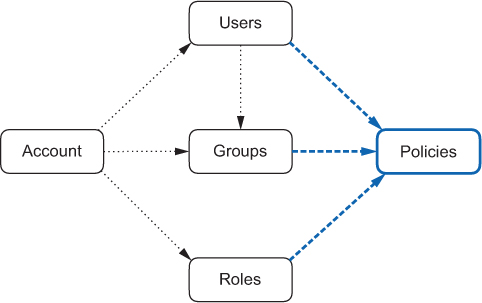
To make users, groups, and roles useful, you need to attach them to one or more policies (figure 4.5). Policies give the actual permissions, describing what those users, groups, or roles are (or are not) allowed to do within the account. By default, nothing is allowed and you need at least one policy. With policies, you give the necessary authorization that those users, groups, and roles require.
Figure 4.5. Policies can be attached to users, groups, and roles to describe what they are (or are not) allowed to do within the account.
For authentication, you need security credentials. Security credentials can be assigned to the root account, but, as discussed, you should use root credentials only to create your first admin user. Users can have permanent credentials, which can be rotated periodically to improve security. Roles don’t have credentials assigned to them, but when a user, an application, or an AWS service assumes a role, it gets temporary credentials that will authorize it to do what’s described in the policies attached to the role (figure 4.6). Temporary security credentials, when expired, are automatically rotated by the AWS CLI and SDKs. If you obtained temporary security credentials in other ways, you need to rotate them manually.
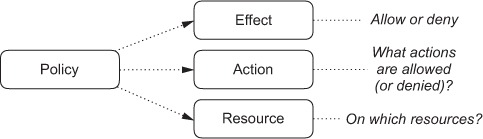
Listing 4.1. Policy to give read/write access to an Amazon S3 bucket
{
  "Version": "2012-10-17",                          #1
  "Statement": [                                    #2
    {
      "Effect": "Allow",                            #3
      "Action": [                                   #4
        "s3:ListBucket",                            #4
        "s3:GetBucketLocation"                      #4
      ],                                            #4
      "Resource": "arn:aws:s3:::BUCKET"             #5
    },
    {
      "Effect": "Allow",                            #6
      "Action": [                                   #7
        "s3:PutObject",                             #7
        "s3:GetObject",                             #7
        "s3:DeleteObject"                           #7
      ],                                            #7
      "Resource": "arn:aws:s3:::BUCKET/*"           #8
    }
  ]
}