concept public internet in category aws

This is an excerpt from Manning's book AWS Security.
Now back to VPCs. A VPC, Virtual Private Cloud, is a private network you can create that exists within a region. A VPC allows you to create networked connections between all the AWS resources within the VPC, while blocking access from everything outside the VPC. There are various tools used to define what connections are permitted in and out of a VPC and between resources within the VPC. The primary tool is Security Groups. A security group lets you define a set of inbound and outbound rules for allowed connections. All other connections not specified will be denied. You can then apply those security group rules to an EC2 instance in a VPC by associating the instance with the security group. The last fundamental resource in a VPC is the Subnet. Subnets are the component sub-networks that make up a VPC. An individual subnet claims a block of the IP range specified in the VPC, and exists within an Availability Zone. EC2 Instances and other resources cannot be put directly into a VPC, rather they are added to one of the subnets within a VPC. There are two different types of Subnets, public and private. Public subnets have routes to an Internet Gateway, which means that they can communicate with the public internet outside of the VPC. Private subnets have no such route to the public internet. By default, two subnets (public or private) in the same VPC cannot communicate with each other, but you can create routes to link any two subnets in the same VPC together. See figure 1.5 which shows a basic configuration of these resources.
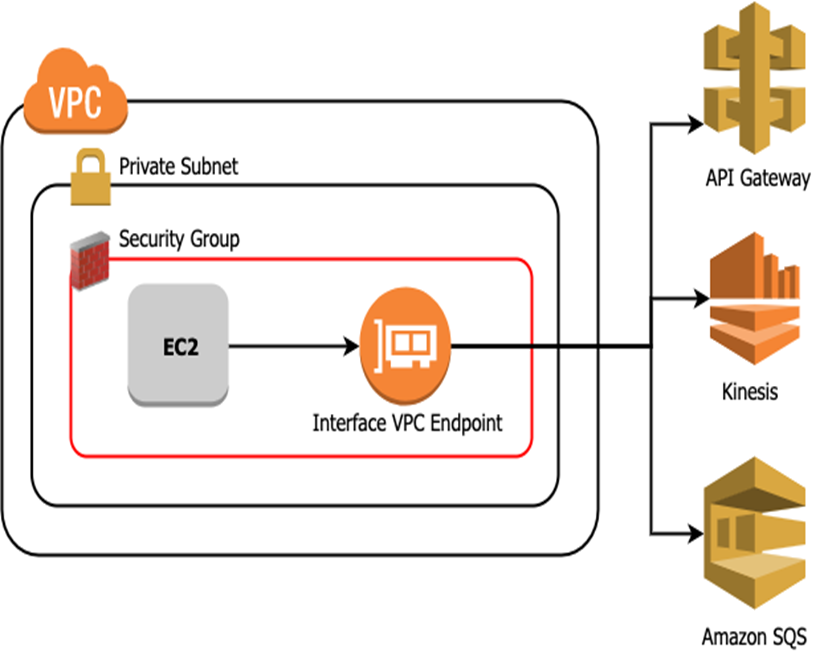
One of the benefits of VPC peering, which we talked about in Chapter 4, is that it lets you route traffic between resources without going over the public internet. In this chapter we'll talk more about the issues around routing traffic over the public internet, and two additional ways of avoiding it. The first way deals with privately connecting to an AWS service from one of your resources using VPC endpoints. An example would be if you had an EC2 instance that called another AWS service like SQS. Figure 5.1 shows how VPC endpoints fit into the network in that situation, allowing a private instance to connect to various AWS services.
Figure 5.1 Interface VPC Endpoints allow you to access AWS services like API Gateway, Kinesis, or SQS from a private subnet. No internet gateway is required.
In addition to networking with AWS services, you can create VPC endpoints for your own applications using AWS PrivateLink. Suppose your customers call your service through an API. You could set up PrivateLink for your API, then your customers could privately access your API from a VPC by routing through an interface VPC endpoint instead of over the public internet. This scenario is depicted in Figure 5.2.