concept Azure Automation account in category azure
appears as: Azure Automation account, An Azure Automation account, n Azure Automation account

This is an excerpt from Manning's book Learn Azure in a Month of Lunches, Second Edition.
At the top of the Update Management window, select Manage Multiple Machines. The window switches to the Azure Automation account that was created when Update Management was enabled for the VM. Don’t worry too much for now about what the runbooks do. There’s nothing for you to customize, and we’ll examine Azure Automation in chapter 18. Note that you can choose Add Azure VM or Add Non-Azure machine, as shown in figure 16.12. This ability highlights a single approach to managing updates across your entire application environment, not just for Azure VMs. Figure 16.12 In the Azure Automation account, you can manage multiple computers and view the status or apply updates. Both Azure VMs and non-Azure computers can be monitored and controlled by the same Azure Automation account. Behind the scenes, Azure can integrate with other providers to install agents on computers in a hybrid environment. This integration allows a single dashboard and management platform to handle your update needs.
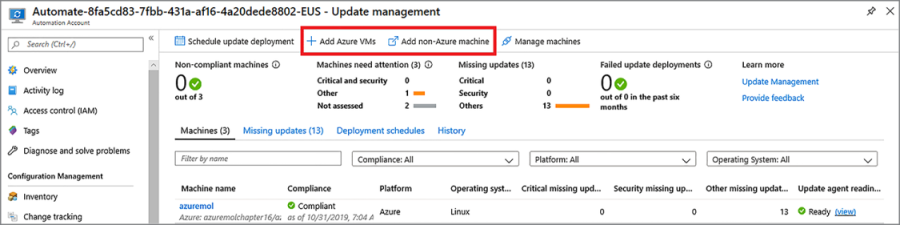
Figure 16.12 In the Azure Automation account, you can manage multiple computers and view the status or apply updates. Both Azure VMs and non-Azure computers can be monitored and controlled by the same Azure Automation account. Behind the scenes, Azure can integrate with other providers to install agents on computers in a hybrid environment. This integration allows a single dashboard and management platform to handle your update needs.
An Azure Automation account brings together many elements, as shown in figure 18.1. A core feature is creating and running scripts on demand or on a defined schedule. You can create scripts in PowerShell or Python and let the Azure platform handle the scheduling and execution of those runbooks. You can share credentials and connection objects, and automatically apply and report on desired configurations of servers. Update Management, which we examined in chapter 16, keeps your servers secure and up to date with the latest host patches and updates throughout the lifecycle of your application environment.