concept container in category azure
This is an excerpt from Manning's book Azure Storage, Streaming, and Batch Analytics: A guide for data engineers.
Resource groups in Azure are organizing containers. Every Azure service has one. Every resource group has a region. The resource group anchors a service to a region, with the primary configuration data for the service stored in that region. This is especially true for some services, like Cosmos DB and Traffic Manager, which are global and have infrastructure in every region.
With these inline functions, you can convert, validate, and construct many variations of the raw data using U-SQL and C#. In the next chapter, you’ll learn how to create your own classes to add even more complex C# logic. The U-SQL catalog forms the container for database items, including assemblies of custom code. Now that you’ve seen some of U-SQL’s processing capabilities, you’re ready to expand on it with integrations for your own custom code and external endpoints.

This is an excerpt from Manning's book Learn Azure in a Month of Lunches, Second Edition.
Azure is one of the largest public cloud computing providers for services such as virtual machines (VMs), containers, serverless computing, and machine learning. We won’t dive into all 100 or more Azure services in this book, but you’re going to learn about the core services and features that cover most of what you need to start building and running solutions in Azure. We’ll look at a common example of how to build and run a web application, and you’ll see how to use some of the core infrastructure and platform services that can make your job easier.
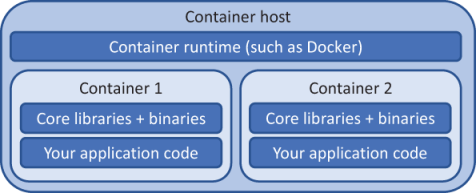
Containers, Docker, and Kubernetes have gained a huge following in a few short years. In the same way that server virtualization started to change how IT departments ran their data centers in the mid-2000s, modern container tools and orchestrators are now shaking up how we build and run applications. There’s nothing that inherently connects the growth of containers with cloud computing, but when combined, they provide a great way to develop applications with a cloud-native approach.
Entire books have been written on Docker and Kubernetes, but let’s go on a whirlwind introduction to see how you can quickly run containers in Azure. A powerful suite of Azure services is dedicated to containers, aligning more with the PaaS approach. You can focus on how to build and run your applications rather than how to manage the container infrastructure, orchestration, and cluster components.
In this chapter, we’ll examine what containers are, how Docker got involved, and what Kubernetes can do for you. To see how to run either a single container instance or multiple container instances quickly in a cluster, we’ll explore Azure Container Instances (ACI) and Azure Kubernetes Service (AKS).
Create a container instance, and specify that you want to have a public IP address and to open port 80: This exercise uses a sample image that I’ve created for you, which we’ll examine a little more when the container is up and running. az container create \ --resource-group azuremolchapter19 \ --name azuremol \ --image iainfoulds/azuremol \ --ip-address public \ --ports 80To see what was created, look at the output of the command to create the container. In the Events section, you can watch as the image is pulled (downloaded) from Docker Hub, a container is created, and the container is started. Some CPU and memory reservations are also assigned, which can be adjusted if needed. A public IP address is shown, along with some information about the container such as the provisioning state, OS type, and restart policy. To open the basic website that runs in the container, you can query for just the assigned public IP address: