concept iot hub in category azure

This is an excerpt from Manning's book Learn Azure in a Month of Lunches, Second Edition.
A device that connects to an IoT hub isn’t useful if you can’t do anything with the data. This is where you can start to integrate many of the services and features you’ve learned about in this book. Want to stream to Azure Storage tables or queues? You can do that. Process data from IoT devices in Azure VMs or containers? Go right ahead! Use Azure Cosmos DB to replicate your data, and then access it with globally redundant Azure web apps and Traffic Manager? Sure!
In the example scenario, the IoT hub is the connection mechanism and entry point for your IoT devices into Azure. The hub itself doesn’t do anything with the data directly. A default endpoint exists for
events, which is a big bucket for any messages received from the IoT device. Your simulated Raspberry Pi device sends messages to the IoT hub, and these messages hit thiseventsendpoint. The flow of messages from devices through the IoT hub to an endpoint is shown in figure 20.4.

Message received in an IoT hub--An IoT device connected to an IoT hub may report a temperature reading in an oven or a delivery vehicle’s location. The IoT hub is configured to forward a notification to Azure Event Grid. An Azure function is subscribed to the Event Grid notifications for an IoT hub and runs a small serverless application component to log the information to Azure Cosmos DB and send an email notification. You could also use Logic Apps instead of Azure Function Apps, depending on how complex the application response needs to be.
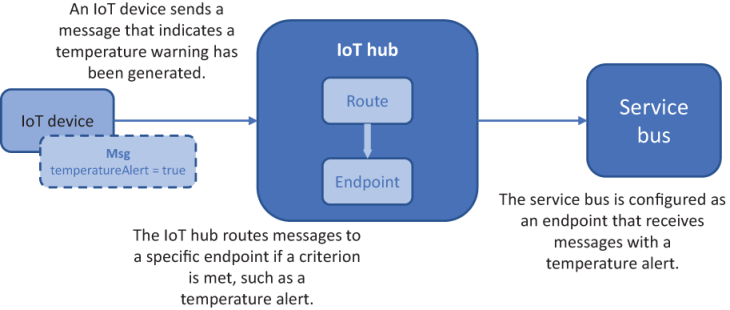
With a service bus and a queue created, how do you configure an IoT hub to use them? In the IoT hub, you define endpoints as the destinations for messages received from IoT devices. A default endpoint exists in the IoT hub for all messages that don’t meet the defined criteria. You can configure the service bus as an endpoint to receive messages. Then a route is defined that includes criteria for which messages should be directed to an endpoint. In this example, that route requires any message that contains
temperatureAlert = truein the message body to be routed to the service bus endpoint, as shown in figure 21.8.Figure 21.8 As messages are transmitted from IoT devices to an IoT hub, they can be routed to specific endpoints based on criteria you define. Messages that contain a temperature alert in the message body can be routed to an endpoint that uses the service bus queue. Then messages placed on the service bus queue that contain a temperature alert can be used to trigger things like Azure logic apps or function apps.