concept message in category azure
This is an excerpt from Manning's book Azure Storage, Streaming, and Batch Analytics: A guide for data engineers.
Event Hubs logs messages from data sources like Azure Functions, Azure Event Hubs SDK code, or API calls.
An Event Hub ingests messages from applications. It records the details of each message in a journal, and saves the message data for retrieval. The message data can be simple or complex. The Event Hub serves messages on request. Each message consumer records the last message read in the journal. Multiple consumers can read from the same journal of messages.
Messages are retained in the journal until the retention period elapses, and are not removed during retrieval. This means multiple consumers can read from the same journal, and a single consumer can read from the journal multiple times. This differs from the Azure Queue service, where messages are deleted on successful processing. Replaying messages from the journal allows reprocessing of events, and having multiple consumers allows different processing to happen on the same data set. Extending the retention period lets us revisit our old data in the future.
Applications submit messages to Event Hubs via an API using HTTPS, Advanced Message Queuing Protocol (AMQP), or the Apache Kafka protocol. HTTPS is the industry standard for secure Internet web communication. AMQP messages are an industry standard for message queuing. Kafka is an open-source option for hosting a high-throughput message endpoint. The Kafka protocol is an open standard. If you don’t want to manage a Kafka cluster, you could use Event Hubs in a namespace using Kafka. One example would be using an Event Hub as the message ingestion point for a Databricks cluster. All protocols require a fully qualified domain name (FQDN) endpoint to submit messages to. In Event Hubs, this is called the Event Hubs namespace.
To have a failover endpoint to mitigate downtime, you need to add a second Event Hubs namespace and connect the primary and secondary namespaces via an alias. The alias is a routing FQDN, which routes incoming messages to the active Event Hubs namespace. Figure 5.2 shows the flow of messages in Event Hubs when using a geo-disaster recovery alias.
Figure 5.2. Routing messages with Event Hubs Geo-disaster recovery alias

Event Hub clients can submit messages individually or in batches. The next PowerShell script expands on the last script by creating a batch of messages within the loop, and sending the whole batch in a single request. The script also adds a parameter to specify the
partitionIdfor the batch of messages. Using this script with Capture enabled, you can see all the messages collect in a single partition output file. Run the script in Listing 5.11 in the same Azure PowerShell session as Listing 3.9.Listing 5.11. Create a REST API request to Event Hubs using partitions
$endpoint = "https://ade-dev-eastus2-hubs.servicebus.windows.net/
<lineArrow/>biometricstats/messages" + "?timeout=60&api-version=2014-01"

$headers = New-Object
<lineArrow/>"System.Collections.Generic.Dictionary[[String],[String]]"
$headers.Add("Authorization", $SASToken) #1
$headers.Add("Content-Type",
<lineArrow/>"application/vnd.microsoft.servicebus.json")
$headers.Add("Host", "ade-dev-eastus2-hubs.servicebus.windows.net")

$eventDate =
(Get-Date).ToUniversalTime().ToString("o") #2
$messages =  New-Object "System.Collections.Generic.List[[String]]"

for($i = 0; $i -lt 30; $i++) #3
{

#Construct body using Hashtable
$partition = @{PartitionKey="3"} #4
$htbody = @{
    Id=(New-Guid).Guid #5
    Player="abera101" #6
    Node=(Get-Random -Minimum 0 -Maximum 40) #6
    NodeValue=(Get-Random -Minimum 40 -Maximum 110) #6
    EventTime= $eventDate #6
  }
$messages.Add((ConvertTo-Json @{ #7
    Body=(ConvertTo-Json $htbody)
    BrokerProperties=$partition
  }))
}

Invoke-WebRequest -Uri $endpoint -Method POST  #8
<lineArrow/> -Body ("[" + ($messages -join ",") + "]") -Headers $headers #9
Event Hubs focuses on reading streams of messages. In the next chapter, you’ll learn how to take these streams and process them into insights in near real-time.

This is an excerpt from Manning's book Learn Azure in a Month of Lunches, Second Edition.
Take a look at what your fictional pizza company may need to build an app that processes orders from customers for takeout or delivery. The app needs a data store that holds the available pizzas, list of toppings, and prices. As orders are received and processed, the app needs a way to send messages among the application components. Then the frontend website needs mouthwatering images to show customers what the pizzas look like. As you can see in figure 4.1, Azure Storage has a variety of storage features and can cover all three of these needs.
Sending message: {"messageId":1,"deviceId":"Raspberry Pi Web
 ➥ Client","temperature":24.207095037347923,
 ➥ "humidity":69.12946775681091}
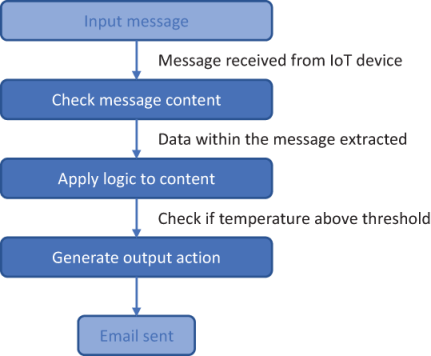
Figure 21.2 In a logic app, an input could be when a tweet is posted, a file is uploaded, or a message is received from an IoT device. The logic app applies rules and filters to the data and determines if the message meets criteria you define. Then output actions, such as generating an email, are completed. All this logic involves no programming or application infrastructure other than an Azure subscription.