concept resource in category azure

This is an excerpt from Manning's book Azure Storage, Streaming, and Batch Analytics: A guide for data engineers.
Every Azure service, also called a resource, must have a name. Consistently applying a naming convention helps users find services and identify ownership and usage of services. You will be browsing and searching for the specific resource you need to work with, from a resource group to a SQL Database to Azure Storage accounts.
The ADF service functions as an organizing structure for a collection of resources. This includes pipelines and the activities within them. The ADF service doesn’t do anything on its own: the pipelines manage the activities that execute. In this way, it’s similar to other Azure services, like the Event Hubs namespace, SQL Server, and Storage accounts, which need additional services configured.

This is an excerpt from Manning's book Learn Azure in a Month of Lunches, Second Edition.
Instead, select a button, and create whatever resources are needed. You pay only for each minute those resources are running or for the amount of storage space or network bandwidth used. When you don’t need the resources anymore, you can power down or delete them. If you suddenly need to increase the amount of compute power by a factor of 10, select a button, wait a couple of minutes, and it’s there. And all this is managed by someone else, freeing you to focus on your applications and customers.
The Azure Resource Manager deployment model is central to how you build and run resources, even though you probably haven’t realized it yet. Resource Manager is an approach to building and deploying resources as much as the automation processes and templates that drive those deployments. In this chapter, you’ll learn how to use Resource Manager features such as access controls and locks, consistent template deployments, and automated multitier rollouts.
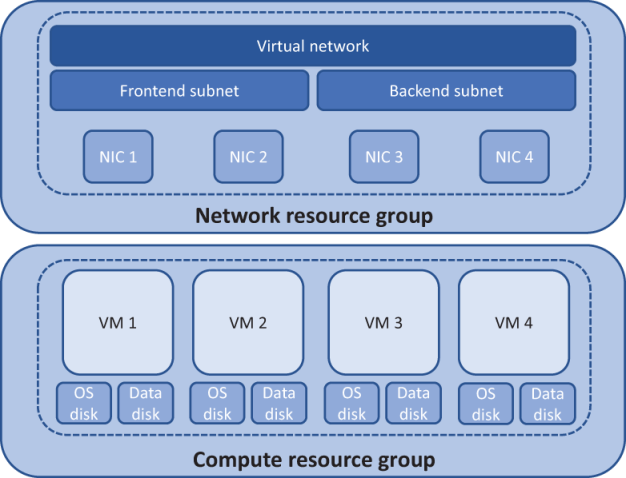
Figure 6.2 An alternative approach is to create and group resources based on their role. A common example is that all core network resources are in a separate resource group from the core application compute resources. The VMs in the compute resource group can access the network resources in the separate group, but the two sets of resources can be managed and secured independently.
Listing 18.3 Getting a list of Azure resources
$ResourceGroups = Get-AzureRmResourceGroup
foreach ($ResourceGroup in $ResourceGroups)
{
    Write-Output ("Showing resources in resource group "
 ➥ + $ResourceGroup.ResourceGroupName)
    $Resources = Find-AzureRmResource -ResourceGroupNameContains
 ➥ $ResourceGroup.ResourceGroupName |
 ➥ Select ResourceName, ResourceType
    ForEach ($Resource in $Resources)
    {
        Write-Output ($Resource.ResourceName + " of type "
 ➥ +  $Resource.ResourceType)
    }
    Write-Output ("")
}