concept service bus in category azure

This is an excerpt from Manning's book Learn Azure in a Month of Lunches, Second Edition.
You can create custom endpoints that route messages directly to Azure services such as Storage and Service Bus. In chapter 4, we looked at Azure Storage queues as a way to pass messages back and forth between applications. A more robust and scalable enterprise messaging platform is Azure Service Bus. Messages can be added to the service bus, such as data received from IoT devices; then other applications can listen for these messages and respond accordingly.
If you don’t need the complexity of reading messages from something like a service bus, you can use consumer groups with the default
eventsendpoint. A consumer group allows services such as Azure Web Apps to read data from the endpoint, as shown in figure 20.5. Each service reading from Azure IoT Hub should have its own consumer group. Multiple services, each with its own consumer group, can receive the same messages and process them as needed.
Event Grid can work with many Azure resources, and it’s well suited to serverless computing with logic apps or function apps. But logic apps and function apps can run based on other data inputs, such as event hubs or a service bus. Let’s look at the differences among these various messaging services so that you can decide when to use them:
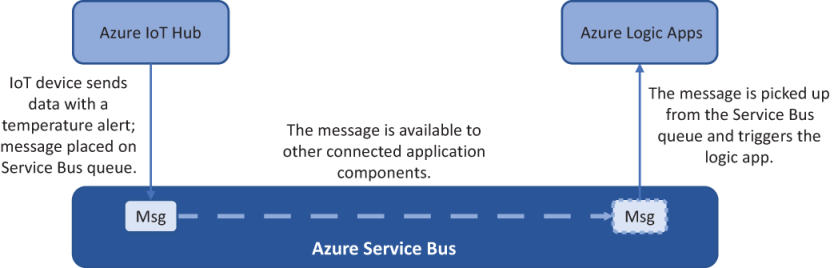
In this scenario, let’s use a service bus to transmit messages received from an IoT hub. Your simulated Raspberry Pi device from chapter 20 generates temperature readings and transmits them to your IoT hub. If the temperature is higher than 30°C, another piece of data is included in the message from the IoT device:
temperature-Alert= true. Figure 21.7 outlines how you can integrate an IoT hub with the service bus to process messages with this temperature alert.