concept time in category azure
This is an excerpt from Manning's book Azure Storage, Streaming, and Batch Analytics: A guide for data engineers.
What if we want to log the time taken to query a database?
For the first iteration of the biometric stats, include a player identifier, sensor identifier, the value read, and the sensor read time, as shown in Listing 5.1.
Listing 11.5. Restore a SQLDB to SQL Server using a point-in-time backup
$Db = Get-AzSqlDatabase -ResourceGroupName "ade-dev-eastus2"  #1
<lineArrow/>-ServerName "ade-dev-eastus2-sql" -DatabaseName "Playerstats"
Get-AzSqlDatabaseRestorePoint -ResourceGroupName $Db.ResourceGroupName
<lineArrow/>-ServerName $Db.ServerName -DatabaseName $Db.DatabaseName
$Date = Get-Date -Year 2020 -Month 2 -Day 2 -Hour 13 -Minute 0 -Second 0
Restore-AzSqlDatabase
<lineArrow/>-FromPointInTimeBackup -PointInTime $Date #2
<lineArrow/>-ResourceGroupName $Db.ResourceGroupName #3
<lineArrow/>-ServerName $Db.ServerName
<lineArrow/>-TargetDatabaseName "Playerstats_2020_02_02_13_00" #4
<lineArrow/>-ResourceId $Db.ResourceID #5
<lineArrow/>-Edition "Standard" -ServiceObjectiveName "S0"

This is an excerpt from Manning's book Learn Azure in a Month of Lunches, Second Edition.
I like sandwiches, so lunch is a great time for me to play with cool new technology. You may be a night owl who has some extra time in the evening, or you may be an early-morning person (what’s wrong with you?!) who can work through a chapter at breakfast. There’s no right or wrong time to learn, but if you can set aside about 45 minutes, you should be able to read a chapter and complete its exercises. Each chapter covers something new, so give yourself time to absorb each day’s lesson.
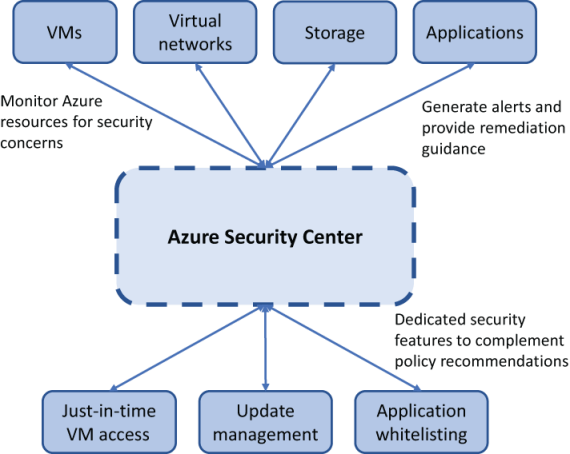
Figure 16.1 Azure Security Center monitors your Azure resources and uses defined security policies to alert you to potential threats and vulnerabilities. Recommendations and steps to remediate issues are provided. You can also use just-in-time VM access, monitor and apply security updates, and control whitelisted applications that can run on VMs.