concept address in category blockchain

This is an excerpt from Manning's book Blockchain in Action.
Both types of accounts, EOAs and smart contracts, can hold a balance of ethers. Thus, every account has these two implicit attributes: addressandbalance. You may not find these attributes explicitly declared in your smart contract;address(this).balancewill get you the balance held in your smart contract.
truffle migrate --network ropsten
Internal functions to support these and other utility functions


This is an excerpt from Manning's book Permissioned Blockchains in Action.
There are quite a few things to go through here. First, note how there are now two recorded transactions: one for contract deployment and the other for calling add. Next, look at the “from” field in the transaction log. This records the address from which this function was called. An address is the hash of the public key of an account. It is what is used to identify entities within Ethereum (and thus, within Solidity). The “to” field also contains an address but this is not the hash of a public key. This is the address of the deployed contract and contracts do not have associated key pairs. Instead the address for a smart contract is the hash of its creator’s address concatenated with its creator’s nonce. The nonce simply is a counter of how many transactions a particular address has sent.
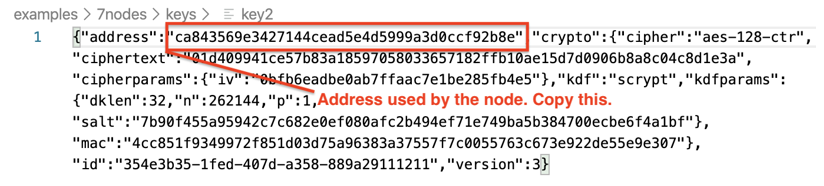
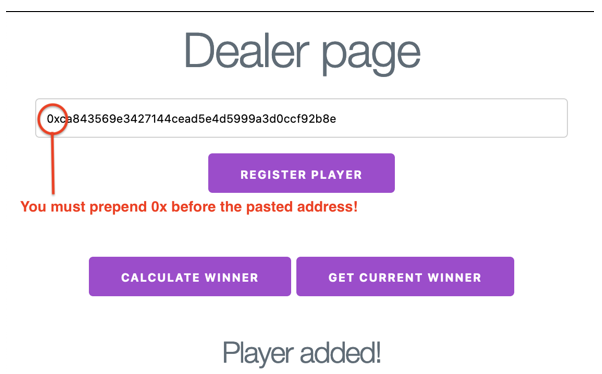
In the Dealer.html page, you will see a field to add new players. Here, you need to enter the addresses of the four players. We know that these four players will connect from nodes 2, 3, 4 and 5. So, to retrieve their addresses navigate to quorum-examples/examples/7nodes/keys. There you will find the key files for each of the nodes. Open the key2 file. In the key2 file, the first entry will be for “address”, as shown in Figure ui1. This is the value we need to paste into the add player field in dealer.html. Type “0x” into the field and then paste that value in, as shown in Figure ui2. Do not forget the “0x”! You will get an error otherwise. Once you’ve pasted in the value, click on “Register Player”. You should get a message saying that the player has been added, as shown in Figure ui2.
Here, we supply the ABI of the contract and the address of the deployed contract to the web3 library. This returns an object that is assigned to the Dealer variable. Dealer is the Javascript representation of our deployed contract: it is how we’ll interact with the contract.
(web3.eth.getAccounts((err, acc) => { Dealer.options.from = acc[0]; }));
Dealer.options.gas = 5000000; // default gas limit for transactions
In the first line, we retrieve the list of accounts available on the node. Then we tell Web3 to use the first account in that list as the “from” address for all transactions to Dealer. In the second line, we set a maximum gas limit for transactions sent to Dealer. As we’ve discussed previously, Gas is a vestigial organ for permissioned blockchains; it is just a relic from public Ethereum and has no real function in DLTs. We thus set the value for gas very high so that we don’t hit the limit for some transaction causing it to fail. Annoyingly, Quorum still adheres to gas limits even though they have no meaning in this context.
Incorrect contract addresses in the UI: Ensure that the addresses saved in the UI pages are the same as those of the deployed contracts.