concept ASP.NET in category c#

This is an excerpt from Manning's book Dependency Injection in .NET.
MARY: I need to implement this business logic so that a preferred customer gets a five percent discount. JENS: Sounds easy. Just multiply by .95. MARY: Thanks, but that’s not what I wanted to ask you about. What I wanted to ask you is, how should I identify a preferred customer? JENS: I see. Is this a web application or a desktop application? MARY: It’s a web app. JENS: Okay, then you can define a user profile and have an IsPreferredCustomer property. You can get the profile through the HttpContext. MARY: Slow down, Jens. This code must be in the Domain Logic Layer. It’s a library. There’s no HttpContext. JENS: Oh. [Thinks for a while] I still think you should use the Profile feature of ASP.NET to look up the value on the user. You can then pass the value to your domain logic as a Boolean. MARY: I don’t know... JENS: That will also ensure that you have good separation of concerns, because your domain logic doesn’t have to deal with security. You know: The SINGLE RESPONSIBILITY PRINCIPLE! It’s the Agile way to do it! MARY: I guess you’ve got a point.
Figure 7.13. In a perfect world, we would like to be able to compose Page objects from an application’s COMPOSITION ROOT. When a request arrives, we should be able to use the defined configuration of DEPENDENCIES to compose an appropriate Page object. However, this isn’t possible because ASP.NET manages the lifetime of Page objects on our behalf.

Other frameworks are decidedly DI-unfriendly and require us to use default constructors to fit in. ASP.NET (Web Forms) is the most notorious of these, but other examples include PowerShell and the Managed MMC SDK. These frameworks manage the lifetimes of the classes we provide, so the only option is to treat each class as a separate COMPOSITION ROOT. This is more work, so I personally prefer to use DI-friendly frameworks whenever I have the choice.
The application entry point in ASP.NET is the global.asax file, and although you can’t compose anything at this point, you can create your mise en place, making everything ready for when the application starts:

This is an excerpt from Manning's book ASP.NET 4.0 in Practice.
ASP.NET is used to build web applications, and it’s the preferred choice when using Microsoft technologies. It was built by Microsoft in the early 2000s as part of the .NET Framework initiative, which offered a unified environment in which to build and run applications for Windows developers. If you think of .NET Framework as a house, then ASP.NET is the rooms.
As ASP.NET approaches its fifth version (counting minor and major releases), the community of developers around ASP.NET is much more mature than it was ten years ago. In the beginning, ASP.NET developers came from backgrounds in Active Server Pages (ASP) or Visual Basic (VB) 6, so topics like design, architecture, and patterns were often ignored. But this isn’t the case today. We’ve found ways to build better web applications and how to overcome challenges we face daily when we’re working in ASP.NET. This book will explore how to solve common problems in ASP.NET, but before we get to the prize, everyone needs to be on the same footing.
You picked up this book because you want to get to know ASP.NET, specifically ASP.NET 4.0. Well, ASP.NET 4.0 isn’t a revolutionary release, but an evolutionary one. In this book, we’ll focus on the new features you’ll find in version 4.0, but we’ll also cover material from the previous releases that’s still used in the 4.0 version. In the beginning of this book, you’ll see content that’s valuable in ASP.NET 3.5 or 2.0, but as we move further along, version 4.0 will be the main focus.
In this chapter, we’ll introduce you to what ASP.NET is, how it works, and how to get started. We’ll look at the typical architecture of an ASP.NET application and then move into the new features you’ll find in the 4.0 release. When that’s all said and done, we’ll introduce a problem-solution-discussion scenario that should make the technology your friend rather than just an acquaintance.
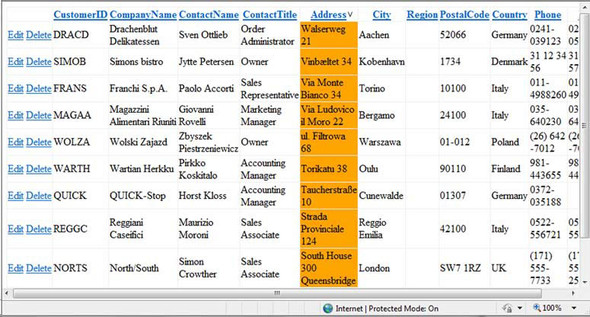
Listing 5.4. The simplest implementation of ListView in ASP.NET 3.5
<asp:ListView ID="CustomerView" runat="server"> <LayoutTemplate> <ul> <li ID="ItemPlaceHolder" runat="server" /> </ul> </LayoutTemplate> <ItemTemplate> <li runat="server"> <%#((Customer)Container.DataItem).ContactName%></li> </ItemTemplate> </asp:ListView>

This is an excerpt from Manning's book ASP.NET MVC 2 in Action.
Notice that two entries are defined. The first is an IgnoreRoute, and that basically tells the framework not to worry about anything matching the specified path. In this case, it says not to process any paths containing the .axd file extension, such as Trace.axd. The second entry, MapRoute, is what defines how URLs are processed. This built-in route will suffice for a while, but later on you’ll want to add more routes in order to provide URLs that are specific to your application. Just like how previous versions of ASP.NET decided the URL for you based on the directory structure and the Web Form filename (such as Default.aspx), ASP.NET MVC projects come with a default URL structure. Applications that don’t require custom URL schemes will do just fine with the defaults.
Many of us have invested heavily in ASP.NET. With ASP.NET MVC now available as an alternative to Web Forms, is all that knowledge useless? Do we have to relearn this platform entirely from scratch?
You’ll be relieved to know that many of ASP.NET’s platform features work the same way they always have. Even some Web Forms server controls work. In this chapter, we’ll cover what works in ASP.NET MVC and what doesn’t. By the end of the chapter, you should feel comfortable using your existing knowledge of ASP.NET to build robust websites with ASP.NET MVC.
Caching is immensely important in today’s web applications. A website of significant size or traffic can drastically reduce the amount of database access by effective use of caching. With ASP.NET we can also cache rendered HTML, which saves CPU resources on the server. Done properly, it’s one of the best tools for coping with severe loads. Done poorly, your efforts will be detrimental to your website’s performance.

This is an excerpt from Manning's book ASP.NET MVC in Action with MvcContrib, NHibernate, and More.
In early 2002, along came ASP.NET and the Web Forms Framework. Web Forms were a complete shift for ASP developers, partly because they moved most program logic into a class file (called a code-behind) and replaced the HTML markup with dynamic server controls written in an XML syntax. Although performance increased, and the debugging experience improved, new problems arose.
The new server-side postback event lifecycle caused newsgroups to explode with activity as confused developers searched for that magic event in which to add those two simple lines of code necessary to make the page work as needed. ViewState, although good in theory, broke down as the application scaled with complexity. Simple pages surpassed 100KB in size, as the entire state of the application had to be stored in the output of every generated page. Development best practices were ignored as tools like Visual Studio encouraged data access concerns like SQL queries to be embedded within view logic. Perhaps the greatest sin of the Web Forms Framework was the tight coupling to everything in the System.Web namespace. There was no hope of unit testing any code in the code-behind file, and today we see Page_Load methods that take several trees to print. Although early versions of Web Forms had some drawbacks, ASP.NET and the larger .NET Framework have made huge inroads into the web application market. Today we see major websites such as CallawayGolf.com, Dell.com, Newsweek.com, WhiteHouse.gov, and Match.com all running on ASP.NET. The platform has proven itself in the marketplace, and when combined with IIS running on Windows, ASP.NET can easily support complex web applications running in large data centers. The ASP.NET MVC Framework leverages the success of ASP.NET and Web Forms to propel ASP.NET forward as a leader in the web application development space.
Many of us have invested heavily in ASP.NET. With ASP.NET MVC now available as an alternative to Web Forms, is all that knowledge useless? Do we have to relearn this platform entirely from scratch? You will be relieved to know that many of ASP.NET’s platform features work the same way they always have. Even some Web Forms server controls work. In this chapter we’ll cover what works in ASP.NET MVC and what does not. By the end of the chapter, you should feel comfortable leveraging your existing knowledge of ASP.NET to build robust websites with ASP.NET MVC.
Caching is immensely important in today’s web applications. A website of significant size or traffic can drastically reduce the amount of database access by effective use of caching. With ASP.NET we can also cache rendered HTML, which saves CPU resources on the server. Done properly, it’s one of the best tools in your belt to cope with severe load. Done poorly, your efforts will be detrimental to your website’s performance.

This is an excerpt from Manning's book LINQ in Action.
ASP.NET controls support data binding to any IEnumerable collection. This makes it easy to display the result of language-integrated queries using controls like GridView, DataList, and Repeater.

This is an excerpt from Manning's book ASP.NET AJAX in Action.
In ASP.NET, when a form posts data back to itself (or even to another page), it’s called a postback. During this process, the current state of the page and its controls are sent to the server for processing. The postback mechanism is relied on to preserve the state of the page and its server controls. This process causes the page to refresh and is costly because of the amount of data sent back and forth to the server and the loss of interaction for the user.

This is an excerpt from Manning's book ASP.Net 2.0 Web Parts in Action: Building Dynamic Web Portals.
By the time the ASP.NET 1.0 framework burst onto the scene in January 2001, its users had built up high expectations. ASP.NET is a web framework that was built from the ground up with a vision of providing the most advanced platform for creating dynamic, modern web applications. Using the framework freed developers from many of the time-consuming and most error-prone operations in existing frameworks, and set them free to focus on meeting application requirements. Newly eliminated operations included common coding tasks as well as more complicated coding for security, web services, and deployment.
At this time, the expectations placed upon web frameworks were becoming increasingly demanding, as businesses were now embracing the web as an application platform in ever-increasing numbers. This was due in part to the success of the web-based business models of companies such as Amazon, Yahoo, and E-Bay. ASP.NET 1.0 had arrived with all the answers to solve the new problems of the day, and it was just in time to take advantage of all this demand. The rest is history. Growth of the platform was stellar as developers and businesses streamed into this new platform in droves. Much of this growth was due to the migration from the earlier ASP platform to .NET. At the time of writing, some statistics that highlight this growth are
In this chapter we plunged deeper into ASP.NET and the portal framework so that we could learn how to do things that are non-standard—such as creating a collapsible EditorZone and adding single-click editing capabilities to our web parts. Having now seen some of the more obscure extensibility points within the framework that can be used to customize our solutions - such as chrome—we are well on the way to being free to implement the fullest solutions that we can create.