concept asynchronous code in category c#

This is an excerpt from Manning's book C# in Depth, Fourth Edition.
The main feature of C# 5 is typically called async/await, and it builds on the TPL. It allows you to write synchronous-looking code that uses asynchrony where appropriate. Gone is the spaghetti of callbacks, event subscriptions, and fragmented error handling; instead, asynchronous code expresses its intentions clearly and in a form that builds on the structures that developers are already familiar with. The language construct introduced in C# 5 allows you to await an asynchronous operation. This awaiting looks very much like a normal blocking call in that the rest of your code won’t continue until the operation has completed, but it manages to do this without blocking the currently executing thread. Don’t worry if that statement sounds completely contradictory; all will become clear over the course of the chapter.

This is an excerpt from Manning's book Windows Store App Development.
Table 3.2. A few interesting WinRT and .NET 4.5 APIs
Why it’s interesting
Windows.UI.Xaml.* This is where you’ll find almost the entire XAML stack. Yes, it’s all in native code, and it’s built into the core API of the platform. Windows.Data.Json Includes basic JSON parsing functionality. I’ve found that most people prefer to use another library like JSON.NET instead. Windows.Data.Xml.* The XML DOM parser and XSLT processor are both found here. Windows.Devices.* All the device access functionality is in here. Windows.Foundation You’ll see more of this in the next chapter. This is where the asynchronous support code lives. Windows.Networking.* This is where much of the support for networking lives. For most typical networking work you do, however, you’ll use the .NET classes. If you’re looking for sockets, websockets, background transfers, push notifications, or basic connectivity information, you’ll find it here. System.Net.* HttpClient, Cookie, HttpWebRequest, WebRequest, and all the usual .NET networking classes are located here, with the exception of sockets, which is in Windows.Networking. Windows.Storage.* Windows.Storage has much of what you used to rely on System.IO for in .NET. Windows.Web.Syndication RSS processing. You can find AtomPub processing in Windows.Web.AtomPub. Windows.Security.* If you need to authenticate a user, identify a user, or work with cryptography, this is the root namespace you’ll need. Windows.Media.* Many apps need to work with video or audio. As you’d expect, this is built right into WinRT and made available to any app. System.Linq.* Linq remains in .NET, not in WinRT. System.Runtime.Serialization.Json JSON serialization/deserialization. System.Runtime.Serialization.Xml XML serialization/deserialization. System.Runtime.WindowsRuntime To make working with WinRT easier for .NET developers, it made sense to include a number of extension methods that work on WinRT types. You’ll find them here. Note that the namespaces inside this assembly differ from the assembly name. System.Runtime.WindowsRuntime.UI.Xaml This includes a small amount of the XAML stack that’s implemented in .NET rather than native code in WinRT. These are generally structures and enumerations, not rendering, controls, or other core XAML functionality. System.Threading.Tasks.* This is the Task Parallel Library. It’s not only built into .NET 4.5, but it’s also a core part of how you interact with asynchronous code in WinRT.
Throughout the book I’ve been using asynchronous operations but without any detailed explanation. In this chapter, we’ll take a look at how WinRT, .NET, and C# work together to make asynchronous calls work with a minimal amount of code. We’ll first look at the reasons why asynchronous code is important. From there, we’ll start with the Windows Runtime approach to asynchronous code and introduce the async and await keywords, together a key feature for the simplification of asynchronous calls. We’ll also look at how to handle progress reporting and cancellation of long-running operations. Once we finish up with the WinRT approach, we’ll look at how .NET has expanded the use of Task in .NET 4.5. Taking a similar approach to what we did with WinRT, you’ll see how to use Task and how to cancel operations. We’ll wrap up with information on how to convert between the WinRT IAsync* approach and the .NET Task approach.
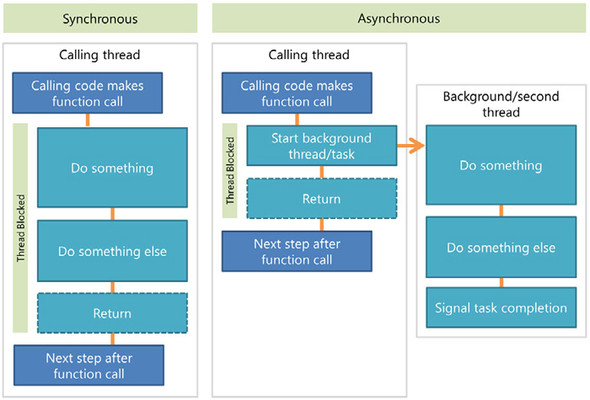
Synchronous functions have been, for a very long time, the norm in programming. In this type of function, the calling code must wait until every instruction is complete before the function will return. It’s just naturally the way code is executed on a processor. In contrast, asynchronous functions are those that return immediately after kicking off some internal process on another thread. Figure 16.1 shows the difference. The benefit of asynchronous code is that the calling code regains control much more quickly. This means, in the case of a UI thread, that it can process UI interaction and other high-priority tasks without being blocked by a long-running process.
Figure 16.1. Synchronous and asynchronous code compared. Notice how the calling thread regains control much earlier in the asynchronous version.
Writing good asynchronous code can be a real hair-puller. Like dealing with thread synchronization in a critical application or learning recursion for the first time, it’s not something many look back on fondly. Writing asynchronous code is also important enough that it isn’t something you can foist onto the new kid on your team like you do all those field validations and other boring code.
All .NET languages and platforms have supported asynchronous calls for quite some time, but for many of us, Silverlight was our first real exposure to asynchronous function calls in .NET. Until Silverlight, asynchronous code was never a platform-imposed requirement. Luckily, Silverlight kept this requirement to a single area: networking. But that single area was enough to make our code complex and to make many turn to a number of helper approaches such as Reactive Extensions (RX) and Tasks from the Task Parallel Library (TPL). Most developers fought it and very few embraced it because, quite simply, it was a pain in the butt to deal with in all but the simplest of scenarios.