concept container in category c#
This is an excerpt from Manning's book Functional Programming in C#: How to write better C# code.
In general, I will omit them because the empty parens () in the first lambda already suggest an empty container (that is, an Option in the None state), whereas the parens with an argument inside, (name), suggest a container with a value inside.
As our list of containers keeps growing, we’ll inevitably hit the problem of combining different containers. If you have a list of Tasks that you want to execute, how can you instead get a single Task that will complete when all the operations have completed? If you have a value of type Task<Validation<T>>, how do you compose it with a function, T → Task<R>, with the least amount of type noise? The second part of this chapter will show you how to deal with these more complex, stacked types.
Given the perspective we’ve been building up in this book, it’s natural to look at Task<T> as just another container of T. If Option<T> can be seen as a box that may contain a T, and Func<T> as a container that can be run to get a T, then Task<T> can be seen as a box within which a T will materialize at some time. So Task<T> can be seen as a construct that adds the effect of asynchrony.
This is an excerpt from Manning's book Dependency Injection in .NET.
Ironically, DI CONTAINERS themselves will tend to be STABLE DEPENDENCIES, because they fit all the criteria. When you decide to base your application on a particular DI CONTAINER, you risk being stuck with this choice for the entire lifetime of the application; that’s yet another reason why you should limit the use of the container to the application’s COMPOSITION ROOT.
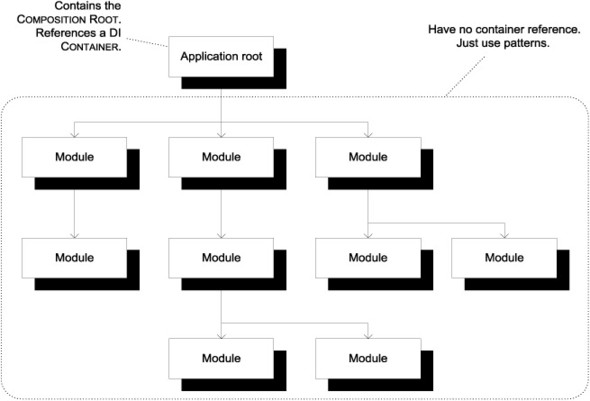
A DI CONTAINER should only be referenced from the COMPOSITION ROOT. All other modules should have no reference to the container.
In figure 3.8 you can see that only the COMPOSITION ROOT has a reference to the DI CONTAINER. The rest of the application has no reference to the container and instead relies on the patterns described in chapter 4. DI CONTAINERS understand those patterns and use them to compose the application’s object graph.
Figure 3.8. Only the COMPOSITION ROOT contained in the application root should have a reference to a DI CONTAINER. All other modules in the application should rely entirely on DI patterns and have no reference to the container.
A COMPOSITION ROOT can be implemented with a DI CONTAINER. This means that you use the container to compose the entire application’s object graph in a single call to the Resolve method. Whenever I talk to developers about doing it like this, I can always tell that it makes them uncomfortable because they’re afraid that it’s terribly inefficient and bad for performance. You don’t have to worry about that because it’s almost never the case, and in the very few situations where it is, there are ways to address the issue.[8]
Because the Application_Start method only runs once, the container is a single instance which is only initialized a single time. When requests come in, this container instance must handle each concurrently—but because all containers are implemented with thread-safe Resolve methods, that’s not an issue.
Loading the configuration into the container is done with a single method call:
container.LoadConfiguration();The LoadConfiguration method loads the XML configuration from listing 3.1 into the container. With the configuration in place, the container can now resolve requests for HomeController, and so on.

This is an excerpt from Manning's book ASP.NET 4.0 in Practice.
Table 4.2. ClientIDMode property values
Value
Description
AutoID The default value for a page. Indicates that the same generation algorithm as in ASP.NET 3.5 SP1 should be used. Static This value forces the control to use the specified ID, ignoring the containers. This value isn’t intended for data-bound controls with multiple children because it will generate duplicated IDs. Predictable Useful in data-bound controls, the ID is generated by concatenating the ClientID value of the parent naming container with the ID value of the control. If the controls generate multiple children, you can specify a ClientIDRowSuffix property. This property specifies text that’s appended at the end of the generated ID. If the property value is left blank, a sequential number is used. Inherit As the name suggests, this value causes the ID that is generated to inherit the behavior of the container. This value is the default for server controls (which continue to work as in ASP.NET 3.5 SP1).
Events are used in custom controls to simplify the code necessary to handle a state. A composite control hides the child controls, so you need to propagate their events outside the container by implementing an event wrapper.
Container controls are a special kind of control that contain other controls. This is an important concept if you consider ASP.NET’s page structure, where a control must have a unique ID. Container controls ensure that the contained controls have a unique ID across the container. As per the ASP.NET control tree, the generated ID (often referred to as ClientID) is composed by concatenating the parent and child IDs, to avoid conflicts across the page.