concept font in category c#

This is an excerpt from Manning's book Windows Store App Development.
The font used is typically a Segoe variant such as Segoe UI. When in doubt, use the fonts and font sizes provided in the default templates. When you need to, you can certainly vary from those fonts: Windows supports beautiful OpenType text, as you’ll see in chapter 8. But keep in mind that doing so should be reserved for times when you want a domain-specific (such as in games or news) or brand-specific look to your application. Figure 2.5 shows two cases. The first, Khan Academy, uses a branded logo but sticks with the default font hierarchy otherwise. The second, Bing News, uses a domain-specific font and layout, eschewing the defaults. It retains a clear type hierarchy, however. Even looking at the image in this figure, you should be able to see which lines are headlines versus body text and where the lead story and its title are located.
The TextBlock supports different fonts and colors, but it’s more lightweight support than the intended use. To really mix and match fonts, colors, and even embedded UI elements, you need to look to the RichTextBlock. This element is also the best one to use to implement multicolumn or more fluid text layout.
One of the most beautiful types of fonts is OpenType. Not only is the normal rendering superior to many other types, but OpenType supports a lot of intelligence about how to format and render alternate capabilities. If you want to automatically convert to small caps, properly format fractions, line up numbers, format for superscript and subscript, or even simulate the classic type styles of historical documents, OpenType makes it possible. We’ll dive into some of the great XAML support for Open-Type features with an eye toward creating beautiful, compelling, and readable text.
Finally, beautiful text is useless without a guarantee that the right fonts are present. One way to ensure that is to acquire embedding rights and embed the fonts in the application. We’ll wrap up the chapter with a look at how to accomplish that.
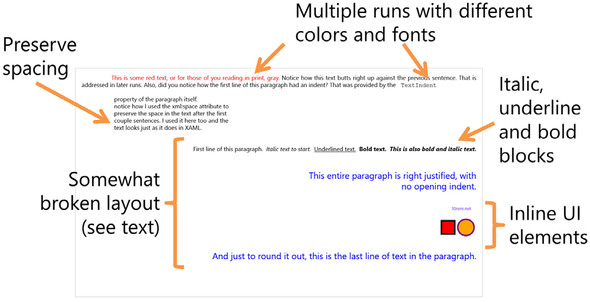
Figure 8.6. A RichTextBlock with paragraphs and UI elements. Notice the mixture of fonts and colors, the inclusion of two vector graphics shapes, and a HyperlinkButton control. See the sidebar “A RichTextBlock layout bug with xml:space” for why I have some of the text labeled as “somewhat broken layout.” That section inside the bracket would normally appear as one continuous set of lines.
The text system always renders text using the specified font, a specified fallback, or a default fallback if unspecified or if the font is unavailable. If the font you’re using in your TextBlock or other control isn’t a standard font, you may want to consider embedding it with your application.