concept image in category c#

This is an excerpt from Manning's book Unity in Action: Multiplatform game development in C# with Unity 5.
Technically, coroutines aren’t asynchronous (asynchronous operations don’t stop the rest of the code from running; think of downloading an image in the script of a website), but through clever use of enumerators, Unity makes coroutines behave similarly to asynchronous functions. The secret sauce in coroutines is the yield keyword; that keyword causes the coroutine to temporarily pause, handing back the program flow and picking up again from that point in the next frame. In this way, coroutines seemingly run in the background of a program, through a repeated cycle of running partway and then returning to the rest of the program.
Online games usually connect to a server specifically intended for that game; for learning purposes, however, we’ll connect to some freely available internet data sources, including both weather data and images we can download. The last section of this chapter does require you to set up a custom web server; that section is optional because of that requirement, although I’ll explain an easy way to do it with open-source software.
First let’s write the code to download an image. You’re going to download some public domain landscape photography (see figure 9.5) to test with. The downloaded image won’t be visible on the billboard yet; I’ll show you a script to display the image in the next section, but before that, let’s get code in place that will retrieve the image.
The code architecture for downloading an image looks much the same as the architecture for downloading data. A new manager module (called ImagesManager) will be in charge of downloaded images to be displayed. Once again, the details of connecting to the internet and sending HTTP requests will be handled in NetworkService, and ImagesManager will call upon NetworkService to download images for it.
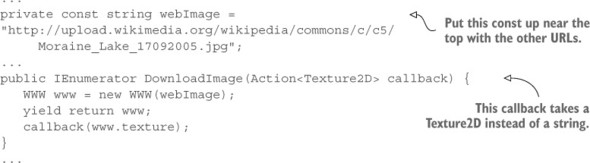
The first addition to code is in NetworkService. The following listing adds image downloading to that script.
The code that downloads an image looks almost identical to the code for downloading data. The primary difference is the type of callback method; note that the callback takes a Texture2D this time instead of a string. That’s because you’re sending back the relevant response: you downloaded a string of data before—now you’re downloading an image. The next listing contains code for the new ImagesManager. Create a new script and enter that code.

This code does two primary things: it calls ImagesManager.GetWebImage() when the device is operated, and it applies the image from the callback function. Textures are applied to materials so you can change the texture in the material that’s on the billboard. Figure 9.6 shows what the billboard will look like after you play the game.

This is an excerpt from Manning's book Fast ASP.NET Websites.
When you first picked up this book and browsed through the table of contents, you may have noticed that a lot of emphasis is placed on front-end techniques (HTML, images, and static files) and not specifically on server-side code optimizations. When I began looking into website performance, I was shocked to discover that the biggest gains I could make were on the front end.
Images are a huge part of the internet today. Whether your website is a glossy e-commerce site, a magazine website, or a small blog, you will have made use of images at some point. Using images on your website can add and enhance the design, but they may add unnecessary bytes depending on the size and quality of the images. As you can see in figure 7.1, if you break down the components of the average website, you’ll find the bulk of the bytes come from the images.
Figure 7.1. Images on a web page make up a significant portion of the total bytes (Source: httparchive.org)

The chart in figure 7.1, produced by httparchive.org and used with permission, shows the average number of bytes per content type on web pages. You can see that the images on an average web page make up a large portion of the overall bytes. In this case, this is almost 63%! Remember that even if you make big gains and reduce the size of scripts, styles, and HTML in a web page, the largest component may be the images. The easiest way to improve page performance, without removing any features, is to optimize the images. You don’t want to waste all the optimization work you’ve done thus far by including bloated images in your website. Leading up to this chapter, you’ve focused your optimization efforts on techniques such as compression, HTTP caching, minifying and bundling, and HTML optimization. But there’s been no direct emphasis on images as of yet. In chapter 3, you learned that compression is highly effective for removing extra bytes in a web page, but it can’t be applied to images because they’re already compressed.
If images are already compressed, how do you go about reducing the size of the files? Well, there are a few techniques you’re going to cover in this chapter that will help you reduce the size of your image files significantly.
In this example, you’re going to make changes to the Surf Store application’s source code. As the web developer on the site, you’ve decided it needs a logo in the header bar. This is a great opportunity to use data URIs because the image is small and this technique will require one less HTTP request to the server. The HTML code in the Master page has been updated to include a small logo, as shown in figure 7.10.
Next, you need to convert the image to a Base64-encoded string. The code in the following listing uses the image URL and creates a Base64-encoded string based on the image that it reads.

The code in listing 7.10 will create an HTML image tag if the image and the browser meet the requirements. If you fire up the application and review the results of the HTML, it will look something like this HTML:
<div class="span3">
<!-- Logo -->
<a href="/" class="logo_bar">
    <img alt="Surf Store Logo"
    src="data:image/png;base64,iVBORw0KGgo
     AAAANSUhEUgAAACg
     AAAAoCAYAAACM/A9
     Zoyj8pW/wfGAx77w
     dBG5WoOXAAAAAASU
     VORK5CYII=" />
    Surf Store Application</a>
</div>