concept ItemsControl in category c#

This is an excerpt from Manning's book Windows Store App Development.
Figure 6.1. The Panel class hierarchy. All panels must ultimately derive from the Panel class (which itself derives from FrameworkElement). Although they are panels, they can’t be used directly; they must be used only within ItemsControl templates such as the GridView and ListView covered in chapter 10.
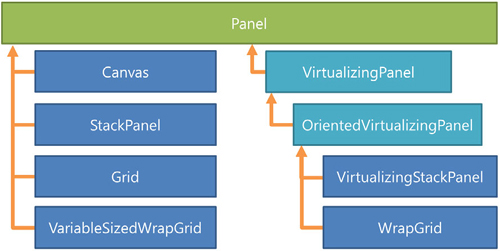
The VirtualizingStackPanel can only be used inside of an ItemsControl such as a ListBox. The WrapGrid and VariableSizedWrapGrid are similarly restricted panels. Because of this, I’ll only briefly cover the VirtualizingStackPanel in this chapter, and I’ll cover the WrapGrid and related panels when I cover the new ListView and GridView controls in chapter 10.
In the previous chapter you created the Ship user control and displayed it on the screen. In this chapter you’ll expand on that work. The primary purpose of this chapter is to show you how I filled out the glue code that makes the socket service and player display from the previous chapters respond to the user input from the next chapter. As part of this, you’ll learn some interesting techniques such as using a bound ItemsControl to display the players on the playing field and spinning up background threads to send test data across the wire.
You’ll start by updating the Player model class. If you want to send meaningful player information across the network, you’ll need more than just a name. Next, you’ll create a collection of Players in the game and expose that via the viewmodel. This collection will be maintained via network events and will be the source of data for an ItemsControl in the UI. The ItemsControl is an interesting use of a UI element because it won’t display a typical list of data but will instead render the ships onscreen at the correct positions.