concept layout in category c#

This is an excerpt from Manning's book Windows Store App Development.
The font used is typically a Segoe variant such as Segoe UI. When in doubt, use the fonts and font sizes provided in the default templates. When you need to, you can certainly vary from those fonts: Windows supports beautiful OpenType text, as you’ll see in chapter 8. But keep in mind that doing so should be reserved for times when you want a domain-specific (such as in games or news) or brand-specific look to your application. Figure 2.5 shows two cases. The first, Khan Academy, uses a branded logo but sticks with the default font hierarchy otherwise. The second, Bing News, uses a domain-specific font and layout, eschewing the defaults. It retains a clear type hierarchy, however. Even looking at the image in this figure, you should be able to see which lines are headlines versus body text and where the lead story and its title are located.
This is an excerpt from Manning's book ASP.NET MVC in Action with MvcContrib, NHibernate, and More.
Listing 1.13. The layout for our view
<%@ Master Language="C#" AutoEventWireup="true" Inherits="System.Web.Mvc.ViewMasterPage" %> <!DOCTYPE html PUBLIC "-//W3C//DTD XHTML 1.0 Transitional//EN" "http://www.w3.org/TR/xhtml1/DTD/xhtml1-transitional.dtd"> <html xmlns="http://www.w3.org/1999/xhtml" > <head runat="server"> <title>Hello!!</title> <asp:ContentPlaceHolder ID="head" runat="server"> </asp:ContentPlaceHolder> </head> <body> <div style="border: solid 4px red"> <asp:ContentPlaceHolder ID="Main" runat="server"> </asp:ContentPlaceHolder> </div> </body> </html>
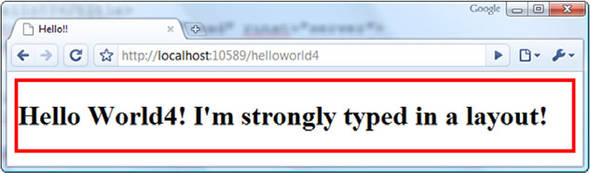
Master pages function the same as in Web Forms for templating, but the server-side postback and ViewState mechanisms are irrelevant. Rendering is the only responsibility of the view and the master page. Listing 1.13 shows our master page, which outlines the structure for the page. The layout declares System.Web.Mvc.ViewMasterPage as the base type.
Listing 1.13. The layout for our view
<%@ Master Language="C#" AutoEventWireup="true" Inherits="System.Web.Mvc.ViewMasterPage" %> <!DOCTYPE html PUBLIC "-//W3C//DTD XHTML 1.0 Transitional//EN" "http://www.w3.org/TR/xhtml1/DTD/xhtml1-transitional.dtd"> <html xmlns="http://www.w3.org/1999/xhtml" > <head runat="server"> <title>Hello!!</title> <asp:ContentPlaceHolder ID="head" runat="server"> </asp:ContentPlaceHolder> </head> <body> <div style="border: solid 4px red"> <asp:ContentPlaceHolder ID="Main" runat="server"> </asp:ContentPlaceHolder> </div> </body> </html>
Layout is a fundamental element of screen design. A layout is known as a master page in ASP.NET, but the term precedes master pages. ASP.NET MVC carries master pages forward as one way to componentize the view necessary for a single screen. Just as with Web Forms, view master pages can be nested. In fact, System.Web.Mvc.ViewMasterPage derives from System.Web.UI.MasterPage; it has all the same capabilities. When using ASP.NET MVC, you use master pages in a manner similar to Web Forms. You specify the screen frame with specific sections marked as placeholders for content specific to the screen. Web applications typically have a common page border and color scheme. The master page is the perfect place to put the common elements as well as style sheets and site-wide JavaScript libraries such as jQuery. Figure 4.3 shows the portion of the screen that is specific to the page shown. The area not shadowed is rendered from the master page.