concept object in category c#

This is an excerpt from Manning's book Code like a Pro in C#.
Because tuples are immutable, they are great at representing a database record. You can mix and match types within a tuple, as long as the declaration matches the assignment. This means that you can make your tuples as lengthy and complicated as you want, as long as you assign the tuple to a set of objects with the same types (and order of types) as your tuple variable. Listing 2.1 has examples of both a valid assignment where the variable and assigned set have the same types (and order) and one where it does not.
>\ ildasm HelloPythagoras.exe /output:HelloPythagoras.il
#H For every flight, get the destination Airport details

This is an excerpt from Manning's book C# in Depth, Fourth Edition.
First, we’ll consider how you create and initialize objects. Delegates have probably evolved the most and in multiple stages. In C# 1, you had to write a separate method for the delegate to refer to and then create the delegate itself in a long-winded way. For example, here’s what you’d write to subscribe a new event handler to a button’s Click event in C# 1:
Listing 4.9. The result of decompiling two simple dynamic operations
using Microsoft.CSharp.RuntimeBinder;
using System;
using System.Runtime.CompilerServices;

class DynamicTypingDecompiled
{
  private static class CallSites                                  #1
  {
    public static CallSite<Func<CallSite, object, int, object>>
       method;
    public static CallSite<Func<CallSite, object, string>>
       conversion;
  }

  static void Main()
  {
    object text = "hello world";
    if (CallSites.method == null)                                 #2
    {
      CSharpArgumentInfo[] argumentInfo = new[]
      {
        CSharpArgumentInfo.Create(
          CSharpArgumentInfoFlags.None, null),
        CSharpArgumentInfo.Create(
          CSharpArgumentInfoFlags.Constant |
            CSharpArgumentInfoFlags.UseCompileTimeType,
          null)
      };
      CallSiteBinder binder =
        Binder.InvokeMember(CSharpBinderFlags.None, "Substring",
          null, typeof(DynamicTypingDecompiled), argumentInfo);
      CallSites.method =
        CallSite<Func<CallSite, object, int, object>>.Create(binder);
    }

    if (CallSites.conversion == null)                             #3
    {
      CallSiteBinder binder =
        Binder.Convert(CSharpBinderFlags.None, typeof(string),
          typeof(DynamicTypingDecompiled));
      CallSites.conversion =
        CallSite<Func<CallSite, object, string>>.Create(binder);
    }
    object result = CallSites.method.Target(                      #4
      CallSites.method, text, 6);                                 #4

    string str =                                                  #5
      CallSites.conversion.Target(CallSites.conversion, result);
  }
}
Just like extension methods, object and collection initializers were largely added to the language as part of the bigger feature of LINQ. And just like extension methods, they’ve been tweaked in C# 6 to make them slightly more powerful.
This is an excerpt from Manning's book Functional Programming in C#: How to write better C# code.
FP differs from OOP by focusing on functions, rather than objects, and on data transformations rather than state mutation.
To represent data, we use data objects: objects that contain data, but no logic. These are also called “anemic” objects, but there’s no negative connotation in the name. In FP (unlike OOP) it’s natural to draw a separation between logic and data:
Essentially, creating an instance of HealthData is equivalent to taking all the possible combinations of the two sets Age and Gender (a Cartesian product), and picking one element. More generally, every time you add a field to an object (or a tuple),you’re creating a Cartesian product and adding a dimension to the space of the possible values of the object, as illustrated in figure 3.3.
This concludes our brief foray into data object design. The main takeaway is that you should model objects in a way that gives you fine control over the range of inputs that your functions will need to handle. Counting the number of possible instances can bring clarity. Once you have control over these simple values, it’s easy to aggregate them into more complex data objects.

Functions everywhere. You may still have a feeling that objects are ultimately more powerful than functions. Surely a logger object should expose methods for related operations such as Debug, Info, and Error? To see that this is not necessarily so, challenge yourself to write a very simple logging mechanism (logging to the console is fine) that doesn’t require any classes or structs. You should still be able to inject a Log value into a consumer class or function, exposing the operations Debug, Info, and Error, like so: void ConsumeLog(Log log) => log.Info("look! no classes!");

This is an excerpt from Manning's book Unity in Action: Multiplatform game development in C# with Unity 5.
All right, you already have an empty script in the project, but you also need an object in the scene to attach the script to. Recall figure 1.1 depicting how a component system works; a script is a component, so it needs to be set as one of the components on an object.
Select GameObject > Create Empty, and a blank GameObject will appear in the Hierarchy list. Now drag the script from the Project view over to the Hierarchy view and drop it on the empty GameObject. As shown in figure 1.15, Unity will highlight valid places to drop the script, and dropping it on the GameObject will attach the script to that object. To verify that the script is attached to the object, select the object and look at the Inspector view. You should see two components listed: the Transform component that’s the basic position/rotation/scale component all objects have and that can’t be removed, and below that, your script.
Triggers are often referred to as volumes rather than objects in order to conceptually differentiate solid objects from objects you can move through.
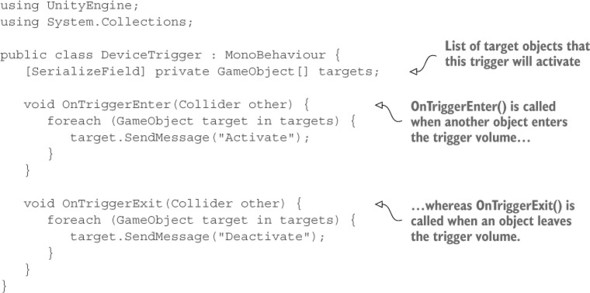
Play the game now and you can freely move through the trigger volume; Unity still registers collisions with the object, but those collisions don’t affect the player’s movement anymore. To react to the collisions, we need to write code. Specifically, we want this trigger to control the door. Create a new script called DeviceTrigger (see the following listing).
This listing defines an array of target objects for the trigger; even though it’ll only be a list of one most of the time, it’s possible to have multiple devices controlled by a single trigger. Loop through the array of targets to send a message to all the targets. This loop happens inside the OnTriggerEnter() and OnTriggerExit() methods. These functions are called once when another object first enters and exits the trigger (as opposed to being called over and over while the object is inside the trigger volume).
In the previous section, devices were operated by keyboard input from the player, but that’s not the only way players can interact with items in the level. Another very straightforward approach is to respond to collisions with the player. Unity handles most of that for you, by having collision detection and physics built into the game engine. Unity will detect collisions for you, but you still need to program the object to respond.

This is an excerpt from Manning's book C# in Depth.
In C# 3, the assignment to worksheet would fail without a cast, because the type of the ActiveSheet property is represented as object. When using the embedded PIA feature, the type of ActiveSheet becomes dynamic, which leads to an entirely different feature.
Listing 12.4. An implementation of IQueryProvider that uses FakeQuery
class FakeQueryProvider : IQueryProvider { public IQueryable<T> CreateQuery<T>(Expression expression) { Logger.Log(this, expression); return new FakeQuery<T>(this, expression); } public IQueryable CreateQuery(Expression expression) { Type queryType = typeof(FakeQuery<>).MakeGenericType(expression.Type); object[] constructorArgs = new object[] { this, expression }; return (IQueryable)Activator.CreateInstance(queryType, constructorArgs); } public T Execute<T>(Expression expression) { Logger.Log(this, expression); return default(T); } public object Execute(Expression expression) { Logger.Log(this, expression); return null; } }
The idea behind Parallel LINQ is that you should be able to take a LINQ to Objects query that’s taking a long time and make it run faster by using multiple threads to take advantage of multiple cores—with as few changes to the query as possible. As with anything to do with concurrency, it’s not quite as simple as that, but you may be surprised at what can be achieved. Of course, we’re still trying to think bigger than individual LINQ technologies—we’re thinking about the different models of interaction involved, rather than the precise details. But if you’re interested in concurrency, I heartily recommend that you dive into Parallel Extensions—it’s one of the most promising approaches to parallelism that I’ve come across recently.

This is an excerpt from Manning's book Dependency Injection in .NET.
To create the Salutation class, you pass in the Mock instance of IMessageWriter. Because writerMock is an instance of Mock<IMessageWriter>, the Object property is a dynamically created instance of IMessageWriter. Injecting the required DEPENDENCY through the constructor is called CONSTRUCTOR INJECTION.
public interface IInstanceProvider
{
    object GetInstance(InstanceContext instanceContext);
    object GetInstance(InstanceContext instanceContext, Message message);
    void ReleaseInstance(InstanceContext instanceContext, object instance);
}
Figure 8.8. When a COMPOSER is asked to resolve an object, it gathers all of the requested object’s DEPENDENCIES. In this case, the requested object has three DEPENDENCIES, and two of them are disposable. One of these disposable DEPENDENCIES is shared with other consumers, so it’s reused, whereas the other DEPENDENCIES are instantiated on the spot. When the request to release the object comes in, the COMPOSER disposes of the private disposable DEPENDENCY and lets the non-disposable DEPENDENCY and the object itself go out of scope. The only interaction with the shared DEPENDENCY is that it’s injected into the requested object; but because it’s shared, it isn’t disposed of (yet).
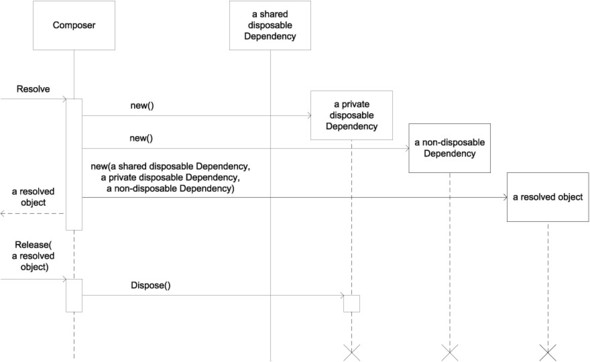
On the other hand, the PER GRAPH and TRANSIENT lifestyles don’t keep track of the objects that StructureMap creates. As you saw in listings 8.7 and 8.8, object instances are created and returned with no internal tracking. This has some advantages and disadvantages.
Because StructureMap doesn’t hold on to instances unnecessarily, the risk of inadvertent memory leaks is much smaller. With a container like Castle Windsor, memory leaks are guaranteed if we forget to call the Release method for all resolved object graphs. This isn’t the case with StructureMap because objects will automatically be garbage-collected as they go out of scope.

This is an excerpt from Manning's book ASP.NET 4.0 in Practice.
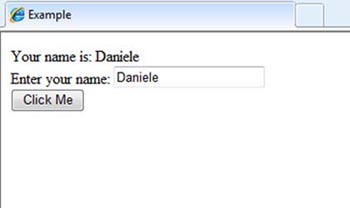
Sub HandleSubmit(sender as Object, e as EventArgs)
    ResponseText.Text = "Your name is: " & Name.Text
End Sub
ASP.NET is part of .NET Framework, so it takes full advantage of the object-oriented programming (OOP) capabilities offered by the framework itself. OOP lets you think in terms of objects and program their interactions. Because we as humans think in terms of objects in real life, OOP is one of the easiest programming paradigms to understand. When you create a web page using ASP.NET, you’re creating an object with behaviors (the page’s events), commands (methods), and state (objects instantiated).
Throughout this book, we’ve used Entity Framework to access data stored in a database. Although it’s recommended, Entity Framework isn’t the only choice for retrieving data. A good alternative is to use ADO.NET. Entity Framework itself leverages this component. ADO.NET is easy to use, but you have to manually handle the connection to the database, the command to execute queries, and the transaction to execute multiple update commands. Finally, data isn’t returned as objects but as a generic-purpose container. All these features make ADO.NET simple but extremely code intensive. That’s why Entity Framework is the recommended approach.

This is an excerpt from Manning's book ASP.NET MVC 2 in Action.
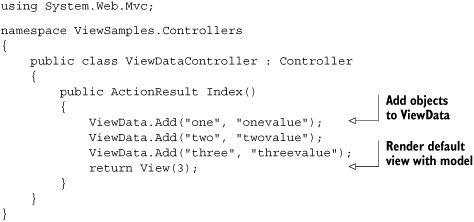
We want to access this data on the view (so that we can present the entry to the user). To do this, we utilize a feature called ViewData. This is a dictionary object (which means you put objects in a data structure that are referenced by a key).
Once the CustomerSummary objects have been created, the controller passes them into the View() method, which transferring the objects to the view
. There’s a special mechanism for sharing the model in ASP.NET MVC 2, and we’ll cover it next.
Listing 10.8. The ParamBuilder object
public class ParamBuilder : ExplicitFacadeDictionary<string, object> { private readonly IDictionary<string, object> _params = new Dictionary<string, object>(); protected override IDictionary<string, object> Wrapped { get { return _params; } } public static implicit operator RouteValueDictionary( ParamBuilder paramBuilder) { return new RouteValueDictionary(paramBuilder); } public ParamBuilder Username(string value) { _params.Add("username", value); return this; } }

This is an excerpt from Manning's book DSLs in Boo: Domain-Specific Languages in .NET.
StructureMap (http://structuremap.sourceforge.net/) is an Inversion of Control (IoC) container, probably the oldest on .NET. An Inversion of Control container is a tool that helps you manage dependencies and lifetimes of objects in your application. You can think about them as very smart factories, although that doesn’t do them justice. You can read more about IoC containers here: http://www.martinfowler.com/articles/injection.html.
Think of a class as a box that contains variables and methods. You can create objects (other boxes) based on that class. Each object (box) gets its own independent copy of the variables, whereas all of the objects share the methods. Creating an object from a class is called instantiation, and the object that’s created is often called an instance of its class. We will use both terms interchangeably.
An element of one of the objects can be accessed by using the object name, followed by a period, followed by the element name:
Account1.Deposit(400.0)
Account1.Withdraw(50.0)
print Account1.Balance               # prints 350
print Account2.Balance               # prints 0
The constructor method is special. It is automatically called when a new object is created. This is where the initialization of the object occurs.
This is an excerpt from Manning's book Real-World Functional Programming with Examples in F# and C#.
In C#, we can explicitly mark a field as immutable using the readonly keyword. This means that we can’t change the value of the field, but we could still modify the target object if the field is a reference to a class that’s not immutable. When creating a truly immutable class, we need to make sure that all fields are marked as readonly and that the types of these fields are primitive types, immutable value types, or other immutable classes.
According to these conditions, our GameCharacter class is immutable. All its fields are marked using the readonly modifier ❶. int is an immutable primitive type and Point is an immutable value type. When a field is read-only, it can be set only when creating the object, so we can set the health and location of the character only in the constructor ❷. This means we can’t modify the state of the object once it’s initialized. So, what can we do when an operation needs to modify the state of the game character?
> Option.map (fun dt -> dt.Year) (Some(DateTime.Now));;
error FS0072: Lookup on object of indeterminate type.

> Option.map (fun (dt:DateTime) -> dt.Year) (Some(DateTime.Now));;
val it : int option = Some(2008)
The LISP code is quite readable and a human can easily understand what it means. The code doesn’t reveal any technical details. We can’t tell whether we’re creating an object that will represent the animation as a tree-like data structure that we can process or whether we’re creating a function that knows how to draw the animation. This is the nice thing about declarative programming. When we use the library, the technical details are abstracted away from us.
Figure 15.5. Two circles from figure 15.4 moving from the left to the right (shadows are added, so you can see how objects move)
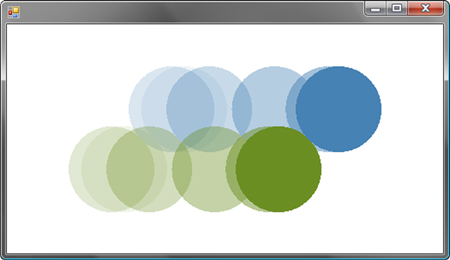
The second option that we can use for creating composable libraries is to build some function or an object that represents the declarative specification and that can execute it. This limits the operations we can do with the composed object, because the operation is an intrinsic part of every primitive. In fact, it’s often used when we need to perform a single operation, such as drawing an animation frame or calculating trades of a financial contract. We can easily add new primitives and implement new ways for composing the primitives. In functional languages, libraries written in this ways are called combinator libraries.

This is an excerpt from Manning's book ASP.NET MVC in Action with MvcContrib, NHibernate, and More.
Notice how simple the controller is. There is not much generated code to wade through, and each action method returns an object derived from ActionResult. This controller derives from System.Web.Mvc.Controller
. You’ll probably find this base class adequate, but there are others to choose from in the MvcContrib project, and as time goes on, the community will likely make many more available. It also may be a good practice to create your own layer supertype to use in your application.
Inside each action method, you’ll typically put some objects into a dictionary called ViewData
. This dictionary will be passed to the view upon rendering. The controller can provide any objects the view requires in this ViewData dictionary; the primary object the view will render should be assigned to the ViewData’s Model property. This can be done automatically by passing the object into the controller’s View() method. In the starter project, the objects are simple strings, but in your application, you’ll use more complex objects like those in figure 1.5.
ASP.NET MVC Views take back control of HTML markup. Although it is possible to use the rendering capabilities of some existing controls, the guidance with MVC Views is to lay out the HTML by hand and use server delimiters to make parts of the view dynamic. MVC Views leverage the Web Forms rendering engine but jettison the postback logic, ViewState, and control hierarchy. An MVC view renders top to bottom and then goes away. It also has much less responsibility than a Web Form. The view accepts objects in its ViewData dictionary and transforms those objects into a response suitable for the web. That is it. No decision logic, no permissions, no database access, no web service calls, just rendering. MVC views do not use a code-behind file, but you can retain a code-behind while migrating from Web Forms if necessary. This ability comes from the fact that System.Web.Mvc.ViewPage derives from System.Web.UI.Page.
Listing 4.5 is a simple master page, and we see it rendering objects in ViewData the same way as with a regular view. All markup is the same. The only difference is that we use the ContentPlaceHolder control to designate where the view should be placed. In a master page, you can use any of the normal or custom view helpers you may have at your disposal.
Listing 4.5. A layout using WebFormViewEngine
<%@ Master Language="C#" AutoEventWireup="true" Inherits="System.Web.Mvc.ViewMasterPage" %> <%@ Import Namespace="System.Web.Mvc.Html"%> <!DOCTYPE html PUBLIC "-//W3C//DTD XHTML 1.0 Strict//EN" "http://www.w3.org/ TR/xhtml1/DTD/xhtml1-strict.dtd"> <html xmlns="http://www.w3.org/1999/xhtml"> <head runat="server"> <meta http-equiv="Content-Type" content="text/html; charset=iso-8859-1" /> <title><%= Html.Encode(ViewData ["Title"])%></title> <link href="../../Content/Site.css" rel="stylesheet" type="text/css" /> </head> <body> <div class="page"> <div id="header"> <div id="title"> <h1>My Second Sample MVC Application</h1> </div> <div id="menucontainer"> <ul id="menu"> <li><%=Html.ActionLink("Home", "Index", "Home")%></li> <li><%=Html.ActionLink("About Us","About","Home")%> </li> </ul> </div> </div> <div id="main"> <asp:ContentPlaceHolder ID="MainContent" runat="server" /> <div id="footer"> My Sample MVC Application © Copyright 2008 </div> </div> </div> </body> </html>
ViewData is the bag of state (sometimes referred to as a property bag) that is passed to a view. A view should get all the information it needs from ViewData, which is implemented as a dictionary. It contains key/value pairs as well as some special properties, like Model. The controller is responsible for filling the ViewData dictionary with objects, but action filters can add to the dictionary as well. In fact, ViewData is a property on System.Web.Mvc.ControllerBase, so anywhere you can access the controller you can access ViewData. As the view is executing, it pulls objects from ViewData during the rendering process.
In chapter 1, you saw a simple use of ViewData, so we won’t repeat that here. In any nontrivial application, your view will be composed of a master page, a main view, and many partials—possibly nested partials. It will help to know how ViewData is segmented among the views. For instance, it is important to consider a partial view that might be used by several other views. If the partial view needs an object in ViewData, whose responsibility is it to put the object into the dictionary? The following is an example that illustrates just what happens in this complex scenario. Examine the source of the controller in listing 4.6, the Index.aspx view in listing 4.7, Partial.aspx in listing 4.8 and NestedPartial.aspx in listing 4.9.

This is an excerpt from Manning's book LINQ in Action.
Once you are ready, let’s move on to LINQ to XML and LINQ to SQL. We’ll spend some time with these two other flavors of LINQ so you can get an idea of what they taste like. We will get back to LINQ to Objects in detail in part 2 of this book.
Now that we’ve learned about the LINQ to XML API and seen how to query and transform XML using LINQ to XML, it’s time to explore some common scenarios that you may come across when working with LINQ to XML. These include building objects from XML, creating XML from a set of objects, creating XML with data from a database, filtering and mixing data from a database with XML data, updating a database with data read from an XML file, and transforming text files into XML using LINQ to XML. As we explore these common scenarios, you’ll witness the powerful capabilities offered by LINQ to XML.
Our goal in the section is to create a collection of objects that contain the data within the XML document shown in listing 11.1 using the capabilities offered by LINQ to XML.
Listing 11.1. Book data in XML format
<?xml version="1.0" encoding="utf-8" ?> <books> <book> <title>LINQ in Action</title> <authors> <author> <firstName>Fabrice</firstName> <lastName>Marguerie</lastName> <website>http://linqinaction.net/</website> </author> <author> <firstName>Steve</firstName> <lastName>Eichert</lastName> <webSite>http://iqueryable.com</webSite> </author> <author> <firstName>Jim</firstName> <lastName>Wooley</lastName> <webSite> http://devauthority.com/blogs/jwooley/</webSite> </author> </authors> <subject> <name>LINQ</name> <description>LINQ shall rule the world</description> </subject> <publisher>Manning</publisher> <publicationDate>January 15, 2008</publicationDate> <price>44.99</price> <isbn>1933988169</isbn> <notes>Great book!</notes> <summary>LINQ in Action is great!</summary> <reviews> <review> <user>Steve Eichert</user> <rating>5</rating> <comments>What can I say, I'm biased!</comments> </review> </reviews> </book> <book> <title>Patterns of Enterprise Application Architecture</title> ... </book> </books>As we can see, the XML contains a set of information about books. If we move our attention to the classes shown in figure 11.1, we can see that we have a series of objects that correlate to the data contained in the XML file in listing 11.1.
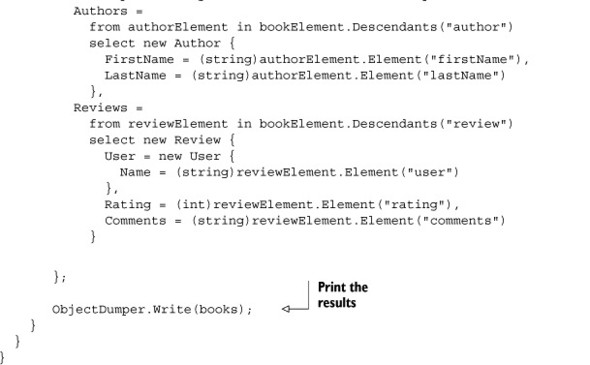
With LINQ to XML we can transform our XML data into alternate data formats quickly and easily. By combining query expressions with the new object initializer syntax offered by C# 3.0, we can build objects from XML using familiar LINQ language constructs. As you’ll see throughout the remainder of this chapter, LINQ to XML provides a simple and consistent API for transforming data to and from XML.
Now that we’ve covered how to create objects from XML, let’s look at how we can handle our next common scenario, creating XML from objects using VB9’s XML literals.
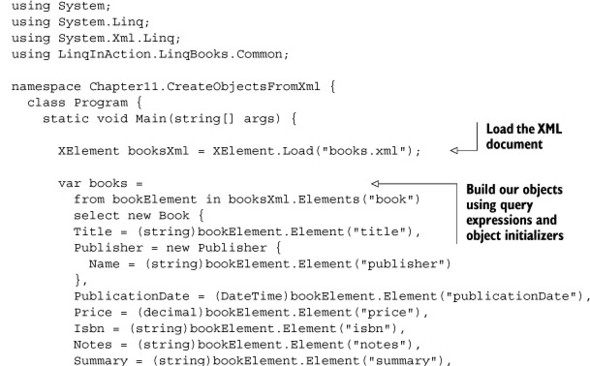
As we already mentioned, the first scenario that we’re going to cover is building objects from XML. Before we look at the specifics of how we go about building objects from XML with LINQ to XML, let’s talk briefly about why we would want to do it in the first place. When we build applications today, we do so using objects. Objects allow us to encapsulate the logic and data that exist in our software. Since XML is a data format and not a programming language, we need to read the data out of the XML files if we want to use it in our applications. To ensure our application doesn’t get too tightly coupled to the format of an XML file, we’ll convert the data within the XML file into a set of objects using the powerful capabilities offered by LINQ to XML.
As we’ll see, LINQ to XML allows us to convert XML into objects using the same transformation techniques we learned about in the previous chapter. No matter what format we need to transform our XML into, LINQ to XML is up to the challenge. With that said, let’s get started by examining our goal for this scenario.

This is an excerpt from Manning's book ASP.NET AJAX in Action.
The XMLHttpRequest object is at the heart of Ajax programming because it enables JavaScript to make requests to the server and process the responses. It was delivered in the form of an ActiveX object when released in Internet Explorer 5, and it’s supported in most current browsers. Other browsers (such as Safari, Opera, Firefox, and Mozilla) deliver the same functionality in the form of a native JavaScript object. Ironically, Internet Explorer 7 now implements the object in native JavaScript as well, although differences between browsers remain. The fact that there are different implementations of the object based on browsers and their versions requires you to write browser-sensitive code when instantiating it from script. Listing 1.1 uses a technique called object detection to determine which XMLHttpRequest object is available.
The object literal {} represents a sort of empty object. We’ll discuss the various JavaScript literals in detail in section 3.1.7. Once you’ve created an object, you can take advantage of an important characteristic of the language: You can expand objects at any time by adding new properties to them. This is different from what happens in class-based languages such as C# and VB.NET, where the structure of an object is specified in a class and instances can’t be modified at runtime.
To add a property to an object, you need to access it and assign a value. You can do this anywhere in the code, at any time. If the property doesn’t exist, it’s automatically created at runtime. The following code shows how to add a property called title to the book object you created before:
book.title = 'ASP.NET AJAX In Action';As we said previously, objects in JavaScript are collections of name and value pairs. To demonstrate, you can add a property to an object using an indexed notation, as if you were accessing a collection such as an array or a hash table. The following is another way to add a title property to the book object:
book['title'] = 'ASP.NET AJAX In Action';You can loop over an object’s properties by using the for-in construct. This construct is similar to the foreach construct of C#. For example, the following code displays the name and values of the properties of the book object:
for(var property in book) {
    alert('Name: ' + property + ', Value: ' + book[property]);
}
In this code snippet, the property variable holds, at each iteration, a string with the name of a property of the object. As result, book[property] returns the value of that property. The name and value of each property are displayed using the JavaScript’s alert function, which displays a string in a message box on screen.
Figure 3.3. Inheritance in JavaScript is prototype-based. An object inherits all the properties defined in the prototype of the parent objects.
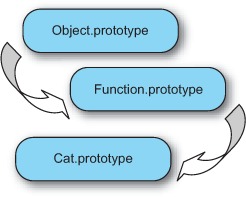
In JavaScript, implementing inheritance is simple; but it’s done differently than in class-based languages, where the parent class can be specified in the class declaration. For example, one approach is to assign the object returned by the parent constructor to the prototype object of the child constructor. Without going into too much detail, the code in listing 3.7 shows how you can define a Cat object that inherits all the properties from a Pet object using prototype-based inheritance.
JavaScript is a true object-oriented language. The notion of an object in JavaScript is different from that in object-oriented languages such as C# and VB.NET. Objects in JavaScript aren’t instances of classes, because JavaScript doesn’t support the notion of a class. Instead, you obtain the structure—or template—of an object by manipulating a special, native object called the prototype, which you’ll encounter in section 3.1.5.
A JavaScript object is nothing more than a collection of name and value pairs called properties. Usually, this kind of structure is also called a dictionary or an associative array. JavaScript provides also an array data type, which is a collection of values of different types. A major role in the language is played by functions, which are objects like dictionaries or arrays. Functions are probably the most powerful objects provided by JavaScript; they’re responsible for its great power and flexibility. In the following sections, we’ll do an overview of objects, arrays, and functions, which are the foundations of the JavaScript language.