concept RichTextBlock in category c#

This is an excerpt from Manning's book Windows Store App Development.
The RichTextBlock is the main way to display read-only rich text in XAML apps. It’s similar to a TextBlock but adds support for paragraphs and inline UI elements within the control. As mentioned earlier, the RichTextBlock can’t work directly with RTF; you’ll need the RichEditBox for that.
What the RichTextBlock can do well is support combining different types of content in the same element. Unlike the TextBlock, it doesn’t use inlines but instead uses items that inherit from Block. Block is conceptually similar to Inline and related by its common inheritance from TextElement but is optimized for use with rich text and UI elements. A Block has support for the line-stacking and text-alignment properties previously covered; so in some ways, it’s almost a mini TextBlock itself. In addition, however, it adds the ability to include arbitrary UI elements like hyperlinks, buttons, and more.
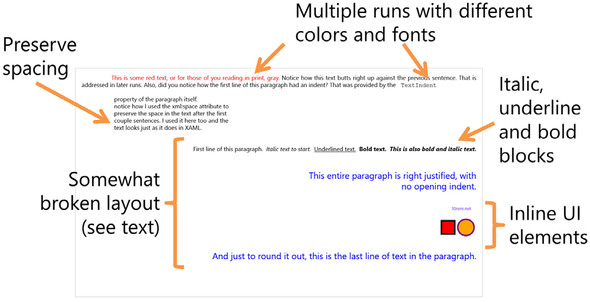
Figure 8.6 shows a single RichTextBlock taking up the entire page. Inside that Block, there are numerous examples of different fonts and colors, text formatting and positioning, inline UI elements and more.
Figure 8.6. A RichTextBlock with paragraphs and UI elements. Notice the mixture of fonts and colors, the inclusion of two vector graphics shapes, and a HyperlinkButton control. See the sidebar “A RichTextBlock layout bug with xml:space” for why I have some of the text labeled as “somewhat broken layout.” That section inside the bracket would normally appear as one continuous set of lines.
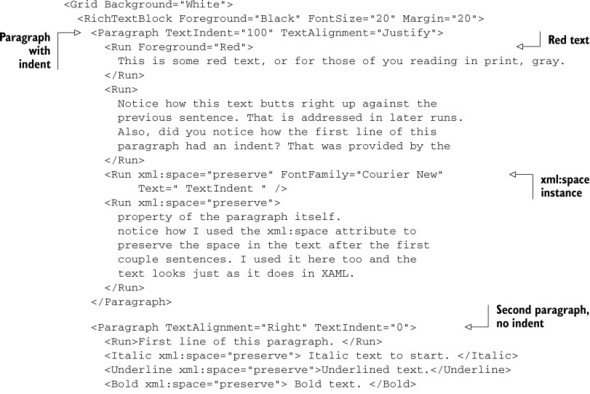
The following listing shows how to create the RichTextBlock in figure 8.6, including loading a StackPanel with two vector graphics shapes right into the RichText-Block.
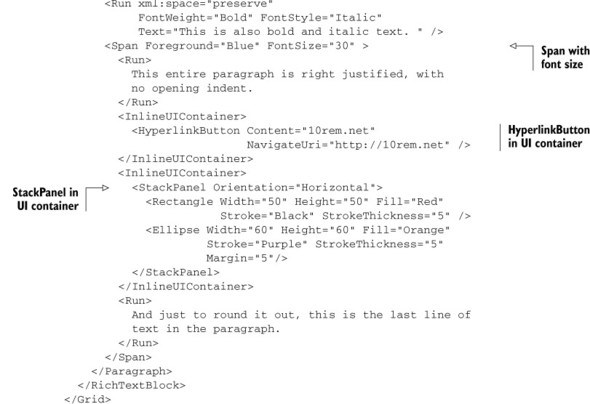
This listing shows all the major features of the RichTextBlock and the Block and Span elements it can contain. The RichTextBlock itself can contain only Block-derived elements, typically Paragraphs. A Paragraph can, however, contain all the same inlines that a TextBlock can contain. Therefore, everything you learned earlier in this chapter can be applied here. In addition, the Paragraph can also hold a new element called the InlineUIContainer.
The InlineUIContainer enables you to put XAML controls and elements inside the RichTextBlock text flow. Normally, this would be used to add in hyperlinks and images, but it could be really anything. Each InlineUIContainer can contain only a single element. If you have more than one element, and you want the elements to flow with the rest of the text, put them in different containers. If you want to keep a set of elements grouped in a specific visual layout, put them in a Grid, StackPanel, or other panel, and make that panel the child of the InlineUIContainer.