concept section in category c#

This is an excerpt from Manning's book C# in Depth, Fourth Edition.
But different workloads have different performance demands. As you’ll see in section 1.2, C# is now in use across a surprising variety of platforms, including gaming and microservices, both of which can have difficult performance requirements.
When you wait for an asynchronous operation, you’re saying “I’ve gone as far as I can go for now. Keep going when the operation has completed.” But if you’re not going to block the thread, what can you do? Very simply, you can return right then and there. You’ll continue asynchronously yourself. And if you want your caller to know when your asynchronous method has completed, you’ll pass a token back to the caller, which they can block on if they want or (more likely) use with another continuation. Often, you’ll end up with a whole stack of asynchronous methods calling each other; it’s almost as if you go into an “async mode” for a section of code. Nothing in the language states that it has to be done that way, but the fact that the same code that consumes asynchronous operations also behaves as an asynchronous operation certainly encourages it.
For the moment, you can ignore the ConfigureAwait call within ReadByteAsync. You’ll come back to that in section 5.10, when you look at how to use async/await effectively. The rest of the code is straightforward, and all of it could be written without ValueTask<TResult>; it’d just be much less efficient.
In this case, most invocations of our ReadByteAsync method wouldn’t even use the await operator because you’d still have buffered data to return, but it’d be equally useful if you were awaiting another value that’s usually complete immediately. As I explained in section 5.6.2, when you await an operation that’s already complete, the execution continues synchronously, which means you don’t need to schedule a continuation and can avoid object allocations.

This is an excerpt from Manning's book C# in Depth.
There are two important forms of the spec—the international standard from ECMA, and the Microsoft specification. As I write this, the ECMA specification (ECMA-334 and ISO/IEC 23270) only covers C# 2, despite being the fourth edition. It’s unclear whether or when this will be updated, but the Microsoft version is complete and freely available. This book’s website has links to all the available versions of both specification flavors (http://mng.bz/8s38), and Visual Studio ships with a copy too.[5] When I refer to sections of the specification within this book, I’ll use numbering from the Microsoft C# 5 specification, even when I’m talking about earlier versions of the language. I strongly recommend that you download this version and have it on hand whenever you find yourself eager to check out a weird corner case.
A lot of detailed terminology is involved in generics. I’ve included it for reference—and because occasionally it makes it easier to talk about topics precisely. It could also be useful if you ever need to consult the language specification, but you’re unlikely to need this terminology in day-to-day life. Just grin and bear it for the moment. A lot of this terminology is defined in section 4.4 of the C# 5 specification (“Constructed Types”)—look there for further details.
This is an excerpt from Manning's book Dependency Injection in .NET.
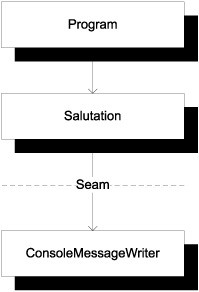
Figure 1.12. The Hello DI application from section 1.2 contains a SEAM between the Salutation and ConsoleMessageWriter classes because the Salutation class only writes through the ABSTRACTION of the IMessageWriter interface.
In section 1.2.1, you didn’t use late binding because you explicitly created a new instance of IMessageWriter by hard-coding creation of a new ConsoleMessageWriter instance. However, you can introduce late binding by changing only a single piece of the code. You only need to change this line of code:
Sometimes we can’t use a generic API because we don’t know the appropriate type at design time. All we have is a Type instance, but we’d still like to get an instance of that type. You saw an example of that in section 7.2, where we discussed ASP.NET MVC’s DefaultControllerFactory class. The relevant method is this one:
The LifecycleIs method takes an instance of ILifecycle, so you can pass in any class that implements that interface. As you’ll see in section 11.2.2, this is also how we configure a component with a custom lifetime.
All built-in StructureMap lifestyles have a corresponding ILifecycle implementation except the PER GRAPH lifestyle, which is the default. This lifestyle is normally implicitly configured by omitting an explicit lifestyle. All the configurations you saw in section 11.1 used the PER GRAPH lifestyle.
When we need to define components in XML, we’ll also want to be able to configure their lifestyles in the same place. This is easily done as part of the XML schema introduced in section 11.1.2. You can use the optional Scope attribute to declare the lifestyle:
<DefaultInstance PluginType="Ploeh.Samples.MenuModel.IIngredient,
                 Ploeh.Samples.MenuModel"
                 PluggedType="Ploeh.Samples.MenuModel.Steak,
                  Ploeh.Samples.MenuModel"
                 Scope="Singleton" />
Compared to the example in section 11.1.2, the only difference is the added Scope attribute that configures the instance as a SINGLETON. When you previously omitted the Scope attribute, StructureMap’s PER GRAPH default was automatically used.

This is an excerpt from Manning's book ASP.NET AJAX in Action.
Application model— When you enable the Microsoft Ajax Library in a web page, an Application object is created at runtime. In section 2.2, you’ll discover that this object takes care of managing the client lifecycle of a web page, in a manner similar to what the Page object does on the server side. The Application object hosts all the client components instantiated in the web page and is responsible for disposing them when the page is unloaded by the browser.
The Toolkit’s extenders expose additional properties to configure the client component that provides the Ajax functionality. These properties are exposed by the custom ExtenderControlBase class, which is the class from which all Toolkit extenders derive. This class is part of the Toolkit API for building Ajax-enabled controls, which we’ll discuss in section 10.2. Now, let’s examine the additional properties available in the Ajax Control Toolkit’s extenders.
The idea behind a control like the AutoCompleteExtender, which we discussed in section 10.1.1, is to provide the user with real-time feedback. As the user enters text in a text box, data is retrieved from the server and presented to them in a pop-up displayed under the text file. Ajax makes it possible to implement this pattern by sending asynchronous requests to the web server in the background.
Many variations on the auto-complete pattern are possible. For example, you can filter the content of a GridView in real time based on the filter expression the user is typing. You can also perform a live search on the web page and highlight the matching words as soon as the user types them. We presented an example of such functionality in section 6.5, where you built the Live GridView Filter. Figure 10.8 shows this control.