concept StringWriter in category c#

This is an excerpt from Manning's book Code like a Pro in C#.
By instantiating our instance of type
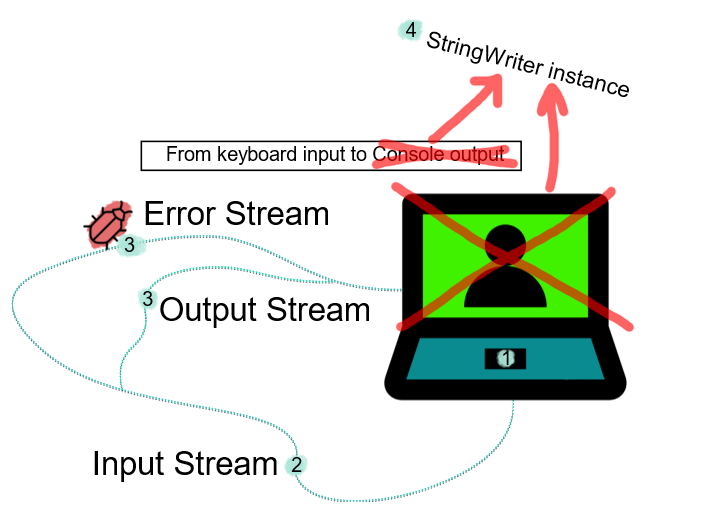
StringWriter(a data stream dealing with strings) and hanging onto a reference to that variable while using it as theConsole’s output stream, we can grab the history data pretty easily. Instead of writing to some intangible output stream, theConsole.WriteLinemethod writes to ourStringWriter. Take note that some programming languages such as Java distinguish between input and output streams on a type level. C# does not do this. You can use anyStreamderived class as an input or output stream.Figure 9.5 When redirecting Console output to a StringWriter instance, the Output and Error streams write to the StringWriter instance instead of the regular Console output. The lifecycle from Figure 9.4 turns into: First, keyboard input (1) is sent to the Input Stream (2). Then some processing is done inside the application (this can be anything you want). Following processing, if an exception was thrown, the error is written to the Error Stream (3). If no exception, information is written to the Output Stream (3). Finally, the Error and Output streams are written to our StringWriter instance (4).
The
Streambase class is the foundation for all data streams.Streamis anabstractclass and the base class for many derived classes (such asStringWriter) that deal with a sequence of bytes. AStringWriteris a stream that deals with a sequence of bytes and exposes functionalities based on those bytes representing strings (and because, under the hood, a string is an array of characters: therefore characters). Since you typically write continuously to a stream, which makes it hard for the garbage collection to know when it can collect on a stream, theStreamclass implements theIDisposableinterface. As all derived classes fromStreamimplement theIDisposableinterface, we need to clean up the instantiatedStreamonce we are done with it or risk a memory leak.