concept transformer in category c#

This is an excerpt from Manning's book ASP.NET AJAX in Action.
The bridge file supports the ability to transform or convert the response from the service before it reaches the caller. A few built-in transformers make this possible, including one that maps elements and tags in the response to an object. Listing 5.20 illustrates how adding a transformer to the bridge file can alter the response you get in the browser from XML to an object that’s friendlier and easier to work with.
So far, we’ve presented the evaluation of a binding as a process that synchronizes the values of two properties. But the value of the source property can be transformed to obtain the value of the target property. This is done with special functions called transformers. A transformer is a function that takes an input value and uses it to produce the output value. As you’ll see, bindings can use transformers to obtain the actual value that will be bound to the target property.
In general, a transformer can behave differently based on the value of two different parameters:

This is an excerpt from Manning's book ASP.Net 2.0 Web Parts in Action: Building Dynamic Web Portals.
Transformers provide us with a way to climb out of this hole. Using transformers, you can connect web parts that are incompatible. You can use a transformer to write code that takes data from the accounting part and exposes it as the data type that is expected by the charting web part.
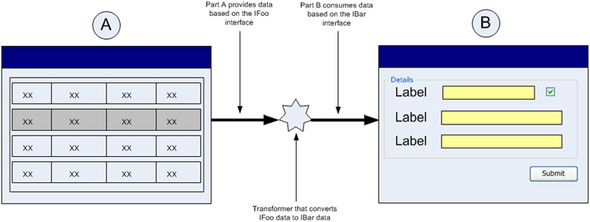
Figure 3.9 shows an example of how transformers act as a bridge for connection data that is incompatible. In the diagram we see that data is received form the provider web part (A) and transformed into different data type that is expected by the consumer web part (B).
Figure 3.9. A transformer is a control that sits in the middle of a connection and transforms connection data from one type into another type.
Let’s take a further look at what makes up a transformer, in order to learn more about how it manages the transformations. We’ll also discover how to create our own transformers. Creating a custom transformer is something that only needs to be done when a very high level of specificity is required, because the portal framework provides us with some generic transformers that come as a standard part of ASP.NET 2.0. However, by creating our own transformer we will see exactly what is required to perform a conversion between two different types of data.
TransformerTypeCollection transformers =
       WebPartManager1.AvailableTransformers;

foreach (Type type in transformers) {
       Trace.Warn(type.Name);
}
Figure 3.11 shows the listing of transformers that the code above created.