concept URL in category c#

This is an excerpt from Manning's book ASP.NET MVC 2 in Action.
The URL still says “Sign” even though we rendered the ThankYou view. This is because we didn’t redirect to a success page; we simply rendered one. This causes the next unfortunate aspect of the site...
Routing is all about the URL and how we use it as an external input to the applications we build. The URL has led a short but troubled life, and the HTTP URL is currently being tragically misused by current web technologies. As the web began to change from being a collection of hyperlinked static documents into dynamically created pages and applications, the URL has been kidnapped by web technologies and undergone terrible changes, so that we now see file extensions like .aspx and .php mapping to physical files in public URLs. The URL is in trouble, and as the web becomes more dynamic, we, as software developers, can rescue it and bring back the simple, logical, readable, and beautiful resource locator that it was meant to be.
Rescuing the URL means changing the way we write web applications. Although routing isn’t core to all implementations of the MVC pattern, it’s often treated as a convenient way to add an extra level of separation between external inputs and the controllers and actions that make up an application. The code required to implement routing using the ASP.NET MVC Framework is reasonably trivial, but the thought behind designing a schema of URLs for an application can raise many issues.
Table 16.3. The URL schema for sample widget store
URL
Description
1 http://example.com/ Home page; redirects to the widget catalog list 2 http://example.com/privacy Displays a static page containing site privacy policy 3 http://example.com/<widget code> Shows a product detail page for the relevant widget code 4 http://example.com/<widget code>/buy Adds the relevant widget to the shopping basket 5 http://example.com/basket Shows the current user’s shopping basket 6 http://example.com/checkout Starts the checkout process for the current user
This is an excerpt from Manning's book ASP.NET MVC in Action with MvcContrib, NHibernate, and More.
Routes will be discussed in great detail in chapter 5; however, you should be aware of some route basics to move through this section. Although Web Forms mandated a strict convention for URLs, the MVC framework provides a mechanism to allow developers to handcraft URLs, and have them map automatically to an object in the system that can handle the incoming web request. Routing was added to ASP.NET in the .NET Framework 3.5 Service Pack 1 release, and is available to all ASP.NET applications. The Global.asax.cs file contains basic routes that are provided with the MVC Web Application project to help you get started. Before continuing, we should define a route.
A route is the complete definition for how to dispatch a web request to a controller, usually using the System.Web.Mvc.MvcRouteHandler. In the past we have had little control over message dispatching without resorting to external tools like ISAPI filters or carefully crafted HttpModules for URL rewriting. With Web Forms, the URL of the web request was tightly coupled to the location of the page handling the request. If the page was named Foo.aspx in a folder named Samples, the URL was sure to be something like http://MvcContrib.org/Samples/Foo.aspx. Many teams have resorted to URL rewriting to wrangle some control over the URLs and how they are produced. With the ASP.NET MVC Framework, and ASP.NET 3.5 SP1 in general, routes are first-class citizens that can be managed directly in the web application. We start with defining how we want our URLs structured. The project template gives us a few routes to start, as shown in listing 1.1.
Routing is all about the URL and how we use it as an external input to the applications that we build. The URL has led a short but troubled life and the HTTP URL is currently being tragically misused by current web technologies. As the web began to change from being a collection of hyperlinked static documents into dynamically created pages and applications, the URL has been kidnapped by web technologies and undergone terrible changes. The URL is in trouble and as the web becomes more dynamic we, as software developers, can rescue it to bring back the simple, logical, readable, and beautiful resource locator that it was meant to be.
Rescuing the URL means controlling those that control applications. Although routing is not core to all implementations of the MVC pattern, it is often implemented as a convenient way to add an extra level of separation between external inputs and the controllers and actions which make up an application. The code required to implement routing using the ASP.NET MVC Framework is reasonably trivial but the thought behind designing a schema of URLs for an application can raise many issues. In this chapter, we’ll go over the concept of routes and their relationship with MVC applications. We’ll also briefly cover how they apply to Web Forms projects. We’ll examine how to design a URL schema for an application, and then apply the concepts to create routes for Code Camp Server, our sample application. Because routes are the front door of your web application, we’ll discover how to test routes to ensure they are working as intended. Now that you have an idea of how important routing is, we can start with the basics.
The history of the URL can be traced back to the very first web servers, where it was primarily used to point directly to documents in a folder structure. This URL would have been typical of an early URL and it’s reasonably well structured and descriptive:
http://example.com/plants/roses.htmlIt seems to be pointing to information on roses and the domain also seems to have a logical hierarchy. But hold on, what is that .html extension on the end of the URL? This is where things started to go wrong for our friend the URL. Of course .html is a file extension because the web server is mapping the path in the URL directly to a folder of files on the disk of the web server. The category is being created by having a folder called plants containing all documents about plants.
Figure 5.3 shows how the values are pulled out of the URL. Remember, this is only the default route template. You are free to change this for your own applications.
Figure 5.3. Decomposing a URL into route values using the default route of {controller}/{action}/{id}
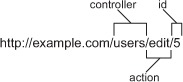
The route values, shown in table 5.2, are all strings. The controller will be extracted out of this URL as users. The "Controller" part of the class name is implied by convention; thus the controller class created will be UsersController. As you can probably already tell, routes are not case sensitive. The action describes the name of the method to call on our controller. In ASP.NET MVC, an action is defined as a public method on a controller that returns an ActionResult. By convention the framework will attempt to find a method on the specified controller that matches the name supplied for action. If none is found it will also look for a method that has the ActionNameAttribute applied with the specified action. The remaining values defined in a route are pumped into the action method as parameters, or left in the Request.Params collection if no method parameters match.
Now we are going to implement a route collection for a sample website. The site is a simple store stocking widgets for sale. Since the routes for Code Camp Server are a bit more complex, we’ll first examine a slightly simpler case and continue our examples with Code Camp Server later in the chapter. Using the guidelines covered in this chapter we have designed a URL schema shown in table 5.3.
Table 5.3. The URL schema for sample widget store
URL
Description
1
http://example.com/
Home page, redirects to the widget catalog list
2
http://example.com/privacy
Displays a static page containing site privacy policy
3
http://example.com/<widget code>
Shows a product detail page for the relevant <widget code>
4
http://example.com/<widget code>/buy
Adds the relevant widget to the shopping basket
5
http://example.com/basket
Shows the current user’s shopping basket
6
http://example.com/checkout
Starts the checkout process for the current user
There is a new kind of URL in there that we have not yet discussed. The URL in route 4 is not designed to be seen by the user. It’s linked via form posts. After the action has processed, it immediately redirects and the URL is never seen on the address bar. In cases like this it is still important for the URL to be consistent with the other routes defined in the application. How do we add a route?