concept WebHost in category c#

This is an excerpt from Manning's book Code like a Pro in C#.
We need some way to configure our brand-new .NET Core app on launch to be able to route to endpoints and accept HTTP requests. We have to finish the configuration and tie it to the
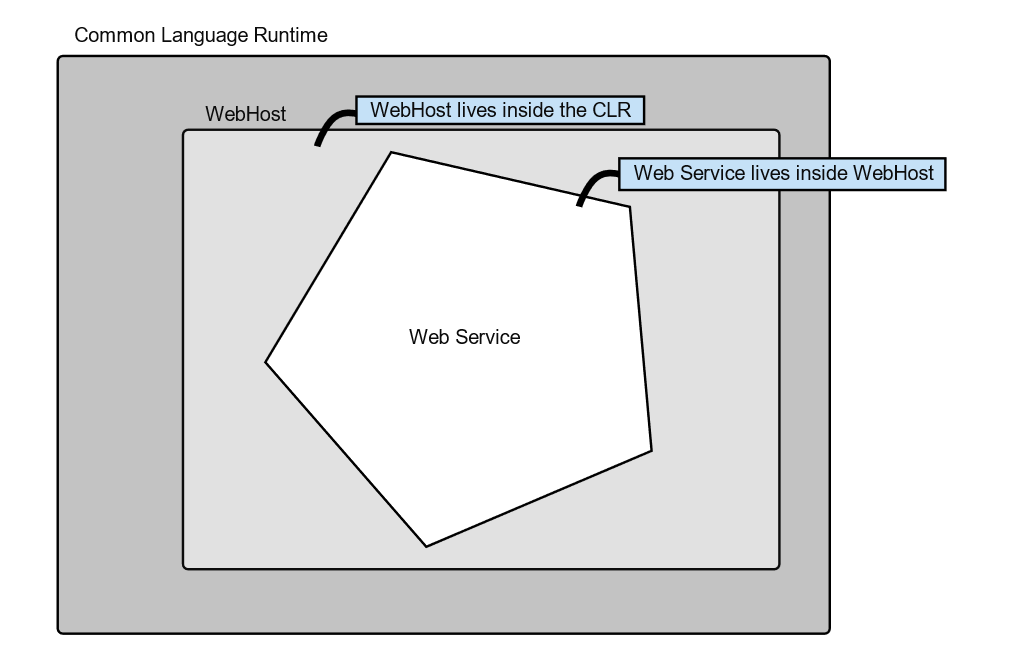
WebHostrunning our application.WebHostis the underlying process that runs the web service and interacts with the CLR. Our application lives inside theWebHost, which in turn lives inside the CLR. We can draw similarities between web containers (such as IIS) and Tomcat. To put it in Java terms, .NET Core is your JVM and Spring whileWebHost isyour Tomcat. Often, we also use ASP.NET in our web services. This launches a “host” that is responsible for app startup and lifetime management. At a minimum, the host configures the server and request processing pipeline.Figure 5.6 A Web Service runs inside the WebHost, which runs inside the CLR. This model allows the CLR to spin up a WebHost that can execute our Web Service.
There is a defined way of configuring the
WebHostin .NET Core. To create and configure ourWebHost,we need to follow three steps:
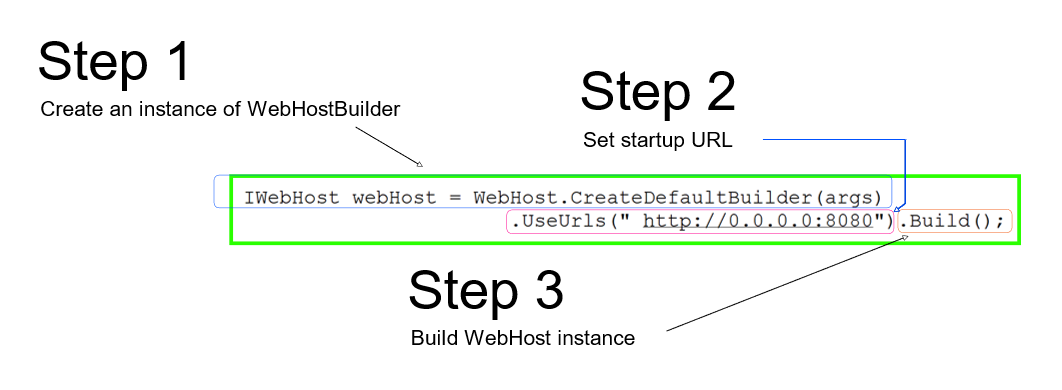
Set the startup URL to be http://0.0.0.0:8080 Build an instance of WebHostusingWebHostBuilder.Figure 5.8 In this section we create an instance of WebHostBuilder, set a startup URL, and build the WebHost instance. This code uses the builder pattern, explained in section 5.2.2.
In Program’s
Mainmethod, we add a call toWebHost.CreateDefaultBuilder. This call returns aWebHostBuilder,with some defaults already set, passing in the console arguments to the constructor. We chain a call toUseUrlsto specify the URL and port we want to serve on is. Then we callBuildto build and return the actualWebHost. We assign the output to a variable of typeIWebHost. We assign our newWebHostto an explicitly typed variable of typeIWebHost(the return type of theWebHostBuilder, there is polymorphism at play here!). Finally, we run theWebHostby callingwebHost.Run(). To use all these classes and methods, we need to use theSystem,Microsoft.AspNetCore, andMicrosoft.AspNetCore.Hostingnamespaces.using System; using Microsoft.AspNetCore; using Microsoft.AspNetCore.Hosting; namespace FlyingDutchmanAirlines { class Program { static void Main(string[] args) { IWebHost webHost = ➥WebHost.CreateDefaultBuilder(args).UseUrls("http://0.0.0.0:8080").Build➥(); webHost.Run(); } } }If you try to compile and run the service in this state, the service launches but then terminates with an
InvalidOperationException. This exception tells us we do not have aStartupclass configured and tied to theWebHost, and that is correct! But before we create thisStartupclass, let’s leave theProgramclass in the best shape possible. We have ourWebHostcreation and call toRunin theMainmethod, but should it really be in there?In section 1.4 we discussed the need for methods that read like a narrative. If I am a new developer, looking at a public method (in this case
Main), I probably do not care about implementation details. Instead, I want to get an understanding of the broad strokes of the operations and concepts dealt with in the method. To that end, we can extract the initialization and assignment ofWebHost, and the call towebHost.Run, into a separate, private method:
Note that the exact constraint names may differ on your system, as they are auto-generated. Perhaps the most notable thing here is the calls to
modelBuilder. TheOnModelCreatingmethod sets up the entities internally for Entity Framework Core, along with the required key constraints. This allows us to operate on the entities without directly messing with the database. There also is a generated method (and call to) calledOnModelCreatingPartial. The Entity Framework Core console toolset generated theOnModelCreatingPartialmethod so you can execute additional logic as part of the model creation process. We are not going to do that, so we can remove theOnModelCreatingPartialmethod and the call to it.