concept body in category camel

This is an excerpt from Manning's book Camel in Action.
Figure 1.6 A message can contain headers, attachments, and a body.

The body is of type
java.lang.Object, so a message can store any kind of content and any size. It’s up to the application designer to make sure that the receiver can understand the content of the message. When the sender and receiver use different body formats, Camel provides mechanisms to transform the data into an acceptable format, and in those cases the conversion happens automatically with type converters, behind the scenes. Chapter 3 fully covers message transformation.
public class HtmlBean {
    public static String toHtml(String body) {
        body = body.replaceAll("\n", "<br/>");
        body = "<body>" + body + "</body>";
        return body;
    }
}
Binds to the parameters of the selected method (for example, using the body of the input message as a parameter; this is covered in detail in section 4.5)

This is an excerpt from Manning's book Camel in Action.
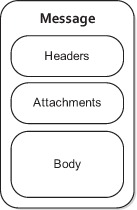
The body is of type java.lang.Object. That means that a message can store any kind of content. It also means that it’s up to the application designer to make sure that the receiver can understand the content of the message. When the sender and receiver use different body formats, Camel provides a number of mechanisms to transform the data into an acceptable format, and in many cases the conversion happens automatically with type converters, behind the scenes.
public class HtmlBean {
public static String toHtml(String body) {
body = body.replaceAll("\n", "<br/>");
body = "<body>" + body + "</body>";
return body;
}
}
This text (in this case, “Hello”) will be read in by the Stream component and added as the body of a new message. This message’s body (the text you entered) will then be written out to a file in the data/outbox directory (which will be created if it doesn’t exist).
The JDBC component is a dynamic component in that it doesn’t merely deliver a message to a destination but takes the body of the message as a command. In this case, the command is specified using SQL. In EIP terms, this kind of message is called a command message. Because a JDBC endpoint accepts a command, it doesn’t make sense to use it as a consumer, so, you can’t use it in a from DSL statement. Of course, you can still retrieve data using a select SQL statement as the command message. In this case, the query result will be added as the outgoing message on the exchange.