concept cluster in category camel

This is an excerpt from Manning's book Camel in Action.
HazelcastIdenpotentRepositoryis a store using the Hazelcast in-memory data grid as a shared Map of the keys across the cluster of JVMs. Hazelcast can be configured to be in-memory only or to write the Map structure to persistent store by using different levels of QoS. This implementation is suitable for clustering. This store is provided in the camel-hazelcast module.
Docker is so popular that you may have heard that it solves all your problems. Although Docker provides a great portable container format for shipping applications between environments and allows you to run these applications anywhere, it’s just one part of a bigger puzzle. When you move beyond the single-container phase and run your applications in a cluster of nodes, you need something more. You need powerful clustering facilities such as service discovery, load balancing, fault-tolerance, container scheduling, rolling deployment to minimize downtime, mounting persistent volumes, and configuration management. That’s where Kubernetes enters the stage. It has all of that, and it’s the third-generation container platform from Google, which brings tons of wisdom about running containers reliably at scale.
Figure 18.3 A user wants to call a service running inside the Kubernetes cluster. The service is accessible through node port 31068 on the Kubernetes master, which forwards the traffic to the Hello service running inside the cluster. The Hello service also forwards the traffic to the running pod with the targeted service being called.
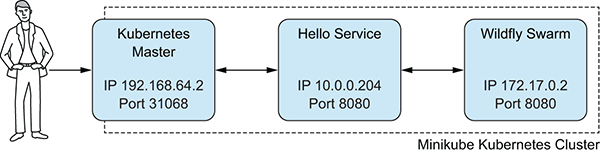
In Kubernetes, you use Kubernetes services as a level of indirection between your running pods and clients calling into these pods. (Section 18.4 goes more in depth about the Kubernetes concepts.) In figure 18.3, you can see that a Hello service sits between the Kubernetes master and the pod that runs the WildFly Swarm application. At this time, all you need to know is that by calling IP 192.168.64.2:31068, you’ll end up being routed to the WildFly Swarm pod on IP 172.17.0.2:8080 inside the cluster. But wait a minute—how do you know that it’s port 31068 that ends up being routed to the WildFly Swarm application? To determine this, you can use kubectl:
$ kubectl get service NAME CLUSTER-IP EXTERNAL-IP PORT(S) AGE hello-service 10.0.0.204 <nodes> 8080:31068/TCP 3h !@%STYLE%@! {"css":"{\"css\": \"font-weight: bold;\"}","target":"[[{\"line\":2,\"ch\":49},{\"line\":2,\"ch\":54}]]"} !@%STYLE%@!You can then see the port number (highlighted here). But there’s an easier way: you can ask Minikube to give you the URL to any service running inside the cluster. To get the URL to hello-service, you type this: