concept JConsole in category camel

This is an excerpt from Manning's book Camel in Action.
Then, from another shell, you can start JConsole by invoking
jconsole.When JConsole starts, it displays a window with two radio buttons. The Local radio button is used to connect to existing JVMs running on the same host. The Remote radio button is used for remote management, which we’ll cover shortly. The Local option should already list the local running processes. You can find the correct process by hovering the mouse to display a tooltip with the full name. The process containing the word
Launchercorresponds to the running application that was launched from Maven. Select this process, and you can click the Connect button to connect JConsole to the Camel instance.Figure 16.5 shows the Camel management beans (MBeans) that are visible from JConsole.
Figure 16.5 Camel registers numerous MBeans that expose internal details, such as usage statistics and management operations.
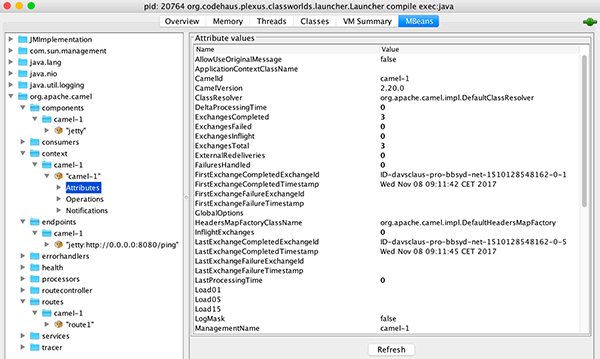
Camel registers many MBeans that expose statistics and operations for management. Those MBeans are divided into 12 categories, which are listed in table 16.1. Most MBeans expose a set of standard information and operations concerning things such as lifecycle. We encourage you to spend a moment browsing the MBeans in JConsole to see what information they provide.

This is an excerpt from Manning's book Camel in Action.
Java provides a JMX tool named JConsole. You’ll use it to connect to a Camel instance and see what information is available.
Then, from another shell, you can start JConsole by invoking jconsole.
When JConsole starts, it displays a window with two radio buttons. The Local radio button is used to connect to existing JVMs running on the same host. The Remote radio button is used for remote management, which we’ll cover shortly. The Local should already list a process, and you can click the Connect button to connect JConsole to the Camel instance. Figure 12.4 shows the Camel MBeans (Management Beans) that are visible from JConsole.
Figure 12.4. Camel registers numerous MBeans that expose internal details, such as usage statistics and management operations.

Camel registers many MBeans that expose statistics and operations for management. Those MBeans are divided into nine categories, which are listed in table 12.1. Most MBeans expose a set of standard information and operations, concerning things such as lifecycle. We encourage you to spend a moment browsing the MBeans in JConsole to see what information they provide.