concept ProducerTemplate in category camel
This is an excerpt from Manning's book Camel in Action.
First you create an instance of
SimpleRegistryand populate it withHelloBeanunder thehelloBeanname 1. Then, to use this registry with Camel, you pass the registry as a parameter to theDefaultCamelContextconstructor 2. To aid when testing, you createProducerTemplate, which makes it simple to send messages to Camel, as you can see in the test method. Finally, when the test is done, you clean up the resources by stoppingProducerTemplateand Camel 3. In the route, you use thebeanmethod to invokeHelloBeanby thehelloBeanname you gave it when it was enlisted in the registry 1.
Figure 9.2 The Camel Test Kit is comprised of the camel-test JAR for testing with Java in general, and three specialized JARs for testing with with OSGi Blueprint, CDI, and Spring. Inside camel-core you’ll find the mock component,
ProducerTemplate, andFluentProducerTemplate, which are frequently used with unit testing.
Listing 9.7 Unit testing with @RunWith instead of extending the CamelSpringTestSupport class
@RunWith(CamelSpringRunner.class) #1 @ContextConfiguration( #2 classes = MyApplication.class, #2 loader = CamelSpringDelegatingTestContextLoader.class) #2 public class RuntWithFirstTest { @Autowired private CamelContext context; #3 @Autowired #3 private ProducerTemplate template; #3 @Test public void testMoveFile() throws Exception { #4 template.sendBodyAndHeader("file://target/inbox", "Hello World", Exchange.FILE_NAME, "hello.txt"); Thread.sleep(2000); File target = new File("target/outbox/hello.txt"); assertTrue("File not moved", target.exists()); String content = context.getTypeConverter() .convertTo(String.class, target); assertEquals("Hello World", content); } } #1 Uses @RunWith with the CamelSpring runner #2 Configures Spring to use the @Configuration class #3 Dependency injects CamelContext and ProducerTemplate #4 The unit test method is identical to testing without using @RunWith.

This is an excerpt from Manning's book Camel in Action.
First you create an instance of SimpleRegistry and populate it with HelloBean under the helloBean name
. Then, to use this registry with Camel, you pass the registry as a parameter to the DefaultCamelContext constructor
. To aid when testing, you create a ProducerTemplate, which makes it simple to send messages to Camel, as can be seen in the test method. Finally, when the test is done, you clean up the resources by stopping Camel
. In the route, you use the beanRef method to invoke HelloBean by the helloBean name you gave it when it was enlisted in the registry
Throughout this book, you’ve seen the ProducerTemplate used as an easy way of sending messages to a Camel endpoint. While it was simple to understand in those cases, there are many more options to the ProducerTemplate. There is also an analog for consumers—the ConsumerTemplate, which makes consuming messages easy.
Both of these templates are inspired by the template utility classes in the Spring Framework that simplify access to an API. In Spring, you may have used a JmsTemplate or JdbcTemplate to simplify access to the JMS and JDBC APIs. In the case of Camel, the ProducerTemplate and ConsumerTemplate interfaces allow you to easily work with producers and consumers.
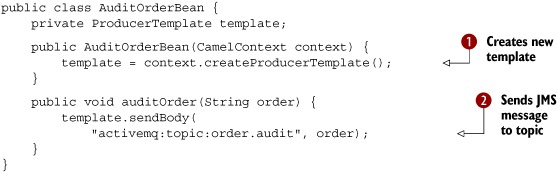
Here’s an example of how to use the ProducerTemplate to send a message to a JMS topic that’s used to audit orders.
In the constructor, you create a new instance of the ProducerTemplate