concept web browser in category camel

This is an excerpt from Manning's book Camel in Action.
When the example is running, you can access the service from a web browser on http://localhost:8080/hello.
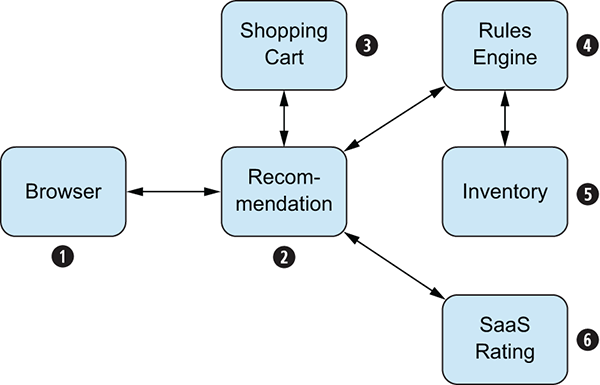
Figure 7.3 Rider Auto Parts recommendation system. From the web browser ❶, the recommendation service ❷obtains items currently in the shopping cart ❸ and then calls the rules engine ❹ to compute items to be recommended, which takes into account the number of items currently in stock ❺. Finally, an external user-based ranking system from a cloud provider ❻ is used to help rank recommendations.
The list works as if you’re doing smart completion on regular Java code. You can use type ahead, and by pressing Ctrl-J while the list is present, another window is shown on the side that presents documentation for the currently selected option in the list. This gives you information at your fingertips; you don’t have to open a web browser and find the Camel component documentation. And if you want to go there, press Ctrl-F1, and IDEA will open the web page for the selected component for you in the browser.