concept datum in category chatbot

This is an excerpt from Manning's book Building Chatbots with Microsoft Bot Framework and Node.js.
The second step is to use the data extracted from the payload and use that data to generate a response. In our case we extract the query as “Find AI hackathons in NYC”. Now we need to process the message and generate a response for that query. In this step, we handle the request by first understanding the request and then performing some computation to get the results for the query. We will take a deeper look into understand the query with intent and entity recognition in chapters 3 and 4.
So, managing state data is a crucial element to a successful bot. In this chapter, we take a deeper look at the process of storing state data through in-memory data storage as well as external data services. Bot Framework provides APIs to manage state at four different levels. The first is user level where all the information stored is specific to a user on a specific channel. The user level state is stored in the namespace “UserData”. The next is conversation level where the information stored is specific to a conversation on a specific channel. This state data is stored in the namespace “ConversationData”. The third level is at the dialog level where the data stored is specific to a dialog within a conversation. To understand these differences better, let’s take a look at Figure 6.1 which shows this information in a graphical format.
Figure 6.1 Three of the four levels that the bot framework provides to maintain state data. A user can have multiple conversations with a bot and each conversation is broken down into multiple blocks. Corresponding to this bot framework lets us store data at a user level across all conversations in userData, user data specific to a conversation in conversationData and data specific to a dialog in a conversation in dialogData.
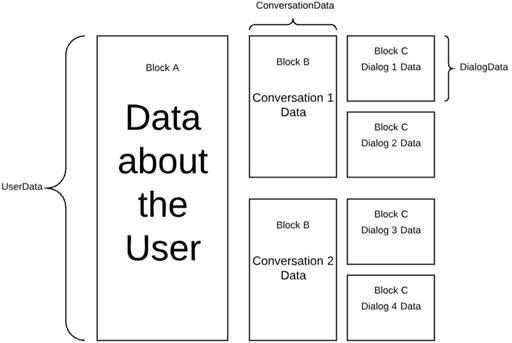
In Figure 6.1 we can see the hierarchical structure of data available in the bot. At the highest level we have data about the user shown in Block A. At the end of day all the information we get is from the user so this can be thought of as user data. The user data is however received across multiple conversations the user has with our bot which is represented by the second layer of Block B. Each of these conversations can be constituted of multiple dialogs, for example a conversation might include a dialog to book a flight and then another dialog to book a cab to the airport. Corresponding to these multiple layers, bot framework provides us the capability to store data at these multiple hierarchical levels. ‘UserData’ is used to store all data about the user across all conversations. ‘ConversationData’ is used to store data specific to a conversation and ‘DialogData’ is to used to store data specific to a dialog within a conversation. The fourth level which is “PrivateConversationData” makes more sense in the special case of group chatbot as shown in Figure 6.2.
Figure 6.2 Data hierarchy in a chatbot that supports group chat where multiple users are part of the same conversation. In such cases the data level ConversationData is accessible to all the users in the conversation. If we want to store private information about a particular user not visible to others we should use PrivateConversationData.
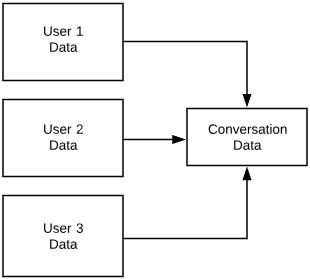
Figure 6.2 shows us how the data gets structured in special cases where the chatbot supports group chat. In group chat multiple users are part of the same conversation and can see each other’s chat with the bot or among themselves in the chat window. In such cases the data stored in ‘ConversationData’ is available to all the users that are part of the conversation. This means that we should not use the ‘ConversationData’ data level to store sensitive information about a user or data in the conversation that is specific to a user. Instead this should be used to store data like the current movie being discussed in the chat or the current holiday destination being planned. To store data for a particular user in a conversation we should use ‘PrivateConversationData’.
Getting the data
In the previous section we learnt how to store information about the user like their name so we could later access that name to give personalized replies using their name. Let’s take a look at how we can access the data that we had stored in the storage container by simply referencing the corresponding property of the storage container object as shown in listing 6.7.
Listing 6.7 Getting the data saved in a storage container by referrencing the corresponding property.
var user_meeting_preferred_time = session.userData.userMeetingPreferredTime; var user_data = session.userData.aboutUser;