concept array in category chuck

This is an excerpt from Manning's book Programming for Musicians and Digital Artists: Creating music with ChucK.
An array is a collection of data stored in memory. For composer-programmers, one use for arrays is to store lists of musical parameters that you want to use to control your songs over time, such as musical pitches (or MIDI note numbers), volumes, times, and/or durations. Another use for arrays is to store lists of character strings such as song lyrics. Arrays can store any type of data, and you can even make arrays of unit generators like SinOsc or Noise, which you’ll do in the next chapter.
So far you’ve generated melodies by using loops to increase or decrease frequencies or pitches, or you’ve made long programs that specify each note you want, line by line. Wouldn’t it be great if you could make a list of the notes you want to play at the beginning of the program? What if you could somehow store your compositional parameters in memory, making it easier to write whole songs? That’s exactly what arrays allow you to do.
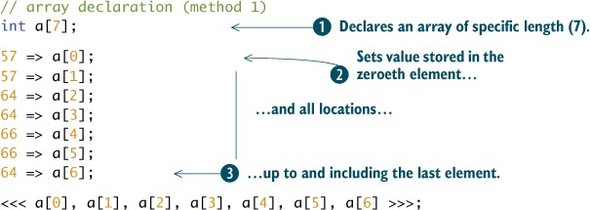
Now let’s see how to represent this concept in code. You represent an array with square brackets ([]), with the number in the square brackets being the number of elements in the array. In this case there are seven MIDI notes, so you declare array a as int a[7]
in the following listing. Notice that the array is of type integer (you can make arrays of any type, as you’ll see later on). Next, you have to store your melody into the array. You do this by putting each integer into its own location in the array, one at a time, as shown in the lines between
and
.
You now have your MIDI notes in the array, but this took way too many lines of code. Isn’t there a shortcut? Of course there is! As shown in listing 3.2, you can store your MIDI notes all on one line of code. Notice that you use a new operator, @=>, which is a special ChucK operator used to store all of the data into your array a, all at once. @=> is called the at-ChucK operator or the explicit assignment operator. You can use this operator to copy other objects in ChucK, but by far the most common use is for copying lists of elements into arrays.
Listing 3.2. Declare and initialize an array all at once
[57, 57, 64, 64, 66, 66, 64] @=> int a[]; <<< a[0], a[1], a[2], a[3], a[4], a[5], a[6] >>>;The other part of this new way of declaring and initializing an array is that now your declaration of array a doesn’t have the preassigned [7] as the number of elements. This is part of what the @=> operator allows you to do. The a points to the beginning of your list of MIDI notes, but the size needn’t be determined during declaration. ChucK figures this out for you, making it easy to add and subtract notes to make the melody longer or shorter by typing extra numbers into the list, without having to count how many notes you have each time.
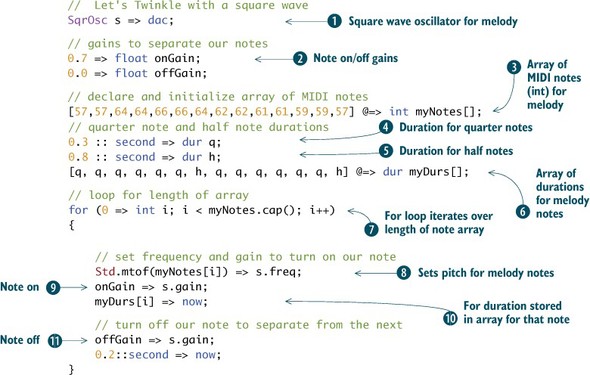
Let’s store your note durations in an array, as shown in listing 3.6. Here you perform the very same setup as in listing 3.4. You first declare and connect the square wave oscillator
and one for half notes called h
. You then use those shorthand variable names to declare and initialize an array of durations called myDurs
.