concept event in category chuck

This is an excerpt from Manning's book Programming for Musicians and Digital Artists: Creating music with ChucK.
There are other ways to advance time; for example, by chucking an Event to now (such as clicking the computer mouse, pressing the fire button on a joystick, or playing a note on a musical MIDI keyboard connected to your computer) for when you don’t know beforehand how much time to advance. We’ll leave that for a later discussion. For now, you’ve just learned one of the most important aspects of ChucK: controlling time using durations.
This is where events come to your aid in ChucK. An event is simply a mechanism to notify a shred when something happens. Events have two sides:
One or more shreds can wait on an event while time advances.
In the previous examples you used Hid, a specialized ChucK event, to get real-time input from the computer keyboard. In this case, you only needed to worry about waiting on the event and responding when the event actually happened. The triggering of the event happened elsewhere in ChucK, behind the scenes.
It’s also possible to create events and programmatically trigger them from your own ChucK programs. This is extremely useful for inter-shred communication, when one or more shreds need to know when something happens on a different shred. For example, one shred might be serving as a master clock or center of operations and wishes to tell related shreds when to perform various tasks. Alternatively, two shreds may simply want a handshake mechanism, where one shred synchronizes to (waits on) the actions of a second shred.
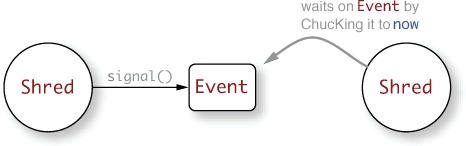
Let’s say you have an event and a shred. As you’ve seen before, the shred can simply ChucK the event to now to wait on it. This is no different than you’ve done in the keyboard examples of listings 10.1 and 10.2. The shred in question is said to be waiting on the event, as shown in figure 10.3. The shred on the right ChucKs the event to now. Any other running shred can signal that event.
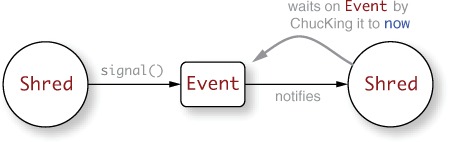
Next, let’s say you have a second shred (on the left in figure 10.3), which has access to the same event as shown in figure 10.4. This shred can manually trigger the event by calling signal(). After the shred on the left triggers the event, the event in turn notifies and wakes up the shred on the right, resuming its execution. In the next section and in listing 10.3 we show how a shred can use the event .signal() method to synchronize with another shred.