concept loop in category chuck

This is an excerpt from Manning's book Programming for Musicians and Digital Artists: Creating music with ChucK.
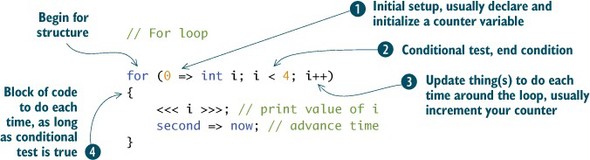
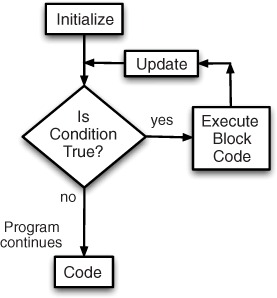
You can make even more interesting music using the next control structure, called a for loop. As the loop name implies, this control structure is used to make loops and cyclical behaviors. In listing 1.16 and illustrated in figure 1.12, a for loop begins by setting an initial state with a variable
. It contains a condition
that it checks to see if it’s true (like an if statement). If it’s true, it then executes a block (paragraph) of code
, and at the end it executes an update command
. Here the initial variable is updated to a new value, and then the condition is checked again. This process continues until the condition is false and the loop is over.
Figure 1.12. Flow chart of a for loop. Variable i is initialized to 0 and then counted up (++) until it reaches the value of 4. The code in the block is executed each time.
There are many musical cases where you might want to use a for loop, such as playing up the notes of a scale (next chapter) or sweeping gradually from one frequency to another by hitting all the frequencies in between. Here you’re counting up and printing integers.
In the example of the previous listing, the integer variable i is initialized to 0
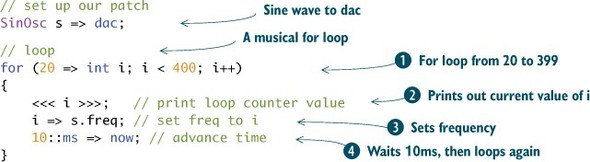
Let’s add sound to this concept so you can start to hear what a for loop can do for you musically. In music programming, for loops can be used to play scales, repeat patterns such as bass lines or melodies, smoothly change gains, sweep frequencies up or down, and many other super-musical things.
In listing 1.17, you use a for loop