concept number in category chuck

This is an excerpt from Manning's book Programming for Musicians and Digital Artists: Creating music with ChucK.
The proliferation of powerful mobile devices such as the iPhone and iPad gave rise to a re-envisioning for the mobile era of traditional musical instruments, such as the Ocarina for iPhone (Ge Wang/Smule), as well as entirely new mobile musical interactions. With millions of worldwide users, Ocarina and a number of other mobile apps have used ChucK for synthesis.
First, let’s talk a bit about sound. We define sound as the traveling of fluctuating air compressions through the air, from some source to our ears. In computer systems, sound is stored and played back in various digital formats as numbers. Although you don’t need to know the specifics of all this to use sound files in ChucK, it’s important to know some things as you load and play sound files and as you look forward to synthesizing sounds in the future.
To get sound into a format that your computer and ChucK can understand, sound is turned into a stream of numbers, called a digital signal. The process of turning a sound waveform into a digital signal is called analog-to-digital conversion. The device that does this is an analog-to-digital converter (ADC), which is essentially the opposite device of the digital-to-analog converter (DAC) that you’ve been using all along to get digital signals synthesized by ChucK out to your speakers or headphones. The ADC works by inspecting electronically the incoming waveform (this is called sampling) at regular intervals, called the sampling period (which is 1/sampling rate) and rounding the value to the nearest integer available to represent and store that amplitude. Figure 4.1 shows this process, zoomed into one “eee” period of our earlier “see” sound. We further zoom into the beginning of the waveform and show a few of the individual integers that represent the first few sample values.
Figure 4.1. Sampling of one period of an “eee” sound. Pressure at a microphone is turned into voltage, which is turned into a number by a process known as analog-to-digital conversion.
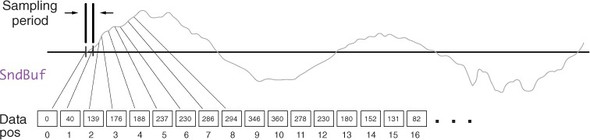
In the previous chapter, when we talked about arrays, we said that arrays can hold anything, and anything that’s in your computer is stored in an array. The process shown in figure 4.1 is doing exactly that, turning the values of a waveform into a sequence of numbers and storing those into an array. Here the indices (0, 1, 2, ...) represent increasing time, one count for each sample period (1/sampling rate). The levels corresponding to each point in time (sample) are integers in most sound file formats like .wav and .aiff, but ChucK converts them into floating point numbers in the range +1.0 to -1.0.