concept ratio in category churn

This is an excerpt from Manning's book Fighting Churn with Data.
Its easiest to imagine 1.0 correlation when the increase is 1:1 (an increase of 1 in the first metric corresponds to an increase of 1 in the second metric), but it can also be any ratio (1:2, 2:1, and so forth) when the correlation is the same. That’s why the correlation depends on the consistency of the association between two metrics but not the exact magnitude of the ratio. Correlation can also be between two metrics with any measurement units or scale (logins, downloads, views, etc.).
If you take a metric that is the amount a customer pays (MRR) and divide it by the amount of calls they make, that is a measurement of the average cost per call. It is a measure of the unit cost the customers pay, similar to the price per gallon or liter for gasoline or milk. The difference is that the ratio of MRR to calls is an effective recurring unit cost, not a contractual one, because the product is not actually priced and packaged for customers to pay by the call.
Figure 7.3, continuing the example from figure 7.1, shows the churn cohort analysis performed for Versature’s customers using MRR per call as the metric. This metric shows a strong relationship with increasing churn following increasing values of the metric. It's true: customers who pay more really do churn more, but you have to measure the effective unit cost with a ratio metric to see it! Figure 7.3 also shows the correlations of the MRR per call metric with the MRR and call metrics that were used to create it. MRR per call is only weakly correlated (negatively) with calls and is practically uncorrelated with MRR. All these facts make MRR per call a great metric for understanding customer engagement and churn. In the next section, you'll learn how to calculate a ratio metric like this and practice doing so with the churn simulation data you've used throughout the book.
If the metric in the denominator of the ratio is exactly zero for an account, then the ratio is undefined. You'll get an error if you try to divide by zero in any program language. And if either metric can be negative sometimes, then the ratio is mathematically okay, but it lacks the usual meaning of a ratio of two other measurements: a unit cost or a rate of an event relative to another event. Other than taking care of the two edge cases listed previously, the calculation of ratios is pretty straightforward.
Figure 7.5: Mechanics of calculating a ratio metric.
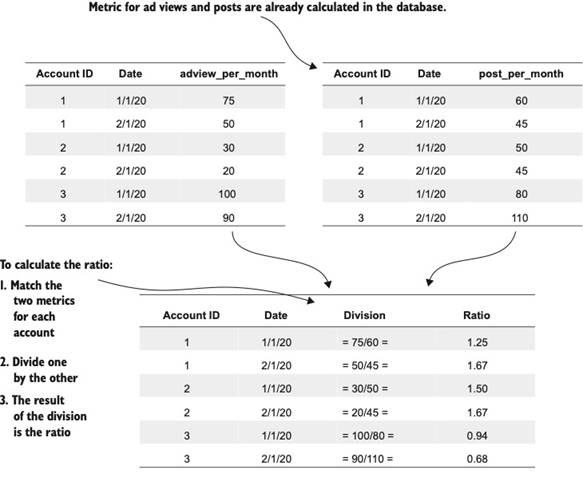
Listing 7.1 provides a short SQL program to calculate a ratio metric, and figure 7.6 illustrates a few lines of the output. The listing also selects the numerator and denominator of the metric for illustrative purposes, not just the final result. Otherwise, the calculation strategy in listing 7.1 mirrors the illustration in figure 7.5 closely: two common table expressions (CTEs) select the results for the two metrics that are going to form the ratio. The final SELECT statement is an INNER JOIN between the two CTEs. Because it is an INNER JOIN, the ratio metric will be calculated for any given account on a date when the account has both metrics that form the ratio. Let’s look at the figure first.
Figure 7.6: Output of running listing 7.1.
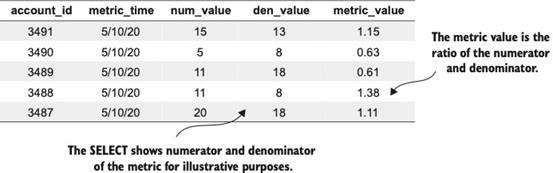
The SQL uses a CASE statement as part of the calculation to guard against a zero metric in the denominator. If you use count metrics as in chapter 3, you don't store zeros; but it’s a best practice to guard against dividing by zero in case you work with metrics imported from other systems. Using the CASE statement, a zero denominator metric produces a zero ratio. That would be the same as the result for a zero numerator, which is mathematically fine and just produces zero. That said, if you didn't store the zeros for the numerator metric, you won't produce the ratio at all. But you'll still fill the result with zero in your churn analysis dataset for any account that doesn't get the ratio (as described in chapter 4).