concept container in category cloud

This is an excerpt from Manning's book Cloud Native Spring in Action.
DevOps is not a role. If we consider DevOps as a culture, a mindset, it’s hard to make sense of a DevOps role. And yet, there is an increasing request for DevOps engineers. Usually, when recruiters search for DevOps engineers, they are looking for skills like proficiency with automation tools, scripting, and IT systems.
DevOps is not a team. Organizations not fully understanding the above risk to end up keeping the same silos as before, with one change: adding a DevOps silo either to replace the Ops silo or a new one.
The collaboration between developers and operators is paramount when going cloud native. As you may have noticed, designing and building cloud native applications requires that you always keep in mind where you’re going to deploy those applications: the cloud. Working together with operators allows developers to design and build higher quality products. It’s called DevOps, but let’s remember that the definition doesn’t apply only to developers and operators. Instead, it generically refers to people, regardless of title or background. It means that collaboration also involves other roles like testers and security experts. Together, they are all responsible for the entire product lifecycle. With a DevOps mindset, you can truly achieve the goal defined by the CNCF for cloud native apps: "make high-impact changes frequently and predictably with minimal toil".
[10] M. Fowler, "Infrastructure As Code", martinfowler.com/bliki/InfrastructureAsCode.html
[11] M. Fowler, "Continuous Delivery", martinfowler.com/bliki/ContinuousDelivery.html
[12] K. Mugrage, "My definition of DevOps", kenmugrage.com/2017/05/05/my-new-definition-of-devops/
Spring Framework provides an execution context (called Spring context or container), where beans, properties, and resources are managed throughout the entire application life cycle. I assume you are already familiar with the framework’s core features, so I will not spend too much time on it. In particular, you should be aware of the Spring context’s role and be comfortable working with Spring beans, annotation-based configuration, and dependency injection. We will rely on those features, so you should have them sorted out.
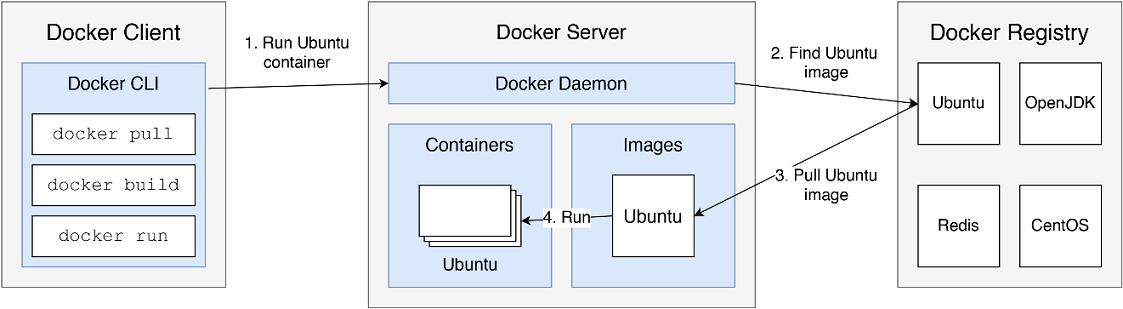
Figure 2.10. The Docker Engine has a client/server architecture and interacts with a registry.
$ docker run --name greeting-service -p 8080:8080 arcticgreetings/greeting-service:0.0.1-SNAPSHOT
This is an excerpt from Manning's book Cloud Native Patterns: Designing change-tolerant software.
As it happens, containers are a great enabler of cloud-native software. Okay, that relationship isn’t quite the coincidence that my somewhat flippant remark suggests, but it’s a chicken-and-egg situation: the popularity of containers was without question driven by the need to support cloud-native applications, and the availability of containers has equally driven advances in cloud-native software.
If, when I use the term “container” you immediately think “Docker,” that’s cool—close enough. But I do want to cover key elements of containers in the abstract so that you can more easily connect those capabilities to the elements of cloud-native software.
Starting at the most basic level, a container is a computing context that uses functionality from a host that it’s running on; for example, the base operating system. Generally, multiple containers are running on a single host, the latter of which is a server, either physical or virtual. These multiple containers are isolated from one another. At the highest level, they’re a bit like virtual machines (VMs), an isolated computing environment running on a shared resource. Containers, however, are lighter weight than VMs, allowing them to be created in orders of magnitude less time, and they consume fewer resources.
I already mentioned that multiple containers running on a single host share the host’s operating system, but that’s all. The rest of the runtime environment needed by your app (and yes, your app will be running in a container) runs within the container.
Figure 3.5 shows the portions of the application and runtime environment that are running both on the host and inside your containers. Only the OS kernel is provided by the host. Inside the container you first have the OS root filesystem, including operating system functions such as openssh or apt get. The runtime needed by your application is also inside the container—the Java Runtime Environment (JRE) or the .NET Framework, for example. And then, finally, your application is also in the container, hopefully running there.
Figure 3.5. A host usually has multiple containers running on it. These containers share the OS kernel from the host. But each container has its own root operating filesystem, runtime environment, and application code.
![]()
When an application instance is to be run, a container is created on a host. All the bits necessary to run your app—the OS filesystem, application runtime, and the application itself—will be installed into that container and the appropriate processes started. The cloud-native platform, using containers at the core, provides a whole lot of functionality for your software, and creation of an app instance is but one. Others include the following:

This is an excerpt from Manning's book Google Cloud Platform in Action.
In many ways, an application built for the cloud is like any other. The primary difference is in the assumptions made about the application’s architecture. For example, in a traditional application, we tend to deploy things such as binaries running on particular servers (for example, running a MySQL database on one server and Apache with mod_php on another). Rather than thinking in terms of which servers handle which things, a typical cloud application relies on hosted or managed services whenever possible. In many cases it relies on containers the way a traditional application would rely on servers. By operating this way, a cloud application is often much more flexible and able to grow and shrink, depending on the customer demand throughout the day.
Eventually, the shipping industry decided that this way of packing things was silly and started exploring the idea of containerization. Instead of packing things like puzzle pieces, people solve the puzzle themselves using big metal boxes (containers) before they even get to a boat. That way, the boat crew only ever deals with these standard-sized containers and never has to play Tetris again. In addition to reducing the time it took to load boats, standardizing on a specific type of box with specific dimensions meant the shipping industry could build boats that were good at holding containers (figure 10.2), devise tools that were good at loading and unloading containers, and charge prices based on the number of containers. All of this made shipping things easier, more efficient, and cheaper.
Software containers do for your code what big metal boxes did for shipping. They act as a standard format representing your software and its environment and offer tools to run and manage that environment so it works on every platform. If a system understands containers, you can be sure that when you deploy your code there, it’ll work. More concretely, you can focus specifically on getting your code into a container, playing Tetris up front instead of when you’re trying to deploy to production. One last piece here needs mentioning, and it comes as a by-product of using containers: isolation.
Before you can run a container on your own machine, you’ll need to install the Docker runtime. Docker Community Edition is free, and you can install it for almost every platform out there. For example, there’s a .deb package file for Ubuntu available on http://docker.com/community-edition.
As you learned earlier, Docker is a tool that understands how to run containers that you define using the Dockerfile format. Once you have Docker running on your machine, you can tell it to run your Dockerfile, and you should see your little web app running. To test whether you have Docker set up correctly, run docker run hello-world, which tells Docker to go find a container image called “hello-world.” Docker knows how to go find publicly available images, so it’ll download the hello-world image automatically and then run it. The output from running this image should look something like this:
$ docker run hello-world
Unable to find image 'hello-world:latest' locally          #1
latest: Pulling from library/hello-world                   #2
b04784fba78d: Pull complete
Digest:
 sha256:f3b3b28a45160805bb16542c9531888519430e9e6d6ffc09d72261b0d26ff74f
Status: Downloaded newer image for hello-world:latest

Hello from Docker!
# ... More information here ...
To run your image, you have to take your Dockerfile that describes a container and build it into a container image. This is a bit like compiling source code into a runnable binary when you’re writing code in a compile language like C++ or Java. Make sure the contents of your Dockerfile are in a file called Dockerfile; then you’ll use docker build to create your image and tag it as hello-node:
$ docker build --tag hello-node .
Sending build context to Docker daemon  1.345MB
Step 1/7 : FROM node:8
Step 2/7 : WORKDIR /usr/src/app
Step 3/7 : COPY package.json .
Step 4/7 : RUN npm install
Step 5/7 : COPY . .
Step 6/7 : EXPOSE 8080
Step 7/7 : CMD node index.js
Successfully built 358ca555bbf4
Successfully tagged hello-node:latest
You’ll see a lot happening under the hood, and it’ll line up one-to-one with the commands you defined in the Dockerfile. First, it’ll go looking for the publicly available base container that has Node v8 installed, and then it’ll set up your work directory, all the way through to running the index.js file that defines your web application. Note that this is only building the container, not running it, so the container itself is in a state that’s ready to run but isn’t running at the moment.
A container is an infrastructural tool aimed at solving the software deployment problem by making it easy to package your application, its configuration, and any dependencies into a standard format. By relying on containers, it becomes easy to share and replicate a computing environment across many different platforms. Containers also act as a unit of isolation, so you don’t have to worry about competing for limited computing resources—each container is isolated from the others.
If all of this sounds intimidating, don’t worry: containers are pretty confusing when you’re starting to learn about them. Let’s walk through each piece, one step at a time, starting with configuration.

This is an excerpt from Manning's book Azure in Action.
In your storage account, you create a set of containers (similar to folders) that you can store your binary files in. In the initial version of the BLOB storage service, containers can either be restricted to private access (you must use an authentication key to access the files held in this container) or to public access (anyone on the internet can access the file, without using an authentication key).
Before we get all technical about accounts, containers, and BLOBs, keep this in mind: an account is simply your account. Dave has an account, Jim has an account, and you have an account. An account is about ownership. A container is somewhere you can store your BLOBs. Containers are about access control (public or private access) and some level of organization.
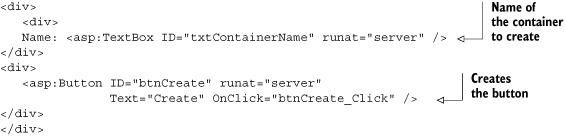
At this stage, you only want to write the code that will create your container; you don’t need to see the list of containers. At present, your UI needs to display only the new container name text box and the Create Container button.