concept deployment in category cloud

This is an excerpt from Manning's book Cloud Native Patterns: Designing change-tolerant software.
In the past, implementing these failover behaviors was generally a bespoke solution, bolted on to a deployment for a system that wasn’t initially designed to adapt to underlying system failures. The knowledge needed to achieve the required SLAs was often limited to a few “rock stars,” and extraordinary design, configuration, and testing mechanisms were put in place in an attempt to have systems that reacted appropriately to that failure.
When are software releases scheduled at your company? Are they done during “off hours,” perhaps at 2 A.M. on Saturday morning? This practice is commonplace because of one simple fact: deployments are usually fraught with peril. It isn’t unusual for a deployment to either require downtime during an upgrade, or cause unexpected downtime. Downtime is expensive. If your customers can’t order their pizza online, they’ll likely turn to a competitor, resulting in direct revenue loss.
When deployments are risky, they’re performed less frequently, which only serves to make them even riskier. You can invert each of these negatives—focusing on repeatability, making deployments safe, and embracing change—and create a system that supports rather than hinders the practices you desire. Repeatability is at the core of optimized IT operations, and automation applies not only to the software build process, but also to the creation of runtime environments and the deployment of applications.

This is an excerpt from Manning's book The Cloud at Your Service: The when, how, and why of enterprise cloud computing.
“I’ll never buy another server again,” said the Director of IT for a medium-sized Software-as-a-Service (SaaS) company, only partially in jest, after recently completing the deployment of a new corporate website for his organization. This website (a PHP-based application with a MySQL backend) showcased the corporate brand and the primary online lead-generation capability for the company’s business.
Before the overhaul, it was run from a redundant pair of web servers hosted by one of the leading managed-hosting service providers at a total cost of roughly $2,200/month. The company replaced the infrastructure for the original website with a cloud implementation consisting of a pair of virtual server instances running for roughly $250/month—almost a 90 percent savings! Its quality of service (QoS) team monitored the performance and availability of the website before and after the change and saw no measureable difference in the service quality delivered to end users. Buoyed by the success with this initial project, this organization is looking at all future initiatives for the possibility of deployment within the cloud, including a software-build system and offsite backup.
Staging —A clean environment meant to clone the production environment as closely as possible and be used as a final sanity check before deployment. You may do performance testing here in addition to final system testing.
Although this scalability argument is one of the best for moving deployments and operations to public or private clouds, there are many good reasons to consider the cloud even if your applications will never get surges of traffic such as this.

This is an excerpt from Manning's book Azure in Action.
Deployment is as easy as uploading a few files and clicking the Run button, at least for you. For Azure, the Fabric Controller kicks in, identifies some unused CPU cores, deploys a virtual server image, copies over your bits, wires up a VLAN for your instances only, reconfigures the load balancers, and then updates the service directories. While all this is happening, which can take from seconds to minutes, depending on what you’re deploying, you’ll see the status of your environment flip to Initializing; when Azure is finished, the status changes to Started. When things are deployed, the cube turns a nice shade of blue, and the status flips to Staging, as shown in figure 2.14. Note that servers are reserved for you when you do the initial upload of your code with the Deploy button, and before you click Run. At this point, the cube turns blue, and you’ll start being charged, even before you click Run. A little saying to remind you when you’ll be charged is, “If the cube is grey, you’re O.K. If the cube is blue, a bill is due.”
The first thing you do to update the configuration for a running role is get an instance of the DeploymentDiagnosticManager for the deployment. One object oversees all the roles in your deployment. Give it a connection string to your storage account for logging. This constructor doesn’t take a configuration element like the DiagnosticsMonitor class does. You have to pass in a real connection string, or a real connection. The code in listing 18.2 grabs the string out of the role configuration with a call to GetConfigurationSettingValue.
After you have a list of your services, you next task is to create a deployment of your application.
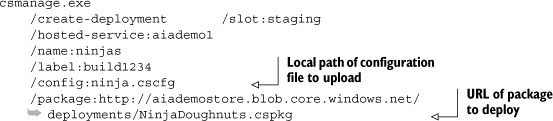
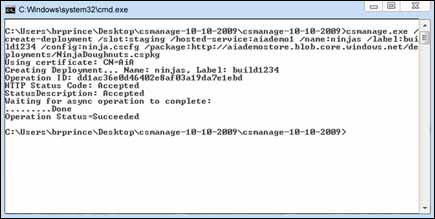
That’s a lot to type in by hand. The most common use of csmanage is in an automated deployment script. You could make the deployment completely hands-off with enough script and PowerShell. When you execute the command in listing 18.6, there’ll be a slight pause as the configuration is uploaded and the management service deploys your bits. The output of the command is shown in figure 18.10.