concept message in category cloud

This is an excerpt from Manning's book Designing Cloud Data Platforms.
Another and arguably more significant trend, however, is the change of application architecture from monolithic to microservices. Since in the microservices world there is no central operation database from which to pull data, collecting messages from these microservices becomes one of the most important analytics tasks. To keep up with these changes, a traditional data warehouse requires rapid, expensive and ongoing investments in hardware and software upgrades. With today’s pricing models, that eventually becomes extremely cost prohibitive.
Batch systems work with files and files in turn consist of individual rows that contain data. Real-time systems operate on the level of an individual row or a
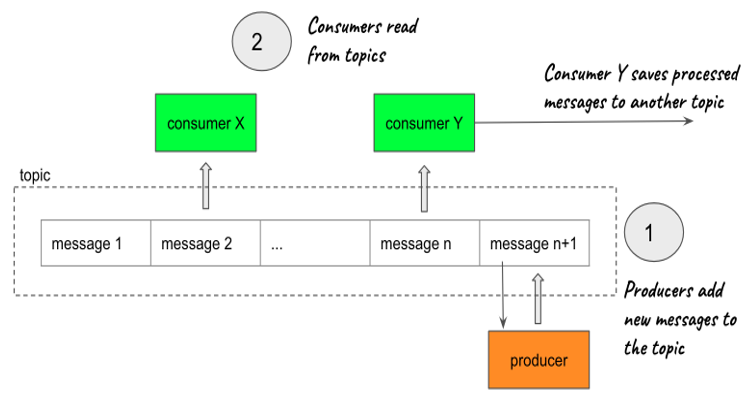
message.A message is basically a piece of data that can be written and then read from the real-time storage. You can think of a single row in a relational database as being a single message or a single row in a text log file. A single JSON document with attribute names and their values is a good example of a message. JSON also supports arrays of documents, but for real-time systems, a message would typically be a single document from that array. In real-time systems, messages are typically very small in comparison to batch files. We are talking about several KBs to 1MB per message. Messages are organized intotopics,which are similar to folders on a file system.Messages are written into the real time storage by
producersand are read and processed byconsumers. Both producers and consumers in this context are applications of some sort. As seen in Figure 6.6, producers write messages into topics (1) and consumers read from topics (2).Figure 6.7. Producers write messages into topics and consumers, which are applications, read from topics

This is an excerpt from Manning's book Google Cloud Platform in Action.
If you run this script, you should see a message saying the file was uploaded. After this, if you rerun the script to list files, you should see the new file listed in the results:
Before we dig all the way down into the low-level details of Cloud Pub/Sub, it would be useful to start with a high-level overview of how Cloud Pub/Sub works in practice. To start, let’s look at the flow of a message through the system from start to finish.
At the beginning, a message producer (also known as a sender) decides it wants to send a message. This is a fancy way of saying “you write code that needs to send messages.” But you can’t send a message out into the world without categorizing it in some way. You have to decide what the message is about and publish it specifically to that topic. As a result, this producer first decides on a category (called a topic) and then publishes a message specifically to that topic.
Once Cloud Pub/Sub receives the message, it’ll assign the message an ID that’s unique to the topic and will return that ID to the producer as confirmation that it received the message (figure 21.1). Think of this flow as a bit like calling an office and the receptionist saying, “I’ll be sure to pass along the message.”
Now that the message has arrived at Cloud Pub/Sub, a new question arises: who’s interested in this message? To figure this out, Cloud Pub/Sub uses a concept of subscriptions, which you might create to say, “I’d like to get messages about this topic!” Specifically, Cloud Pub/Sub looks at all of the subscriptions that already exist on the topic and broadcasts a copy of the message to each of them (figure 21.2). Much like a work queue, subsequent messages sent to the topic will queue up on each subscription so someone might read them later. Think of this as the receptionist photocopying each message once for each department and putting it in each inbox at the front desk.
This brings us to the end of the road from the perspective of the producer—after all, Pub/Sub has received the message and it’s in the queue of everyone who expressed interest in receiving messages about that topic. But the message still isn’t delivered! To understand why, we must shift our focus from the producer of a message to the receiver of that message, which is called a consumer.
Once a message lands in the queue of a subscription, it can go one of two ways, depending on how the subscription is configured. Either the subscription can push it to an interested consumer, or the message can sit around and wait for that consumer to pull it from the subscription. Let’s look quickly at these two options.
In a push-style subscription, Cloud Pub/Sub will actively make a request to some endpoint, effectively saying, “Hi, here’s your message!” This is similar to the receptionist walking over to the department with each message as it arrives, interrupting any current work. On the other hand, in a pull-style subscription, messages will wait for a consumer on that subscription to ask for them with the pull API method. This is a bit like the receptionist leaving the box of messages on the desk until someone from the department comes to collect them. The difference between these two is shown in figure 21.3—make sure to pay special attention to the direction of each of the arrows.
Regardless of how those messages end up on the consumer’s side (either pushed by Cloud Pub/Sub or pulled by the consumer), you may be thinking that once the message gets to the consumer, the work must be done, right? Not quite! A final step is required, where the consumer needs to acknowledge that it has received and processed the message, which is called acknowledgment.
Just because a consumer gets a message doesn’t necessarily mean the system should consider that message processed. For example, it’s possible that although the message is delivered to the consumer, their computer crashes in the middle of processing it. In that scenario, you wouldn’t want the message to get dropped entirely; you’d want the consumer to be able to pick it up again later when it has recovered from the crash.
To complete the process, consumers must acknowledge to Cloud Pub/Sub that they’ve processed the message (figure 21.4). They do this by using a special ID they get with the message, called an ackId, which is unique to that particular lease on the message, and calling the acknowledge API method. Think of this as like a package being delivered to the front desk, and the receptionist asking you to sign for it. This serves as a form of confirmation that not only was the package sent over to you, but you received it and have taken responsibility for it.
What happens when a consumer crashes before it gets around to acknowledging the message? In the case of Pub/Sub, if you don’t acknowledge a message within a certain amount of time (a few seconds by default, but you can customize this for each subscription), the message is put back into the subscription’s queue as though it was never sent in the first place. This process gives Pub/Sub messages an automatic retry feature. And that’s it! Once you’ve acknowledged the message, the subscription considers the message dealt with, and you’re all done. Now that you’ve seen how messages flow through the system, let’s look a bit more at each of the important concepts individually and explore some of the details about them.
If you followed the fan-out broadcast style of messaging, each bidding machine would get every message, which would mean each machine would place its own distinct bid on the item. That would get expensive! Here, you could use the work-queue pattern and have a single subscription that each of your bidders would listen to for notifications of messages (figure 21.16). By using this setup, a single machine, rather than every machine, would handle each message.
How would this look? First, you’d create a new topic (bid-on-item), along with a single pull subscription (bid-on-item-queue). After that, you’d modify your bidding machines to consume messages from this new subscription and bid accordingly. Since all the notifications flow through a single subscription, each item will be consumed by only one bidder on a first-come, first-served basis. Without this form of isolation, you might end up bidding against yourself, which would be a bad scenario. Assuming you create the topic and subscription manually, let’s explore what your code would look like, as follows.
Listing 21.7. Functions to update the amount spent locally
constpubsub = require('@google-cloud/pubsub')({
projectId: 'your-project-id'
});

const topic = pubsub.topic('bid-on-item');                      #1
const subscription = topic.subscription('bid-on-item-queue');

subscription.on('message', (message) => {                       #2
message.ack(() => {                                             #3
bidOnItem(message);                                             #4
  });
});
Notice that you’re erring on the side of accidentally not bidding on items if some sort of problem occurs. For example, if the bidOnItem method throws an error for some reason, you’ve already acknowledged the message, so you won’t get another notification to go bid on that item again. Compare this to the alternative, where you might get the same item twice and bid against yourself. If you were to add a way to check that you aren’t already the high bidder, then it might make sense to do the bidding first and only acknowledge the message after the bid succeeds. That said, this is all the code you have to write, and you have a single-subscription work-queue messaging system!

This is an excerpt from Manning's book Azure in Action.
Message queues are the primary mechanism for communicating with worker roles. Typically, a web role or an external service places a message in the queue for processing. Instances of the worker role poll the queue for any new messages and then process the retrieved message. After a message is read from the queue, it’s not available to any other instances of the worker role. Queues are considered part of the Azure storage system because the messages are stored in a durable manner while they wait to be picked up in the queue.
In the audio file conversion example, after the source podcast BLOB (Podcast01.mp3) is placed in the Source Files container, a web role or external service places a message (containing the location of the BLOB) in the queue. A worker role retrieves the message and performs the conversion. After the worker role converts the file from MP3 to WMA, it places the converted file (Podcast01.wma) in the Converted Files container.
Queues have several major components, and we’ll walk through each of them in turn. We’re first going to look at how queues work in general—how they pass messages around. Then we’ll examine what messages are, the shape they have, and how they work. Finally we’ll look closely at how an Azure queue works—what its limits are and how to get the most out of it.
When you put a message on the queue, the new message is placed onto the bottom or end of the queue. When you get a message from the queue, it’s from the top or front of the queue. Here we have a few lines of code that show how to add a message to a queue:
CloudQueue q = Qsvc.GetQueueReference("newordersqueue");
CloudQueueMessage theNewMessage = new CloudQueueMessage("cart:31415");
q.AddMessage(theNewMessage);
To add a message to the queue, you need to get a reference to the queue, as we did in the preceding code. Once you have the queue reference, you can call the AddMessage method and pass in a CloudQueueMessage object. Creating the message is a simple affair; in this case we’re simply passing in text that will be the content of the message. You can also pass in a byte array if you’re passing some serialized binary data. Remember that the content of each message is limited to 8 KB in size. When you put a message on a queue, a REST message is generated and sent to the queue. The following listing shows you a sample of what that might look like. This sample is for entertainment purposes only.
Listing 16.4. An example of putting a message onto a queue with REST
POST /my-special-queue/messages?timeout=30 HTTP/1.1 x-ms-date: Fri, 07 Aug 2009 01:49:25 GMT Authorization: SharedKey hsslog:3oJPdtrUK47gMSpHfwrmasdnT5nJpGpszg= Host: hsslog.queue.core.windows.net Content-Length: 80 Expect: 100-continue <QueueMessage><MessageText>cart:31415</MessageText></QueueMessage>In this example, we’re adding a message with an order number that can be found in the related Azure table. The consumer will pick up the message, unwrap the content, and process the cart numbered 31415. Their shopping cart is probably filled with pie and pie related accessories.
Before we show you how to get a message, we want to talk about peeking.
Your Azure storage account can have many queues; at any time, a queue can have many messages. Messages are the lifeblood of a queue system and should represent the things that a producer is telling a consumer. You can think of a queue as having a name, some properties, and a collection of ordered messages.
In Azure, messages are limited to 8 KB in size. This low limit is designed for performance and scalability reasons. If a message could be up to 1 GB in size, writing to and reading from the queue would take a long time. This would also make it hard for the queue to respond quickly when there were many different consumers reading messages from the top of the queue.
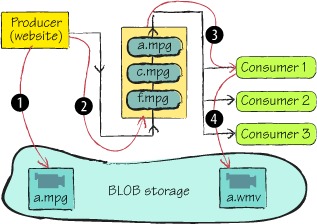
Because of this limit, most Azure queue messages will follow a work ticket pattern. The message will usually not contain the data needed by the consumer itself. Instead, the message will contain a pointer of some sort to the real work that needs to be done.
For example, following along with figure 16.3, a queue that contains messages for video compression won’t include the actual video that needs to be compressed. The producer will store the video in a shared storage location
, perhaps a BLOB container or a table. Once the video is stored, the producer will then place a message in the queue with the name of the BLOB that needs to be compressed
. There’ll likely be other jobs in the queue as well.
Figure 16.3. Work tickets are used in queues to tell the consumer what work needs to be done. This keeps the messages small, and keeps the queue scalable and performant. The work ticket is usually a pointer to where the real work is.
The content of a queue message is always stored as a string. The string must be in a format that can be included in an XML message and be UTF-8 encoded. This is because a message is returned from the queue in an XML format, with your real message as part of that XML. It’s possible to store binary data, but you need to serialize and deserialize the data yourself. Keep in mind that when you’re deserializing, the content coming out of the message will be base64 encoded.
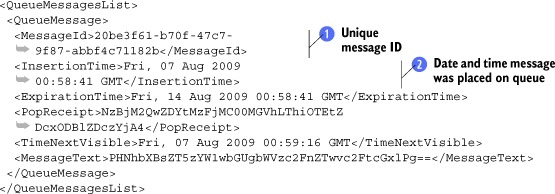
The content of the message isn’t the only part of the message that you may want to work with. Every message has several important properties, as you can see in the following listing.
The ID property is assigned by the storage system, and it’s unique
A message also includes the time and date the message was inserted into the queue
Now that we’ve discussed what messages are, we’re ready to discuss what contains them—the queue itself.