concept number in category cloud

This is an excerpt from Manning's book Cloud Operations.
Multi-factor authentication, or simply MFA, is a security mechanism in which a user is allowed access to a given resource or system only after two (or more) authentication evidences are presented successfully. The typical example that applies also to the root account is to use a hardware or software token system on top of the canonical username/password. The user, after logging in successfully with a username and password, is asked to provide a number issued by a software/hardware token, which is specific to the user and to a specific device.
Each port needs its own set of explicit permissions, and the number of ports (or combined set of services and features if you prefer) needed for a typical system is rather large. It is easy to see how the management behind those permission is the key problem to solve and, also, the main reason why engineers often rely on what I call the star anti-pattern.

This is an excerpt from Manning's book Serverless Architectures on AWS, Second Edition.
Serverless architecture allows developers to focus on software design and code rather than infrastructure. Scalability and high availability are easier to achieve, and the pricing is often fairer because you pay only for what you use. More importantly, you have a potential to reduce some of the complexity of the system by minimizing the number of layers and amount of code needed. Adopting a serverless approach to application development comes with significant agility, elasticity, and cost efficiency gains. However, it is easy to fall into the trap of trying to adopt a serverless approach for *all* applications. We recommend keeping a few principles in mind as you start your serverless journey.
The second thing to consider is that the throughput of the DynamoDB Stream is constrained by the number of shards in the stream. The number of shards is in turn determined by the number of partitions in the DynamoDB table. However, there’s no way for you to directly control the number of partitions, it’s entirely managed by DynamoDB based on the number of items in the table and its read and write throughputs.
Instead of executing the scheduled task immediately after the Waitstate, get a count of the number of tasks that need to run. From here, use aMapstate to dynamically generate parallel branches to run these tasks in parallel. See figure 7.16 for how this alternative design might look.Figure 7.16 An alternative design for the state machine that can run tasks in batches in parallel.
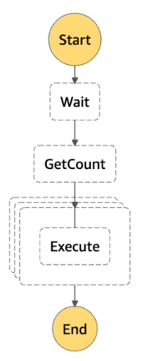
Making these changes would not affect the precision by too much but it would reduce the number of state machine executions and Lambda invocations required. Essentially, we need one state machine execution for every minute when we need to execute some scheduled tasks. There is a total of 525600 minutes in a 365 days calendar year, so this also removes the need to increase the limit on the number of open executions (again, the default limit is 1,000,000).

This is an excerpt from Manning's book Designing Cloud Data Platforms.
The explosion in popularity of Software as a Service (SaaS) has resulted in a big increase in the variety and number of sources of data being collected. SaaS and other systems produce a variety of data types beyond the structured data found in traditional data warehouses, including semi-structured and unstructured data. These last two data types are notoriously data warehouse unfriendly, and are also prime contributors to the increasing velocity (the rate at which data arrives into your organization) as real-time streaming starts to supplant daily batch updates, and volume (the total amount) of data.
Your answer would be wrong because you would be counting the number of rows in each snapshot. Instead you need to always remember to limit such queries to a specific ingestion date. This way you can get the number of premium subscribers on a
given day.Anyone working with this table in the warehouse must remember that this table is a stack of full source table snapshots taken on different days and then must adjust their queries accordingly.
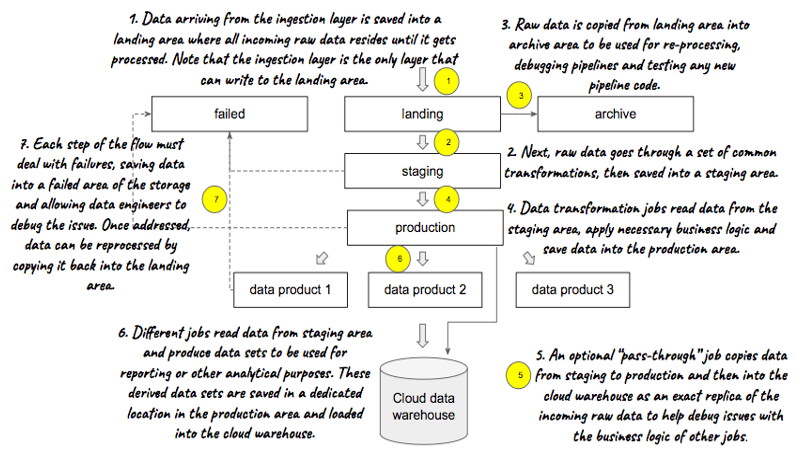
Figure 5.3 Organizing data optimally on storage requires a number of steps

This is an excerpt from Manning's book Cloud Native Patterns: Designing change-tolerant software.
It’s a difference in environment. Users connect to the system through sockets, socket connections require open file descriptors, and a configuration setting limits the number of file descriptors. In the UAT environment, the value found in /proc/sys/fs/file-max is 200,000, but on the production server it’s 65,535. The tests you ran in UAT didn’t test for what you’d see in production, because of the differences between the UAT and production environments.
At the start of the preceding chapter, I presented the illustration repeated here in figure 6.1. This diagram shows that although it seems simple that the same inputs to any of a number of application instances would yield the same results, other factors are also influencing those results—namely, the request history, the system environment, and any application configuration. In chapter 5, you studied techniques for eliminating the impact of the first of these by ensuring that any state resulting from a sequence of requests would be stored in a shared backing service, and this allowed the app instances to be stateless.

This is an excerpt from Manning's book Google Cloud Platform in Action.
On the Edit Instance page, under the Configuration Options, you should see a section called Configure Machine Type and Storage. Inside there, the Storage Capacity section is free for you to change, so increasing the size (and performance) of your disk is as easy as changing the number in the text box to your target size (figure 4.15).
Table 8.5. Schema of access log files
Field (type)
Description
time_micros (int) The time that the request was completed, in microseconds since the Unix epoch. c_ip (string) The IP address from which the request was made. c_ip_type (integer) The type of IP in the c_ip field (1 for IPv4, and 2 for IPv6). c_ip_region (string) Reserved for future use. cs_method (string) The HTTP method of this request. cs_uri (string) The URI of the request. sc_status (integer) The HTTP status code the server sent in response. cs_bytes (integer) The number of bytes sent in the request. sc_bytes (integer) The number of bytes sent in the response. time_taken_micros (integer) The time it took to serve the request in microseconds. cs_host (string) The host in the original request. cs_referer (string) The HTTP referrer for the request. cs_user_agent (string) The User Agent of the request; for requests made by lifecycle management, the value is GCS Lifecycle Management. s_request_id (string) The request identifier. cs_operation (string) The Google Cloud Storage operation. cs_bucket (string) The bucket specified in the request; if this is a list buckets request, this can be null. cs_object (string) The object specified in this request; this can be null.
Listing 18.14. Specifying a limit on the number of workers in a prediction job
$ gcloud ml-engine jobs submit prediction prediction2workers \
  --model census --version v1 \
  --data-format TEXT \
  --region us-central1 \
  --max-worker-count 2 \                                         #1
  --input-paths gs://your-ml-bucket-name-here/data.json \
  --output-path gs://your-ml-bucket-name-here/prediction2workers-output

This is an excerpt from Manning's book Azure in Action.
If you need more computing power (more instances of your website or more instances of your backend service) to run your application, you can allocate more resources to the application, which are then spread across many servers. By increasing the number of resources to your application, you’ll ultimately be able to process more data or handle more incoming traffic.
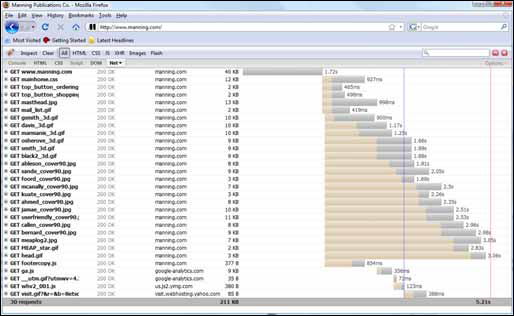
Figure 10.11. Comparison of the number of seconds it takes to serve HTML pages versus the number of seconds it takes to download the static content at www.mannning.com
The worker role is intended to be started up and left running to process messages. You’ll likely want to dynamically increase and decrease the number of instances of your worker role to meet the demand on your system, as it increases and decreases throughout your business cycle.