concept S3 in category cloud

This is an excerpt from Manning's book Serverless Architectures on AWS, Second Edition.
To give you an understanding of serverless architectures, you’re going to build a small, event-driven, serverless application. Specifically, you are going to build a video transcoding pipeline. You will be able to upload a video file to an S3 bucket and have it transcoded to different resolutions and bitrates. To build this video transcoding pipeline you are going to use AWS Lambda, S3, and AWS Elemental MediaConvert. Later, if you so desire, you can build a website around it, akin to YouTube, but we’ll leave it to you as an exercise. If you want to see how we’ve done it ourselves, you can refer to our first edition that covers the website in some detail.
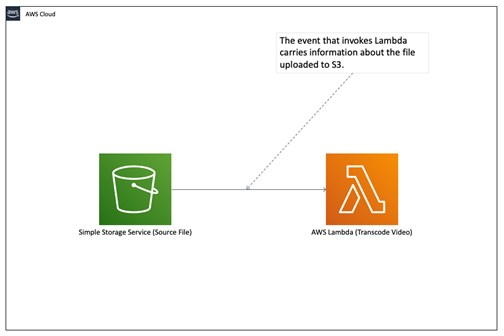
Figure 8.3 This is a very basic and common serverless architecture. Invoking code from S3 is the bread and butter of Lambda functions.
EFS for Lambda is an endless local disk. It grows as much as you need. You can run applications with EFS and Lambda that you couldn’t have run before. Having said that, S3 is still likely to be cheaper so make sure to do your calculations and analysis before choosing EFS. You can solve problems in different ways.
- o You don’t have to use Step Functions because you could use SNS (although Step Functions adds an additional level of robustness and visibility).
- o You don’t need to use EFS because you can use S3.

This is an excerpt from Manning's book The Cloud at Your Service: The when, how, and why of enterprise cloud computing.
Keeping with Amazon’s APIs as good examples to study, we’ve outlined a simple API dealing with Amazon’s S3 in table 2.3.
Table 2.3. Basic terms and operations of Amazon S3
Terms
Description
Object Fundamental entity stored in S3. Each object can range in size from 1 byte to 5 GB. Each object has object data and metadata. Metadata is a set of name-value pairs that describe the data. Bucket Fundamental container in S3 for data storage. Objects are uploaded into buckets. There is no limit to the number of objects you can store in a bucket. The bucket provides a unique namespace for the management of objects contained in the bucket. Bucket names are global, so each developer can own only up to 100 buckets at a time. Key A key is the unique identifier for an object within a bucket. A bucket name plus a key uniquely identifies an object within all of S3. Usage
- Create a bucket in which to store your data.
- Upload (write) data (objects) into the bucket.
- Download (read) the data stored in the bucket.
- Delete some data stored in the bucket.
- List the objects in the bucket.
S3 is about raw storage with no structure and no structured way for it to interact with applications running in the cloud. One type of storage structure that has been built on top of S3 is the ability to mount a file system so that applications think they’re dealing with a file system as if they had formatted disk drives attached to each server.
The basic units of storage S3 deals with are objects and buckets. Objects are the entities used to write, read, and delete collections of data. Objects can be from 1 to 5 GB in size. You can have an unlimited number of objects in S3. Objects are stored in buckets. You can specify whether the bucket is located in the United States or Europe. (Other locales will be available in the future. This becomes important when you’re dealing with a specific country or region’s regulations, such as a locale’s privacy rules.) Access to a bucket is secure and can only proceed through a unique developer-assigned key. Within a bucket, each object can be made private, public, or with access rights granted to specific users. See table 5.3.