concept transfer in category cloud

This is an excerpt from Manning's book Azure in Action.
You use the OnDemandTransferOptions class to configure how the transfer should happen. This class has several parameters that you’ll want to set. Set a time filter at
, which tells the agent to send over only the performance counter data that’s been generated in the last hour. If you’re transferring a log, you can also specify a log level filter (informational, critical, and so on).
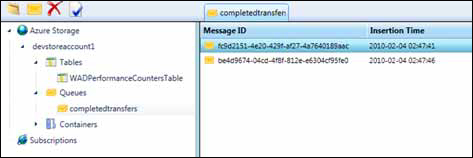
When you start the transfers, each instance performs its own transfer. The transfer operation is an asynchronous operation; you start it and walk away. In most cases, you’ll want to know when the transfers have completed so that you can start analyzing the data. You can have the transfer agent notify you when the transfer for an instance is complete by passing in a queue name
. As each transfer is started, you’ll be given a unique ID
to track. You can see the completion messages in figure 18.7. Each message contains one of the unique IDs associated with each transfer.